


How to Use the SOLIDWORKS Split Command

Article by Lily Bar updated July 22, 2026
Article
The SOLIDWORKS Split command is a helpful tool to divide a part into multiple sections. With this, you can split SOLIDWORKS models and decide which sections to keep or delete.
This is an essential tool for working with multibody parts and imported geometry to divide a single solid or surface body into multiple bodies without removing any material.
What is the SOLIDWORKS Split Command?
The Split command in SOLIDWORKS is used to create multiple sections from an existing part. It allows you to use existing planes and faces to intersect geometry and cut the desired solids.

The Split command on the SOLIDWORKS CommandManager
Trim Tools
When trimming with no extension, the body to be trimmed must intersect the body to be cut completely. If you trim with infinite extension, the trimming body is extended infinitely.
Geometry that uses no extension includes surface bodies and non-planar faces, while infinite extension geometry includes reference planes, planar model faces, and sketches.
Target Bodies
The Target Bodies section will let you choose which bodies will be split. This is useful with multibody parts when you may only want to split a single body without affecting the others.
Resulting Bodies
Options regarding the bodies to be kept or removed reside under Resulting Bodies. At least one of the boxes must be selected to create the split.
How to Use the Split Command
This example features an orange that will be cut in half using the Split command.
To use the SOLIDWORKS Split command:
- Open an existing part in SOLIDWORKS.
- Select the Split command from the Features tab of the CommandManager or from the Insert menu.

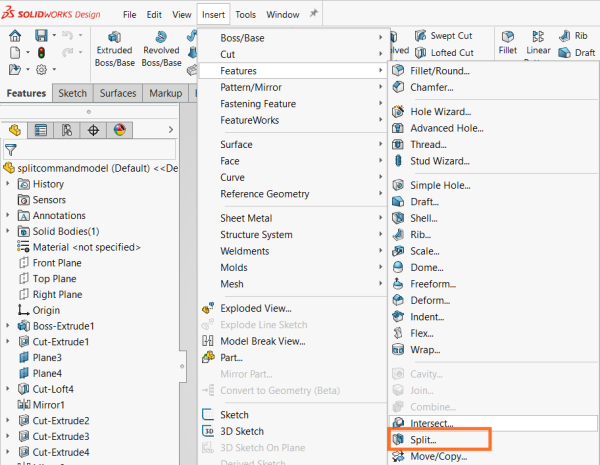 Accessing the Split command through the Insert menu
 - In the Trim Tools section, choose the type of cutting geometry you want to use.
- In the Target Bodies section, choose the bodies you want to split. All bodies are selected by default.
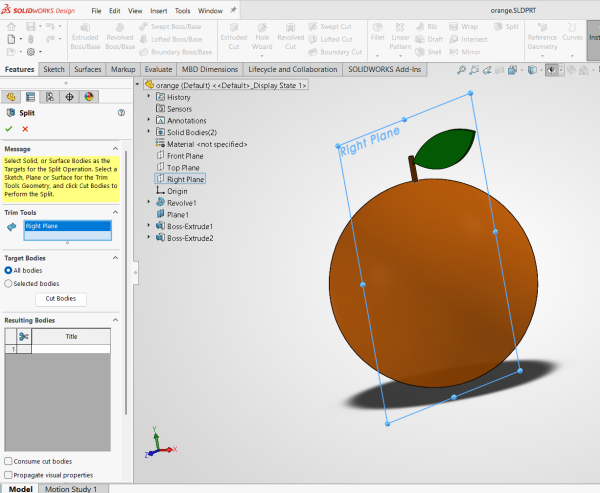 Setting up the split conditions
 - Select the bodies to trim. If you want to remove the split bodies, use the Consume cut bodies option.
- Accept the command to confirm the split.
Why Use the Split Command?
The Split command is useful to those who need to create separate parts for assembly, modify individual pieces, and increase design accuracy. If you use Split, you can take advantage of symmetry first and then make your individual modifications, increasing efficiency.
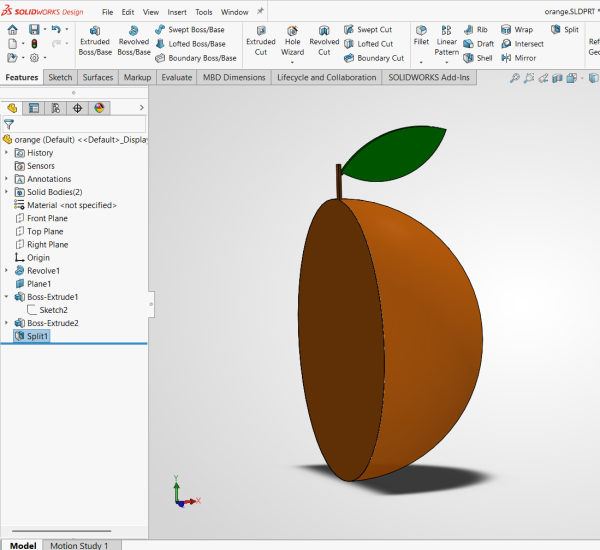
A model split in half
If your goal is to design components for an assembly, you can build it in one part and then use the SOLIDWORKS Split command to break it down into individual components. You can then use the Save Bodies command to export separated bodies into individual part files.
Expanding Your SOLIDWORKS Knowledge
SOLIDWORKS techniques like the Split command can help take your parts, assemblies, and drawings to the next level. Aside from opening the door to more complex models, they also make you more efficient and put you on the path to becoming a SOLIDWORKS power user.
Learning SOLIDWORKS skills takes many forms. Formal, instructor-led training gives the baseline knowledge to learn from SOLIDWORKS Tech Tips to improve your skills.
To sign up for our bi-weekly SOLIDWORKS Tech Tip newsletter, click here.
Liens connexes
Services SOLIDWORKS certifiés proposés par Javelin
Javelin peut vous aider à :
Posts related to 'How to Use the SOLIDWORKS Split Command'
