Services cloud SOLIDWORKS 2024

Vidéo de TriMech Solutions, LLC mise à jour le 2 février 2024

Cette vidéo vous plaît ? Obtenir une formation en ligne en direct de Javelin
Suivez un cours de formation en ligne en direct avec un instructeur certifié et devenez un expert SOLIDWORKS.
À propos de la vidéo
Discover what’s new for SOLIDWORKS 2024 cloud services.
Convenient share & markup tools are integrated directly into your SOLIDWORKS interface and allow you to share designs with anyone via a controlled link. Discover all the benefits of the SOLIDWORKS Cloud Services, and why you should be using them:
Get Connected
You have several options for conveniently connecting your SOLIDWORKS data to the 3DEXPERIENCE platform to increase your team’s productivity so you can leverage its built-in data management and collaboration capabilities. If you want to continue using your existing SOLIDWORKS Desktop installation, you can use Collaborative Designer for SOLIDWORKS, which connects your data to the 3DEXPERIENCE platform.
Or if you are looking for a new SOLIDWORKS installation that is cloud-connected, you can use 3DEXPERIENCE SOLIDWORKS, which is natively connected to the platform. Both include all your favorite SOLIDWORKS features and install locally. 3DEXPERIENCE SOLIDWORKS offers a new offline mode, so you can work without an internet connection.
NOTE: Collaborative Designer for SOLIDWORKS is part of the new Cloud Services, available to new SOLIDWORKS Desktop CAD licenses purchased as of July 1, 2023.
What capabilities are included with Cloud Services that you can take advantage of today?
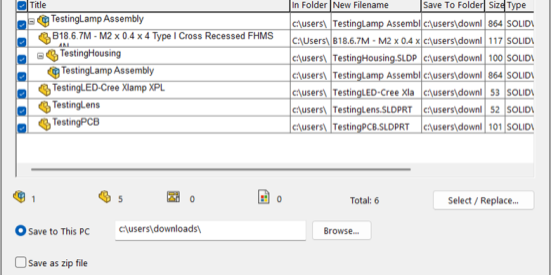
- Share and Markup: Ability to share your 3D designs with ANYONE–directly from SOLIDWORKS.
- Store and Revise: An online storage hub that’s purpose-built with CAD relationships and collaboration in mind.
- Manage and Control: Full access to a suite of tools to help manage data, work through formal change actions and approvals, and keep project tasks in check.
Some of the latest features you can look forward to by connecting your SOLIDWORKS data to the 3DEXPERIENCE platform:
- Collaborate with everyone, whether internally on your team or externally with stakeholders without leaving SOLIDWORKS.
- Customize the rules that guide how SOLIDWORKS configurations are interpreted on the 3DEXPERIENCE platform.
- Get to know your way around the platform fast with the Welcome app, offering short video tutorials and access to more in-depth resources and the SOLIDWORKS user communities.
- Use data management for alignment with company revision schema.
- Sync SOLIDWORKS revisions with platform revisions.
- Save large assembly data as you continue to design, with Asynchronous Save.
Learn more about SOLIDWORKS 2024 cloud services
Suivez un cours de formation SOLIDWORKS en direct de Javelin ou assistez à un webinaire pour connaître les dernières nouveautés technologiques de SOLIDWORKS.
Content related to 'SOLIDWORKS 2024 Cloud Services'