


How to Visualize Contact Interactions in 3DEXPERIENCE SIMULIA

Article by Suman Sudhakaran updated July 24, 2026
Article
Evaluating contact interactions in 3DEXPERIENCE SIMULIA is essential to the design process, as it governs all behavior seen in the real world. Simulation allows you to see when stiffness changes, load paths evolve, and stresses concentrate as parts come into and out of contact.
To properly simulate the real world, you have to accurately define the system and how individual components interact with each other.
What Defines Contact Interactions in 3DEXPERIENCE SIMULIA?
Contact interaction is when components in an assembly or any mechanism touch each other. Contact is inherently nonlinear in nature, and capturing behaviors is important when simulating the performance of multibody parts or assemblies.
Ignoring contact can lead to overly stiff parts, unrealistically low stress, or hidden failures. Depending upon the type of simulation tool used on 3DEXPERIENCE, you can define contact interactions in a variety of ways.
- Tie Connection: Used for welded or bonded regions where relative motion is not allowed.
- Frictionless Contact: Model smooth interfaces that allow sliding without resistance.
- Frictional Contact: Enter user‑defined friction coefficients to simulate realistic load transfer and potential stick‑slip behavior.
- Separation and/or Overclosure: Surfaces can separate apart or close to form a tight or interference fit.
Interaction Property Definition
The Linear Structural Scenario creation app, available in SOLIDWORKS Simulation Designer and Structural Engineer roles, allows users to define interaction properties to clarify behavior between surfaces.
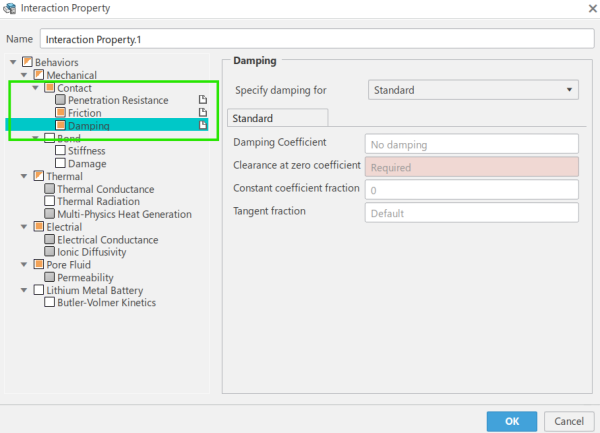
Defining contact interactions in 3DEXPERIENCE Simulation
This capability is incredibly useful to engineers focused on safely bringing new designs to the table.
The Interaction Property dialog box behaviors include:
- Penetration resistance, including hard, soft, or user-defined contact. It is hard contact by default, but users can override the default options.
- Friction with two models, including rough friction and Coulomb friction, available to show friction behavior in contact property definition.
- Damping behavior at the contact interface or cohesive behavior to represent bond stiffness can be defined. To model damage behavior such as glue failure at an interface, both damage initiation and evolution can be defined.
Contact Property Definition
SOLIDWORKS Simulation Analyst, Structural Performance, and Durability and Mechanics engineer roles provide a Contact Property setup window.
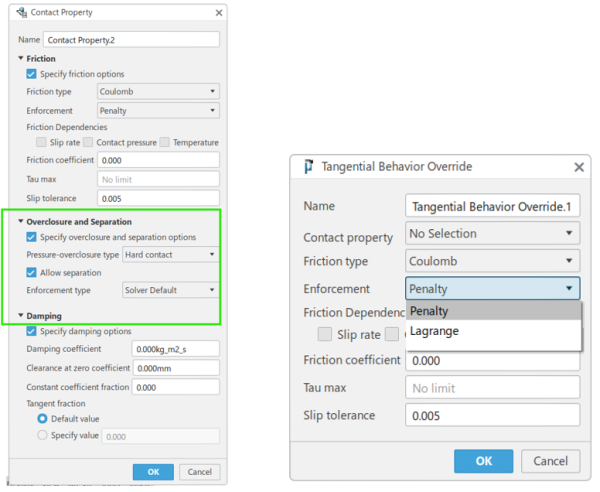
Contact Property setup workflow
Tangential Behavior Override can be defined to override contact property definitions and change the tangential behavior values in a multi-step simulation. Its features are available for general static, quasi-static, and implicit dynamic steps.
General Contact Definition
You can define general contact, a global interaction property that defines the default behavior for contacting surfaces throughout the finite element model, after the contact property is defined. Alternatively, you can define a custom contact property and assign it to the general contact definition.
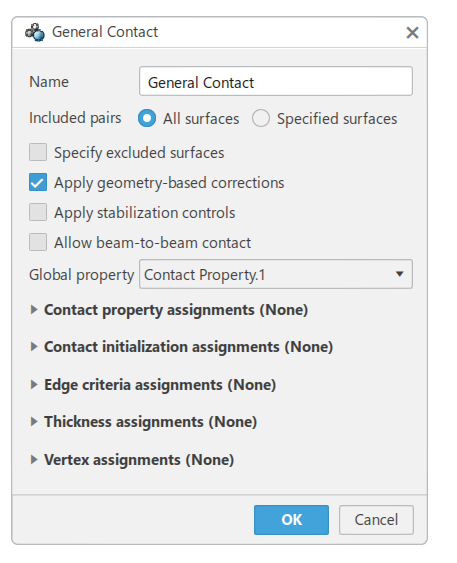
Options available with the General Contact window
It is preferred that users define the contact behavior that best represents the interface region. Surface-based contact or surface-to-surface contact, including self-contact conditions, can also be defined as needed.
Other Contact Tools
3DEXPERIENCE SIMULIA includes other tools for contact definition.
Contact Initialization
Contact initialization lets users define how small openings and overclosures that exist should be handled during the simulation.
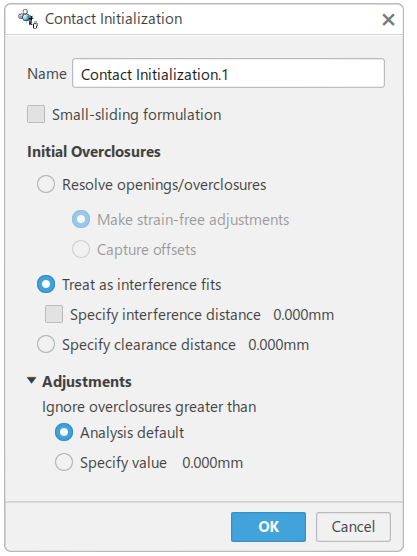
Properties in the Contact Initialization dialog
Contact Interference
Contact interference controls handling of closed surfaces used in surface contact interactions.
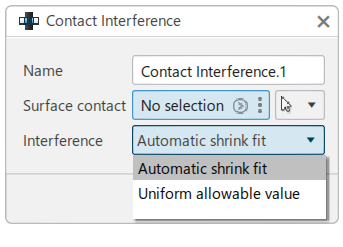
The Contact Interference creation dialog
Contact Control
Contact controls allow for setting up stabilization factors that can help obtain cost-effective solutions for models that have numerous complex contact interfaces.
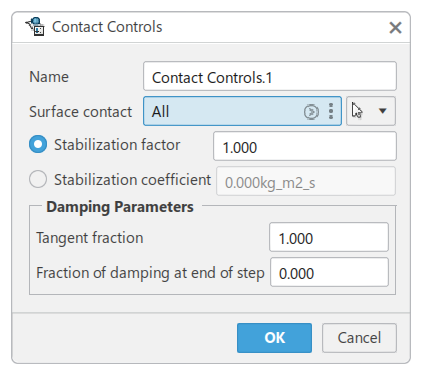
Stabilization models inside contact controls
Contact stabilization helps control rigid body motion in static problems before contact closure and friction restrains the motion. Using stabilization activates damping in the normal and tangential directions.
Contact Interactions of an Arrowhead
For example, an arrowhead passes through an opening under a fixed wall. It is prescribed a displacement of seven millimeters in the x-direction. After passing through the opening under the wall and deflecting, the arrowhead snaps back into position.
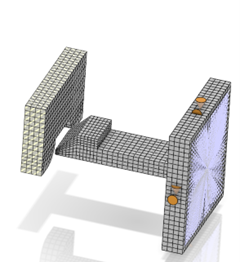
Arrowhead passing under an opening
The General Contact condition is used with a custom contact property of a friction coefficient of 0.1 for capturing tangential behavior and automatically handles transitions between predominant contact surface types under evolving conditions.
Analyzing Interactions with Plots
After running the simulation, when it comes to visualizing the contact results, you can create history plots to analyze the contact energy output variables. The 2D contact plot below shows the different energy output variables while the arrowhead is inserted into the wall and snaps into the final position.
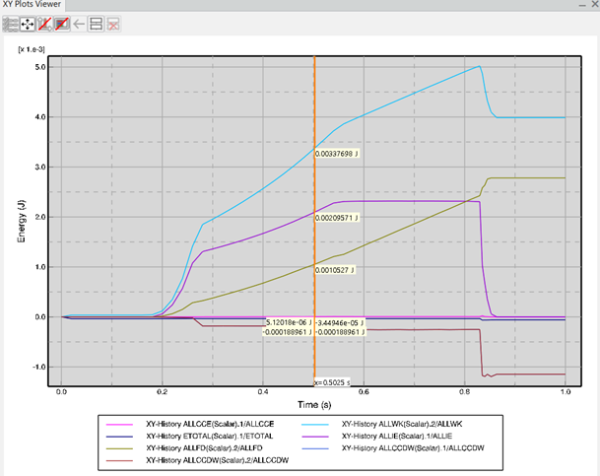
Contact plot for the arrowhead simulation
Contact pressure plots let us analyze the interaction of changes in the normal direction of the contact constraint with relative motion between contacting surfaces.
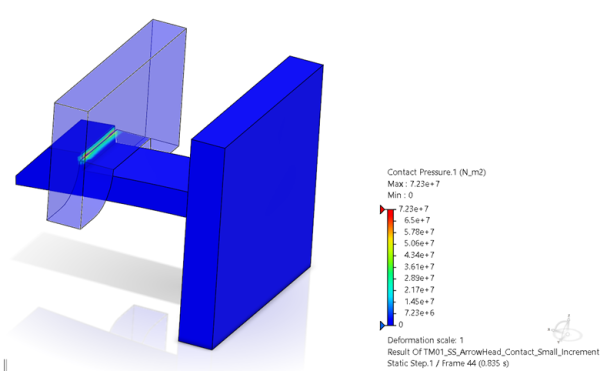
Contact pressure plot
These outputs in simulation give us meaningful insight about how contact interactions behave before even the prototypes are built, thereby improving product performance.
3DEXPERIENCE Simulation Advantages
3DEXPERIENCE SIMULIA allows you to solve complex engineering problems. No longer bound by traditional hardware limits, the cloud-based solvers reduce solve time and improve engineering insight by offloading the work to the cloud.
Accurate simulation solutions are no longer reserved for high-end simulation packages. 3DEXPERIENCE SIMULIA complements your existing SOLIDWORKS Simulation package to provide a new level of insight.
Liens connexes
Services SOLIDWORKS certifiés proposés par Javelin
Javelin peut vous aider à :
Posts related to 'How to Visualize Contact Interactions in 3DEXPERIENCE SIMULIA'
