


Javelin / TriMech Auteur

Nadeem Akhtar
Réparation de l'installation du client SOLIDWORKS et PDM
 Par Nadeem Akhtar on October 7, 2017
If you experience problems with SOLIDWORKS products (e.g. SOLIDWORKS Professional, PDM, eDrawing etc…) you can try repairing the installation. When Repairing SOLIDWORKS Installation search for Control Panel in Windows Start Search and go to Progams > Programs and Feature > Uninstall or change a program….
Mise à jour du module complémentaire SOLIDWORKS PDM Task
Par Nadeem Akhtar on August 22, 2016
When upgrading SOLIDWORKS PDM from one release to another, the Task Add-in does not automatically get upgraded. This Add-in should always be upgraded whenever you upgrade the PDM software. This ensures compatibility and allows you access to any enhancements or fixes that have been added to…
Outil de mise à niveau de la base de données SOLIDWORKS PDM
Par Nadeem Akhtar le 5 avril 2013
Après avoir mis à jour votre chambre forte SOLIDWORKS PDM Professional vers une version majeure plus récente, vous recevez un message similaire à l'image ci-dessous lorsque vous essayez d'accéder à la chambre forte. Le message ci-dessus n'indique pas clairement ce qu'il faut faire, afin de rendre...
SOLIDWORKS PDM – Sauvegardez-vous vos données critiques ? Voici comment mieux vous préparer
Par Nadeem Akhtar le 27 juin 2011Protecting Your SOLIDWORKS PDM Vault: Why Daily Backups Are Non-Negotiable Imagine this: a critical design file disappears overnight. Maybe it was an accidental deletion, a virus attack, or a sudden hardware failure. Whatever the cause, without a solid backup strategy, recovering that data could be nearly impossible—and the cost to your business could be enormous. Why Backups Matter Engineering teams generate massive amounts of data every single day. That means your backup strategy needs to keep pace. In SOLIDWORKS PDM, two areas are absolutely critical to back up daily: 1. Archive Folder This is where your physical files live—on the Archive Server. The good news? You can back up this folder using any standard backup software. Simple, but essential. 2. SQL Database Here’s where things…
SOLIDWORKS PDM – Récupérer les informations d'assistance…
Par Nadeem Akhtar le 20 juin 2011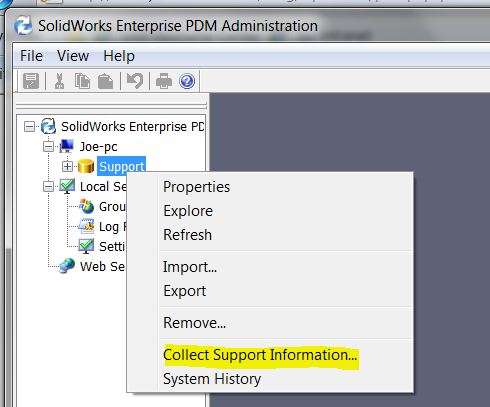
Sometimes the archive log file is not enough to troubleshoot your vault – the “Collect Support Information…” tool allows you to quickly generate a variety of logs and reports. STEP 1: In the SOLIDWORKS PDM Administration, login to PDM vault as ‘Admin’, right-click on the vault and click on…
Test de connectivité au serveur d'archives SOLIDWORKS PDM à l'aide du test Ping
Par Nadeem Akhtar le 18 avril 2011
Afin de résoudre le problème de connectivité de SOLIDWORKS PDM entre le serveur d'archives et le client, un simple test ping peut être utilisé. Le test ping est effectué sur l'ordinateur client. À partir du " Démarrer " de Windows, sélectionnez " Exécuter " et tapez " CMD ". Dans la boîte de dialogue de commande...