


Catégorie du blog
Affichage de 1 à 15 sur 266.
3DEXPERIENCE Works
Conseils techniques pour les rôles et les applications de 3DEXPERIENCE Works




SOLIDWORKS xDesign : Comment créer facilement des modèles de dessin avec xDrawing
 Par Matt Kokoski le 9 juin 2025
SOLIDWORKS xDesign est un système de conception accessible via un navigateur, composé de plusieurs outils. Cet article se concentre sur l'outil xDrawing, disponible dans le rôle « Créateur de définition de fabrication ». xDrawing fournit des informations de fabrication sur les conceptions et les prépare pour…
Dépannage : signets manquants dans l'éditeur de signets 3DEXPERIENCE
 Par Scott Durksen, CSWE le 30 mai 2025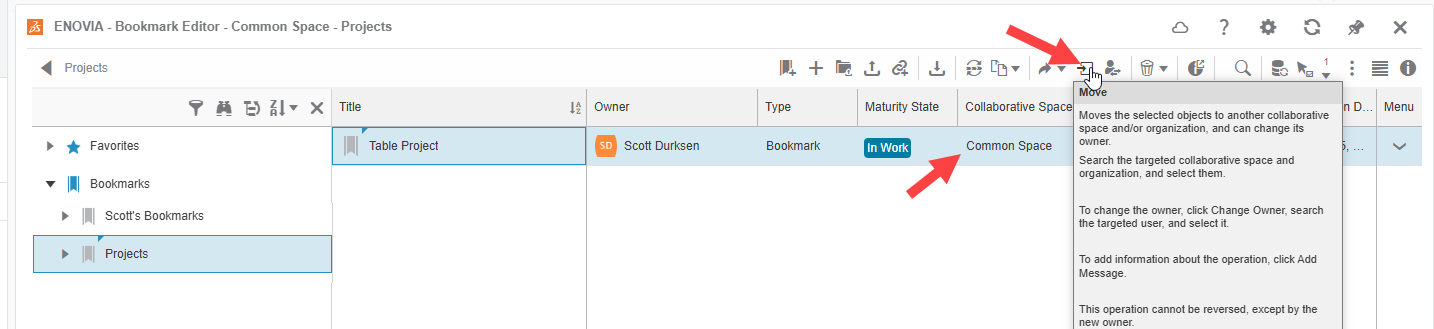
Les signets dans 3DEXPERIENCE constituent un outil puissant pour organiser les conceptions et les données, aidant ainsi les utilisateurs à garder une trace des fichiers et des projets importants. Cependant, il arrive parfois que certains signets ne soient pas visibles pour tous les utilisateurs. Si vous avez constaté que certains…
Optimisation et préparation de l'impression 3D avec 3DEXPERIENCE
 Par Jorge Villacres le 19 mai 2025
L'offre SOLIDWORKS xDesign comprend des outils performants accessibles via un navigateur, destinés à l'optimisation et à la préparation de l'impression 3D, qui vous permettent de valider rapidement vos pièces et assemblages conçus pour l'impression 3D.
Gestion des fichiers 3DEXPERIENCE – Verrouiller, réviser et protéger les données
 Par John Lee, CSWE le 14 mai 2025
3DEXPERIENCE permet à votre équipe de collaborer en ligne. Grâce à cette fonctionnalité, vous disposez d'outils de gestion des fichiers 3DEXPERIENCE qui vous garantissent que le fruit de votre travail ne sera pas perdu. Parmi ces outils, on trouve notamment : Verrouiller les fichiers – Réserver…
Remédier aux problèmes de communication au sein de votre entreprise
 Par Sawyer Gara le 12 mai 2025
Le manque de communication est le principal obstacle qui affecte le plus souvent les entreprises et leurs processus internes. On entend souvent dire « C’est comme ça qu’on a toujours fait » ou « Ça fait l’affaire », mais se contenter…
Principes de base de la modélisation d'assemblages dans SOLIDWORKS xDesign
 Par John Landis le 9 mai 2025
Dans SOLIDWORKS xDesign, l'assemblage s'effectue dans un environnement de modélisation unique, ce qui signifie que tout se déroule au sein du même espace de conception, sans distinction entre les fichiers de pièces et d'assemblage.
Passez à la vitesse supérieure avec 3DEXPERIENCE Cloud PLM Professional
 Par Wayne White le 23 avril 2025
3DEXPERIENCE Cloud PLM Professional offre des fonctionnalités avancées pour optimiser la conception connectée au cloud et le contrôle des versions. Mais quels sont les rôles 3DEXPERIENCE inclus et comment peuvent-ils aider votre équipe ?
Création d'éléments et accès aux propriétés dans xDesign
 Par Rachel Jackson le 18 avril 2025
Tout comme les autres outils de modélisation accessibles via navigateur proposés dans l'offre SOLIDWORKS xDesign, l'application xDesign permet aux utilisateurs de concevoir et de collaborer avec leur équipe partout et à tout moment. Que vous ayez des années d'expérience en modélisation ou…
Comprendre les balises 6W sur la plateforme 3DEXPERIENCE
 Par Ryan Burgess le 11 avril 2025
La plateforme 3DEXPERIENCE est une solution tout-en-un basée sur le cloud qui intègre la CAO, le stockage et la collaboration. Vous pouvez concevoir en ligne à l'aide d'outils de CAO accessibles via un navigateur, tels que xShape et xDesign, ou connecter la plateforme à SOLIDWORKS pour optimiser votre flux de travail grâce à…
Maîtriser les bases du dessin en 2D dans SOLIDWORKS xDesign
 Par Lynette Proch le 7 avril 2025
Tout comme les autres outils de modélisation accessibles via navigateur proposés dans l'offre SOLIDWORKS xDesign, l'application xDesign permet aux utilisateurs de concevoir et de collaborer avec leur équipe partout et à tout moment. Que vous ayez des années d'expérience en modélisation ou…
3DEXPERIENCE vs SOLIDWORKS PDM : analyse technique
Par Wayne White le 2 avril 2025
Les informations et données confidentielles constituent l'élément le plus crucial de toute organisation. La centralisation des données est essentielle pour garantir que les bonnes pièces soient commandées et qu'il n'y ait pas de doublons dans les fichiers. Il est important de connaître l'historique, de savoir qui a apporté des modifications, et…
Découverte de l'interface cloud de SOLIDWORKS xDesign
 Par Matthew Siddall le 28 mars 2025
Tout comme les autres outils de modélisation accessibles via navigateur proposés dans l'offre SOLIDWORKS xDesign, l'application xDesign permet aux utilisateurs de concevoir et de collaborer avec leur équipe partout et à tout moment. Que vous ayez des années d'expérience en modélisation ou…
Boostez votre productivité avec 3DEXPERIENCE Cloud PLM Standard
Par Wayne White le 14 mars 2025
L'offre standard 3DEXPERIENCE Cloud PLM propose des fonctionnalités courantes qui vous permettent d'aller au-delà de la simple gestion des données pour vous orienter vers la planification de projets et la gestion des nomenclatures
Utilisation de la fonction « Nom automatique » et des numéros d'article d'entreprise (EIN) dans 3DEXPERIENCE
Par Scott Durksen, CSWE le 12 mars 2025
La plateforme 3DEXPERIENCE propose plusieurs options pour nommer vos modèles afin de garantir l'unicité des identifiants de vos données. Ces options vont de la saisie manuelle aux systèmes de numérotation automatisés utilisant des attributs basés sur des formules et des compteurs. Lors de la première sauvegarde…
Comment enregistrer vos bibliothèques SOLIDWORKS dans 3DEXPERIENCE
Par Scott Durksen, CSWE le 28 février 2025
La plateforme 3DEXPERIENCE facilite la collaboration au sein des équipes en proposant une gestion des données dans le cloud et une intégration directe avec SOLIDWORKS, ce qui permet d'accéder facilement aux bibliothèques et aux modèles et de les contrôler, notamment grâce à des fonctionnalités de gestion des révisions et de partage.

Services de conception
De la conception à la fabrication en passant par la production à grande échelle, TriMech Design Services aide les créateurs, les start-ups, les inventeurs et les petits fabricants à commercialiser leurs produits.
Articles les plus populaires

Recommandations matérielles pour SOLIDWORKS 2024
TriMech a élaboré ce guide des configurations matérielles recommandées pour SOLIDWORKS 2024 afin de vous aider dans le processus de mise à niveau ou d'achat de nouveau matériel pour SOLIDWORKS.

IMPORTANT ! Activez le transfert avant de passer à SOLIDWORKS 2024
Avant d'installer SOLIDWORKS 2024, vous devez transférer l'activation depuis votre version précédente de SOLIDWORKS afin de vous assurer qu'elle soit disponible pour l'activation de SOLIDWORKS 2024.

Comparaison des offres SOLIDWORKS
Quelle est la différence entre les logiciels de CAO 3D SOLIDWORKS® Standard, Professional et Premium ? Découvrez les fonctionnalités incluses dans chacune des trois offres SOLIDWORKS.