


Simulating Rotating Components with Fluid Dynamics Engineer

Article by Suman Sudhakaran updated June 10, 2026
Article
The Fluid Dynamics Engineer role on 3DEXPERIENCE contains a rotating zone feature that allows you to simulate realities such as a cooling fan inside an electronics enclosure or analyze turbines with great fidelity.
Rotating zones let you simulate rotating parts, like fans, propellers, or turbines, without the computational cost of modeling their actual rotation. This greatly streamlines the development process by allowing teams to quickly simulate “what if” scenarios without long wait times.
The Fluid Dynamics Engineer Role on 3DEXPERIENCE
In the Fluid Dynamics Engineer role, the following models are available:
- Sliding Mesh Model: This provides a time-accurate solution by rotating the components and their corresponding meshes for inherently transient applications such as startup or shutdown operations, modeling unsteady interactions of rotor and stator interactions, or analyzing various rotor positions. The simulation is highly accurate, but computationally expensive.
- Multiple Reference Frame Model (MRF): This provides a time-averaged solution at a significantly reduced cost. It is slightly less accurate than the Sliding Mesh model but is significantly faster.
Depending on analysis goals and available computing resources, you can decide which type of rotating zone model to use. This article will focus only on the MRF model, which is commonly used for flow simulation involving rotating components.
Multiple Reference Frame Modeling
In this model, the simulation domain is divided into different zones, each of which can have a different reference frame. Usually, there is one stationary zone and one for rotating components.
MRF assumes a steady-state flow field, and rotational effects are introduced by applying rotational velocity to the rotating zone, simulating how it affects the fluid in a steady condition.
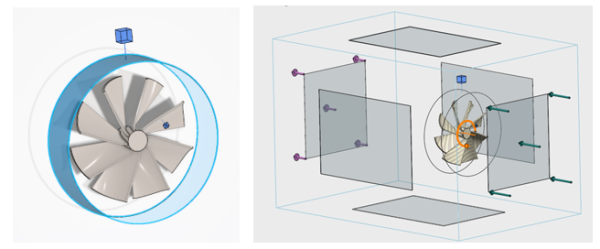
Defining a turbine study using Fluid Dynamics Engineer
Contrary to the Sliding Mesh approach, in the MRF model, the mesh remains stationary throughout the simulation. The rotation effects are captured by switching the frame of reference in the rotation regions.
Multiple Reference Frame vs Sliding Mesh Accuracy
Although the MRF model provides a time-averaged solution to an inherently transient problem, its accuracy is high within its domain of application. It provides results consistent with a time-averaged solution obtained by means of a sliding mesh, at a much lower computational cost, and should therefore be used whenever possible.
Setting Up a Rotating Zone in the Fluid Dynamics Engineer Role
Solving a rotating problem using the MRF approach is analogous to freezing the motion of the rotor and observing the instantaneous flow field within the MRF zone. This is known as the “frozen rotor approach,” and the equations are internally adjusted to mimic rotation.
Setting up the rotating zone in the Fluid Dynamics Engineer role involves defining the rotating zone, angular velocity specification, frame transformation, and solving the flow field.
Defining the Rotating Zone
The first part of the process is geometry selection. You must identify the rotating component and its axis of rotation.
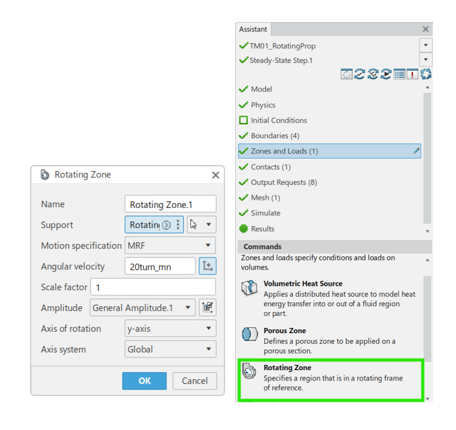
Select the rotating zone from the Simulation Assistant
The rotating zone itself is a volume enclosing the component where the frame of reference switches to rotating.
Angular Velocity Specification
Assign the rotational speed, either in revolutions per minute (RPM) or radians per second, to the zone. The speed can be ramped up or varied using tabular amplitude.
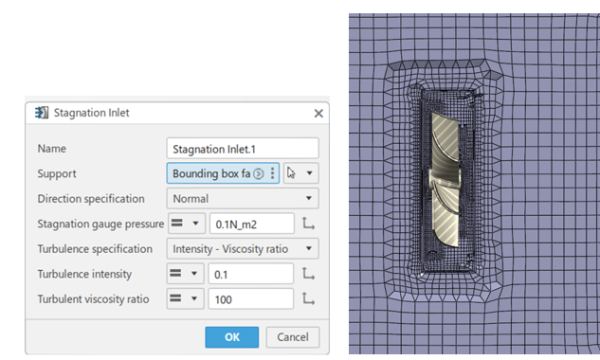
Creating a Stagnation Inlet
Frame Transformation and Solving the Flow Field
In the rotating region, the mass flux of all transport equations is modified, and an additional source term is introduced to model the rotation. Centrifugal and Coriolis forces can be evaluated. When solving the flow field, the stationary and rotating regions are coupled at their interface.
There are two rules for these studies:
- Conservation laws of mass, momentum, and energy must be upheld.
- The flow solution must be steady at the interface.
The solver iterates until convergence, yielding a time-averaged solution for the rotating component’s influence on the flow.
Applications of Multiple Reference Frame Modeling
In the case of aerodynamics, MRF can be used to analyze thrust or the generated flow of propellers and fans, without resolving transient blade motion. In a special instance, such as wind turbines, MRF can still be used to assess approximate blade-wake interactions, although a sliding mesh is better suited.
In the example below, a rotating zone was used for the impeller to run an external analysis.
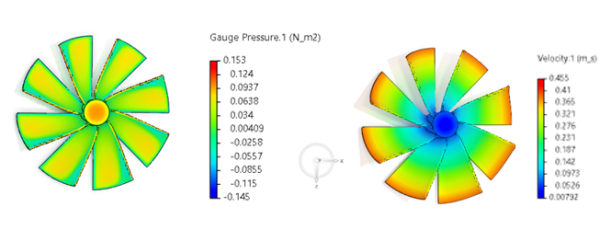
Results of Gauge Pressure and Velocity
The Multiple Reference Frame approach has two main limitations:
- The steady nature of MRF makes it unsuitable for workflows where you need to capture a turbomachinery application with variable rotating speeds, for example, startup or shutdown operations. The sliding mesh approach is recommended for workflows like these
- To reconcile both frames of reference, the flow solution must be steady at the interface. Certain applications with strong rotor/stator interactions could suffer from this approximation
Nonetheless, this feature in the Fluid Dynamics Engineer role is very useful for a myriad of applications that involve rotating components, and product designers can improve productivity and innovation with it.
Leveraging Virtual Protyping to Spot Issues Early
Virtual prototyping with advanced simulation tools can help your team simulate “what if” scenarios and identify costly mistakes early in the design process. Compared to traditional prototyping, virtual methods are quicker, safer, and less expensive, allowing your team to stay agile in a competitive environment.
The TriMech Group supports a range of virtual prototyping solutions from software, project work, and consulting, meaning you have a trusted advisor every step of the way.
Liens connexes
Services SOLIDWORKS certifiés proposés par Javelin
Javelin peut vous aider à :
Posts related to 'Simulating Rotating Components with Fluid Dynamics Engineer'
