


How to Use the Fully Define Sketch Tool in SOLIDWORKS

Article by Lily Bar updated July 6, 2026
Article
The Fully Define Sketch tool in SOLIDWORKS is a great way to fully define a sketch by automatically creating dimensions and relations. It can be applied to selected sketch entities or the entire sketch, but should be used with caution.
While Fully Define Sketch is a powerful tool for locking down geometry, it is important to understand how it affects design intent.
What is the Fully Define Sketch Tool in SOLIDWORKS
Fully Define Sketch calculates dimensions and relations in SOLIDWORKS needed to fully define a sketch at any point. A fully defined sketch has no freedom to move or rotate.
SOLIDWORKS helps you identify underdefined components by highlighting them in blue. Ensure that you look for the points on a line or arc, as they may not be defined despite the arc or line indicating definition.
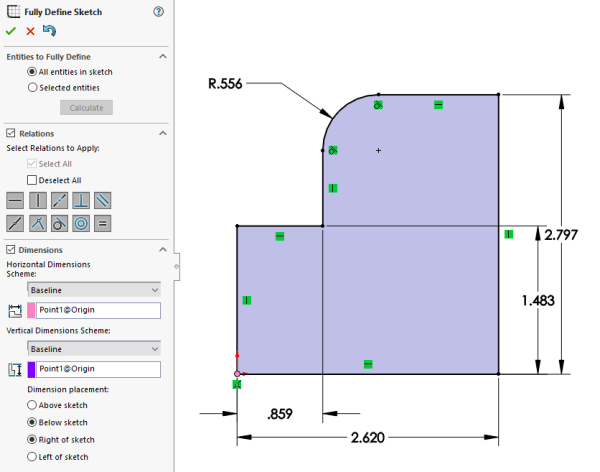
Using Fully Define Sketch in SOLIDWORKS
The Fully Define Sketch PropertyManager can be opened by clicking the Fully Define Sketch command from the CommandManager. You can choose entities to fully define, relations, and dimensions to help lock down a floating sketch.
It is best practice to include some relations and dimensions before using the Fully Define Sketch tool. Be cautious when using Fully Define Sketch because it does not always produce dimensioning that aligns with your design intent.
Dimensions and Relations Options
The Fully Define Sketch PropertyManager includes sections and dropdowns to specify the relations and dimensions you want to include.
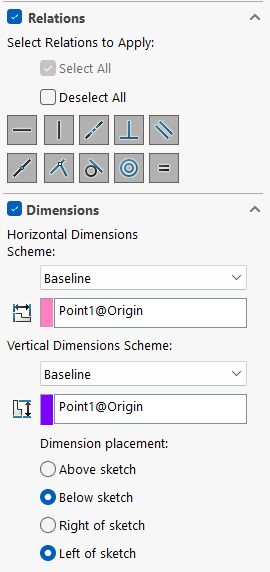
Dimension and relations selection
Under the Relations section, you can select which relations are allowed to be applied. You may choose to select all or individually pick the ones you want.
Relations include:
- Horizontal
- Vertical
- Colinear
- Perpendicular
- Parallel
- Midpoint
- Coincident
- Tangente
- Concentric
- Equal
Under the Dimensions drop-down, you can choose the horizontal and vertical dimension scheme. Options for both include baseline, chain, and ordinate are available as well.
How to Use Fully Define Sketch
To use Fully Define Sketch, you must be in a SOLIDWORKS model and an active sketch.
- Create a sketch on a plane.
- Sketch desired entities and apply base relations to ensure key design intent is maintained.
- While inside the sketch, navigate to the CommandManager, select Display/Delete Relations, and click on the Fully Define Sketch tool.

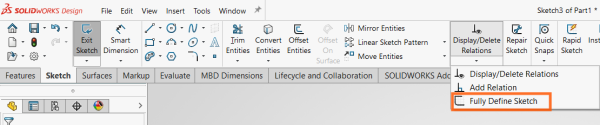 The Fully Define Sketch Tool in the CommandManager
 - In the PropertyManager, select the entities you want to fully define by choosing either the entire sketch or specific entities.
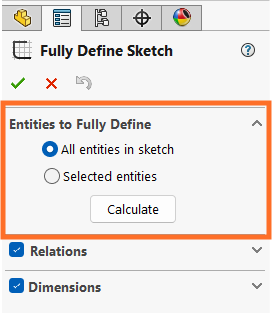 Specifying which sketch entities to define
 - Click Calculate to produce the dimensions and relations.
- Select the green checkmark to accept the generated dimensions.
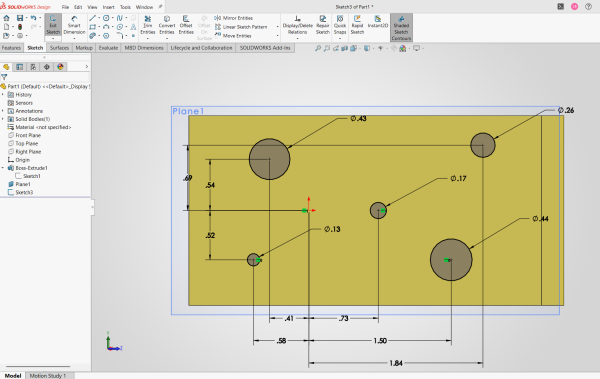 Une esquisse SOLIDWORKS entièrement définie
Learning SOLIDWORKS Design Essentials
Tools similar to Fully Define Sketch are taught and used in our SOLIDWORKS Essentials course. Instructors instill the importance of design intent, proper sketching techniques, and basic modeling practices.
Mastering the SOLIDWORKS fundamentals is an important part of the learning journey. Without the basics, it can be hard to learn more advanced techniques.
To register for an upcoming SOLIDWORKS Essentials training course, click here.
Liens connexes
Services SOLIDWORKS certifiés proposés par Javelin
Javelin peut vous aider à :
Posts related to 'How to Use the Fully Define Sketch Tool in SOLIDWORKS'
