


DriveWorks vs Pack and Go for copying and renaming SOLIDWORKS files

Article by Jim Peltier, CSWE updated September 7, 2017
Article
As a longtime user of SOLIDWORKS, I’m a big fan of Pack and Go. It allows me to easily reuse designs, easily rename new files, change folder locations, update references, and even create zip files to quickly collect all the referenced documents of an assembly. But today, I’m not gushing about it. My colleague, Scott, already beat me to it awhile back, and Pack and Go is still as awesome today as it was back then. However, for this example, Pack and Go may not be the best tool for renaming SOLIDWORKS files:
Let’s say I have a BBQ side shelf, and I’m modifying three dimensions with it: Length, Width, and Height:
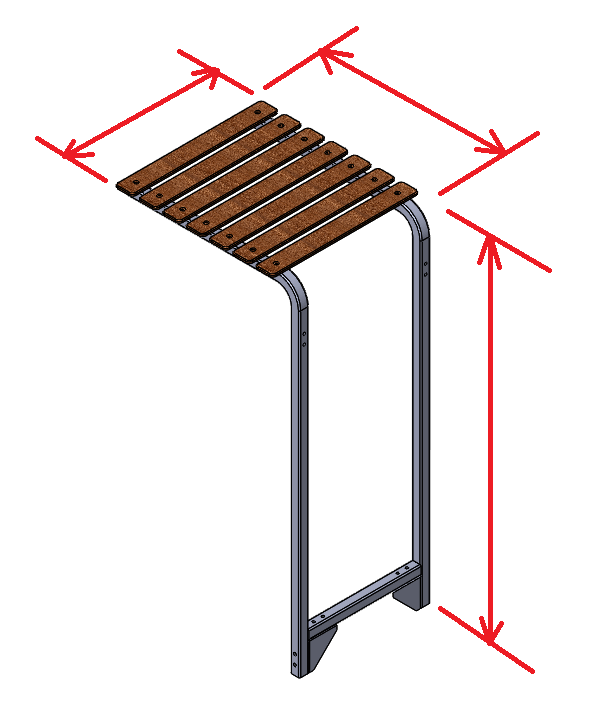
Now, I could be pretty clever in setting this up such that my assembly uses equations or in-context relations to change the dimensions, but there’s really only a few pieces that change sizes: The L-shaped side pieces (drive the length and height), and the cross beam at the bottom drives the width. I also need to adjust the length of the wooden planks when the width changes. But the plank is metric and the other pieces are in inches, so I’m kind of stuck doing this manually for the moment. Still, it’s 3 pieces, so I can’t complain.
Renaming SOLIDWORKS files with Pack and Go
I also run into a bit of frustration when I go to save the files. You see, we rename the part files so that they include the sizes. Here is what it looks like in the Pack and Go:

I have to manually rename each of these 3 files with the correct dimensions, which invites all sorts of opportunities for error: I make a typo, I forget what numbers I used, my boss interrupts me when I am in the middle of changing the numbers, any one of a dozen or so things could happen resulting in the wrong numbers being entered. If I’m careful, I can get it to work perfectly, but it takes about 5 mins each time I want to create a new BBQ shelf – from opening the original assembly, to changing the dimensions, to going through the Pack and Go, and specifying the folder as well.
Automatically renaming SOLIDWORKS files with DriveWorks
If I were a bit more clever, I could make use of DriveWorks for something like this. I could setup an interface that would let me choose the length, width, and height (and even include a toggle for inch or mm), which would look something like this:
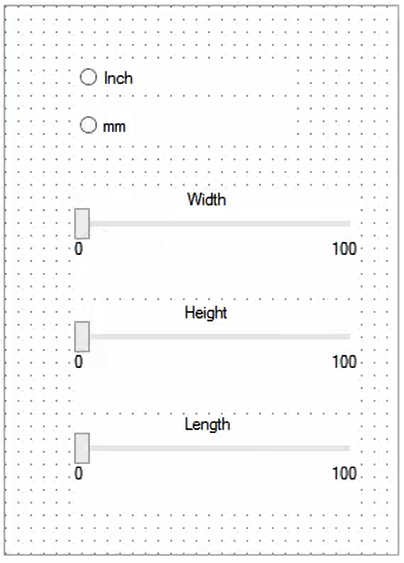
I could even set up rules on the back-end to automatically change my filenames and the dimensions at the same time. My new filenames would have the correct dimensions specified on them, and I can even switch units for the metric planks and inch bars. This would take my process time from 5 mins down to about 15 seconds (just long enough to adjust the sliders). Now I can use the other 4:45 for more interesting or value-added activities.
Let others run the process online
I could also consider something like DriveWorks Live to run this on. Because for a repetitive task like this, even spending 15 seconds on it is a waste of my time. I’d rather have the sales person or even the customer spend 15 seconds of their time (in fact, they would spend way more than that anyways sending me an email for a request for the files). With DriveWorks Live, I could put this form online and just have someone out there who does not have access to SOLIDWORKS experience the joy of being able to create a 3D model in a way that we SOLIDWORKS users take for granted.
Related Links
Certified SOLIDWORKS Services available from Javelin
Javelin can help you to:
Posts related to 'DriveWorks vs Pack and Go for copying and renaming SOLIDWORKS files'
