


Blog Category
Showing 1-15 of 38.
SOLIDWORKS Inspection
Tech tips and techniques for creating ballooned inspection drawings and reports with SOLIDWORKS Inspection software




Creating Custom SOLIDWORKS Inspection Reports with the Footer Row Function
 By Vincent Magcalas on January 16, 2026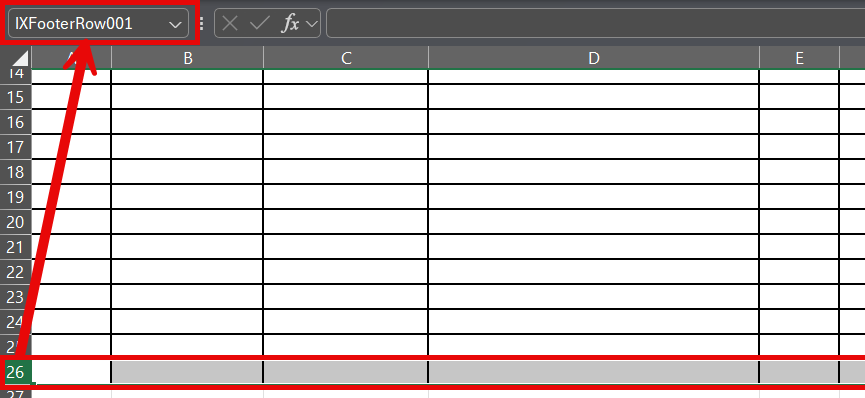
SOLIDWORKS Inspection reports may have various characteristic values included, which makes it difficult to specify how many rows you need specifically when creating your custom report templates. This may lead users to format an excessive…
How to Turn off Balloons in SOLIDWORKS Inspection
 By Kevin Seyler on November 14, 2025
SOLIDWORKS Inspection can create ballooned drawings and First Article reports. Learn how to turn off Balloons in the SOLIDWORKS add-in.
Top 3 Reasons to Upgrade to SOLIDWORKS Inspection Professional
 By Ray Morrogh on July 15, 2024
This blog discusses the top 3 ways that SOLIDWORKS Inspection Professional improves on Inspection standard.
What’s New in SOLIDWORKS Inspection 2023
 By TriMech Solutions, LLC on March 22, 2023
SOLIDWORKS Inspection is a great tool for anyone who needs to create inspection documents. Both SOLIDWORKS Inspection Standard and Professional give you two options for how you want to work. In this article, we will…

SOLIDWORKS Inspection 2021 has some template improvements. Before these improvements were made, when making an Inspection report you would click the “Add” button for a template, same when exporting to an Excel sheet you would…
SOLIDWORKS 2021 Inspection VDA Balloons
 By James Swackhammer on January 4, 2021
VDA balloons have been around for quite some time and were introduced for SOLIDWORKS in the last four to five years for SOLIDWORKS Inspection. Although, when introduced there wasn’t much functionality other than for placing…
Adding Missing SOLIDWORKS Inspection GD&T Specific Fonts
By James Swackhammer on November 14, 2019
Wait, hold up, stop the bus, what do mean you can read this very specific SOLIDWORKS only font on your computer without having SOLIDWORKS installed? There are some occasions where you may need to read…
SOLIDWORKS PDM 2019 Inspection Integration
 By Justin Williams on September 24, 2018
New in SOLIDWORKS PDM 2019, we now have additional integration with SOLIDWORKS Inspection. This integration includes: SOLIDWORKS PDM Ribbon We can now access PDM features, directly within Inspection such as; Check-Out Check-In Change State Get…
Balloon your PDFs faster with SOLIDWORKS Inspection 2018
 By Sam Sharkawi on April 13, 2018
Are you receiving PDF documents for design inspection and quality assurance? If so, then the SOLIDWORKS Inspection Balloon PDF feature in the standalone application is perfect. Especially now, as the 2018 release where multiple characteristics can…
SOLIDWORKS Inspection now has SOLIDWORKS PDM Integration
 By Rod Mackay on March 27, 2018
As of SOLIDWORKS 2018 SP2, SOLIDWORKS PDM integration has been added to the Standalone version of SOLIDWORKS Inspection! Implementing the new functionality is easy, first toggle the option ‘on’ in your SOLIDWORKS Inspection options as…
SOLIDWORKS Inspection Numbering Sequences
 By Sanja Srzic on December 19, 2017
In SOLIDWORKS Inspection 2018 Standalone, numbering sequences can be applied to characteristics to differentiate machining methods, drawing views, drawing sheets, etc. Starting with the first number of the range, balloon numbers are incremented by one. …
Balloon models & new import formats in SOLIDWORKS Inspection 2018
By Sanja Srzic on December 13, 2017
Starting with SOLIDWORKS 2018, the SOLIDWORKS Inspection Add-in supports creating reports from SOLIDWORKS part and assembly models. Balloons can be added to model dimensions, notes, GD&Ts, and hole callouts created in SOLIDWORKS MBD or using DimXpert….
New in SOLIDWORKS Inspection 2018: Renumbering Balloons
By Sanja Srzic on November 28, 2017
SOLIDWORKS Inspection renumbering balloons is as easy as double-clicking the characteristic cell and overwriting the default value. Characteristics below the overwritten value continue in increments of one. Only balloons of the default sequence can be…
Merge and UnMerge Characteristics is new in SOLIDWORKS Inspection 2018
By Sanja Srzic on November 24, 2017
Starting with SOLIDWORKS Inspection 2018 Standalone software, characteristics can be merged: Ctrl-select them and from the right-mouse-button shortcut menu select ‘Merge Characteristics.’ The option ‘UnMerge Characteristics’ is available for the characteristics previously merged:
SOLIDWORKS Inspection 2018 Import with more flexibility
By Sam Sharkawi on October 28, 2017
I’m sure you know SOLIDWORKS Inspection can open SOLIDWORKS Drawing files as well as PDFs and TIFFs, but did you know that SOLIDWORKS Inspection 2018 can work with other CAD drawing files such as: AutoCAD…

Design Services
From concept to manufacturing to scale, TriMech Design Services helps makers, startups, inventors, small manufacturers get to market.
Most Popular Posts

SOLIDWORKS 2024 Hardware Recommendations
TriMech has compiled this recommended SOLIDWORKS 2024 hardware guide to aid you in the process of upgrading or purchasing new hardware for SOLIDWORKS.

IMPORTANT! Transfer Activation Prior to Upgrading to SOLIDWORKS 2024
Prior to installing SOLIDWORKS 2024, you need to transfer activation from your prior release of SOLIDWORKS to ensure it’s available to activate SOLIDWORKS 2024.

SOLIDWORKS Packages Comparison
What is the difference between SOLIDWORKS® Standard, Professional and Premium 3D CAD software? Learn about the features included in each of the three SOLIDWORKS offerings.