


Vote for SOLIDWORKS Enhancement Requests for 3DEXPERIENCE World 2024

Article by Alin Vargatu, CSWE updated January 10, 2024
Article
Almost every SOLIDWORKS user at some time has had a great idea that they would like to see implemented in the software. SOLIDWORKS is always looking for enhancements and you can tell them directly by submitting SOLIDWORKS Enhancement Requests.
If you do not have time to submit a request, you can easily vote on ideas that have been submitted.
Every year SOLIDWORKS compiles a Top 10 List for users to vote on and it’s that time again! Vote now on ideas to improve SOLIDWORKS for years to come.
Because of your votes last year, SOLIDWORKS has implemented several enhancements that will make you more productive once you upgrade to SOLIDWORKS 2024.
Our Solution, Training and Process Consultants work every day with users like you, they listen to your feedback and collect the best ideas for improving performance, ease of use and security. As a result, we have submitted the best of them to the Top 10 List Contest!
NOTE: To vote, click on one of the links below and once logged into the 3DEXPERIENCE Platform, click on the “Like” button. Each link contains a detailed explanation on the benefits from voting on the specific idea.
Vote for SOLIDWORKS Enhancement Requests for 3DEXPERIENCE World 2024
Vote for SOLIDWORKS Enhancement Requests for 3DEXPERIENCE World 2024
Fundamental Performance Enhancing Ideas
Large Assembly Performance Ideas
- Add “Rollup and Rolldown to Selected Component” Icons in Assembly Visualization
- Display States Managed by Tables
- Add Selection Filters (F5) for Features and Part Components
- Filter Modified Components in Resolved and LightWeight Modes
- Enhance Hide/Show Consistency for Large Assemblies
- Enhanced LDR Mode (Breadcrumbs, ALT, Component Preview Window)
- Allow Selection Through Wireframe Faces
- Add Measure, Hide and Show in Snake Cam
Large Drawing Performance Ideas
- Instant Save As Dialog
- Exclude Specific Drawing Views from Standard Rebuild
- Background Processing of Inactive Drawing Sheets (Optimal use of CPU Cores)
- Display State Based Bill of Materials (BOM based on Visibility)
- Reduce Saving Time for Drawings with Detailing Mode Data
- Bring Back the QuickView Mode
- Enhanced Diagnostics for Factors Affecting Drawing Performance
- Make “Automatically populate View Palette with views” a Document Property
Automate Tedious and Repetitive Sketch Operations
- Select Multiple Edges using Y/N Shortcut Keys
- Enhance Offset Entities Command by adding a “Machining Mode”
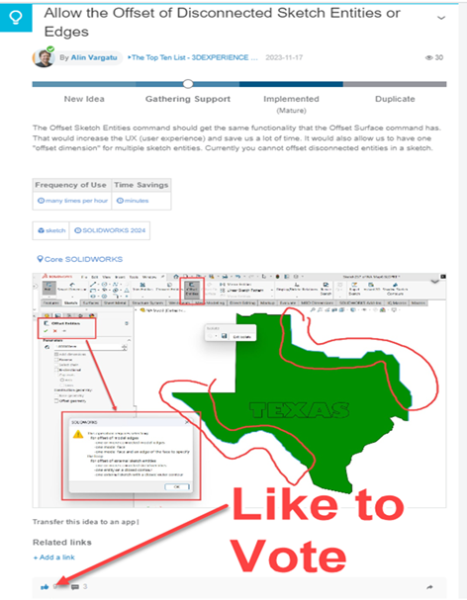
- Allow the Offset of Disconnected Sketch Entities or Edges
- Diagnostic tool for “Offset Sketch Entities” Similar to the one from “Offset Surface” Property Manager
XShape
Vote by January 26, 2024
Don’t forget to ask your colleagues to also vote on the ideas you think your team would benefit the most from! Help SOLIDWORKS improve by taking a few minutes to submit your vote by January 26, 2024.
Whether or not you’re attending 3DEXPERIENCE World 2024 in Dallas, TX, we look forward to seeing your ideas. You just may see your idea in a future release of SOLIDWORKS!
Related Links
Certified SOLIDWORKS Services available from Javelin
Javelin can help you to:
Posts related to 'Vote for SOLIDWORKS Enhancement Requests for 3DEXPERIENCE World 2024'
