


Borrowing Licenses in E3 Wireworks

Article by Delvin Masilamani updated April 26, 2013
Article
E3 runs on network licensing structure. Often users find themselves looking to work remotely. The license borrowing feature is offered by LMTOOLS which can be found on the FlexLM Tools on the local machine.
Following are the steps one must take to borrow a license:
Setting a Borrow period
1) First please make sure to have the borrowing machine connected to the license server
2) Launch LMTOOLS in the Flexlm folder from the client machine
3) Under the “Borrowing” tab, replace the Vendor Name from “All” with “ECADLM”.
Enter a Return Date (i.e. the date the machine will connect back to the network)
Setting the Return Time is optional.
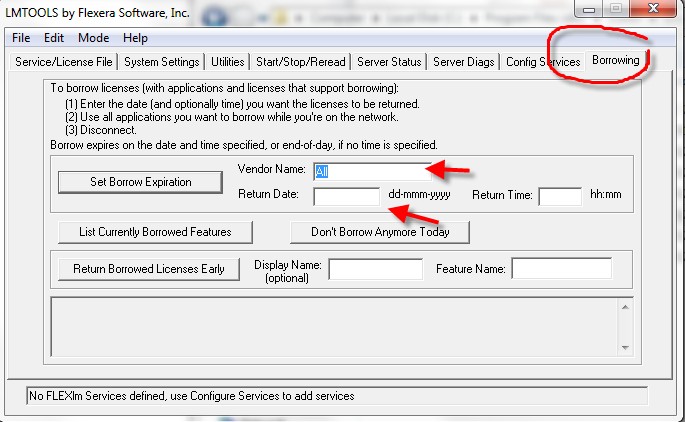
4) Please click on -Set Borrow Expiration.
5) Note the borrow period cannot be renewed till the borrow period has expired.
Renewing borrow period
6) Repeat steps 1-4
Returning license to Original State
7) Once the borrow period is complete, plug the machine back in to the network.
8) User can return the borrowed License early by simply plugging in to the network and launching the LMTOOLS application. The user must click on “Return Borrowed Licenses Early”.
Note: If there is some issue returning the license then each individual feature needs to be returned. The feature names are case sensitive.
Related Links
Get Certified SOLIDWORKS Electrical Services
Our Certified Electrical Experts can help you to:
Posts related to 'Borrowing Licenses in E3 Wireworks'
