


Javelin / TriMech Author

Danish Butt
How to Filter Reports in SOLIDWORKS Electrical
 By Danish Butt on July 10, 2026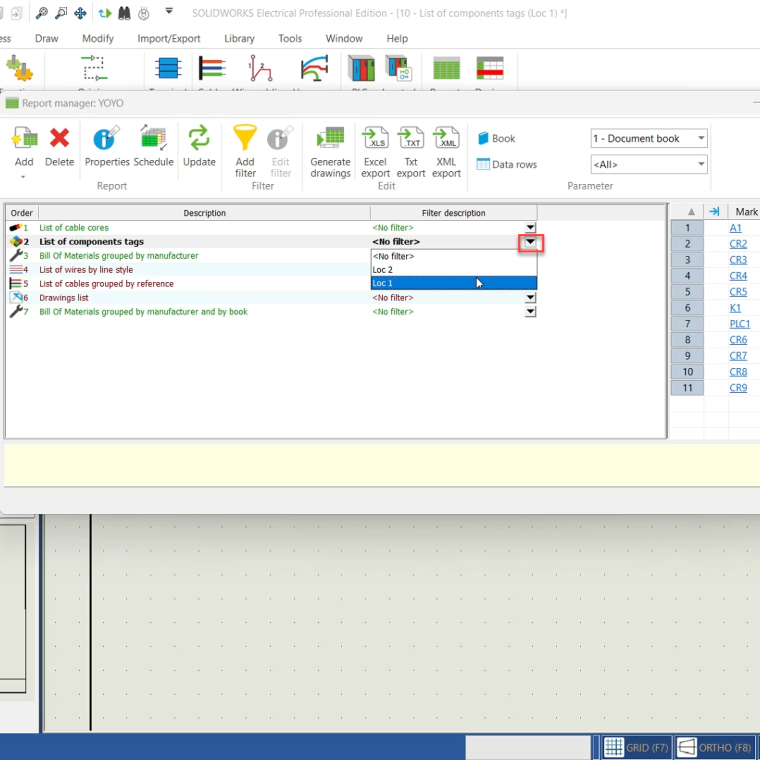
Arguably, the most effective skill for managing electrical projects is knowing how to filter reports in SOLIDWORKS Electrical. Learning to filter reports in SOLIDWORKS Electrical, specifically by book, is an effective tool to manage electrical projects and reports. Filtering reports will provide streamlined data and…
How to Resolve Corrupted Library Issues in SOLIDWORKS Electrical
By Danish Butt on October 23, 2025
The red X indicates that SOLIDWORKS Electrical has a corrupted library item and can not access it. Learn how to resolve the issue of an incorrect file path or a missing link to the shared Application Data folder.
Creating Cable Fanouts in SOLIDWORKS Electrical Schematic
By Danish Butt on September 3, 2025
Cable fanouts are an essential aspect of electrical design, ensuring that wires are correctly connected and properly organized within a schematic. Setting up a fanout correctly improves clarity and prevents design errors. Schematic design tools like SOLIDWORKS Electrical Schematic have dedicated workflows to easily create cable…
How to Round Up Length in SOLIDWORKS Electrical BOMs
By Danish Butt on March 21, 2025
Accurate bills of materials are critical to any team. To standardize lengths, configuring the SOLIDWORKS Electrical BOM to round up length can be a practical approach.
Troubleshooting the “Specified Module Could Not Be Found” Error in SOLIDWORKS Electrical
By Danish Butt on February 10, 2025
If you’re encountering the “specified module could not be found” error when launching SOLIDWORKS Electrical, you’re not alone. This is a relatively common error that can occur for a few different reasons but fortunately, there are simple fixes!
Troubleshooting SOLIDWORKS Electrical Collaborative Server Restart Issues
By Danish Butt on December 18, 2024
If you’ve ever encountered an issue when trying to restart the SOLIDWORKS Electrical Collaborative server and received an error message like the one below, you’re not alone. This can be a frustrating problem, especially when you’re in the middle of a project. Fortunately, there are…
How to Show Marks from SOLIDWORKS Electrical Schematic on SOLIDWORKS Electrical 3D
By Danish Butt on December 9, 2024
Displaying marks from SOLIDWORKS Electrical Schematic into SOLIDWORKS Electrical 3D is essential for ensuring accurate representation and efficient communication in your electrical designs. Follow the step-by-step instructions in this article to successfully display marks from your schematic in 3D.
Troubleshooting SOLIDWORKS Electrical SQL Password Issues
By Danish Butt on May 31, 2024
“Microsoft SQL Server failed to install” error message mainly has to do with the SOLIDWORKS Electrical SQL password inputted not meeting the “strong” password requirements.
How to Upgrade SQL Express to Standard for SOLIDWORKS Electrical
By Danish Butt on January 16, 2024
Upgrade SQL Express to Standard yields numerous advantages, with the most important one being the potential for unlimited storage allocation within SQL Standard
How to Show Total Length of Each Wire by Line Style Used in SOLIDWORKS Electrical Reports
By Danish Butt on April 14, 2023
Displaying the total lengths of each wire style used in an electrical drawing is extremely valuable when preparing documentation for vendors, estimating material costs, or planning wire procurement. Instead of manually adding up the length of every wire segment, a process that can be time‑consuming…