


Javelin / TriMech Author

Jesse Deane
How to Use Multiple Terminal Symbols in SOLIDWORKS Electrical
 By Jesse Deane on March 18, 2026
Prior to SOLIDWORKS Electrical 2025, unlike other electrical components, you were unable to insert multiple terminal symbols. Therefore, a workaround is required for single-level terminals in versions older than SOLIDWORKS 2025. While SOLIDWORKS Electrical 2025 and newer versions added a new workflow to natively represent…
Fundamentals of SOLIDWORKS Electrical Troubleshooting
By Jesse Deane on August 14, 2025
It is critical that your electrical schematic design tool is working properly so you and your team can continue to produce electrical documentation. In our case, knowing basic SOLIDWORKS Electrical troubleshooting steps could mean the difference between being dead in the water and getting that…
Update and Replace Symbol Command Not Responding in SOLIDWORKS Electrical Schematic
By Jesse Deane on June 25, 2025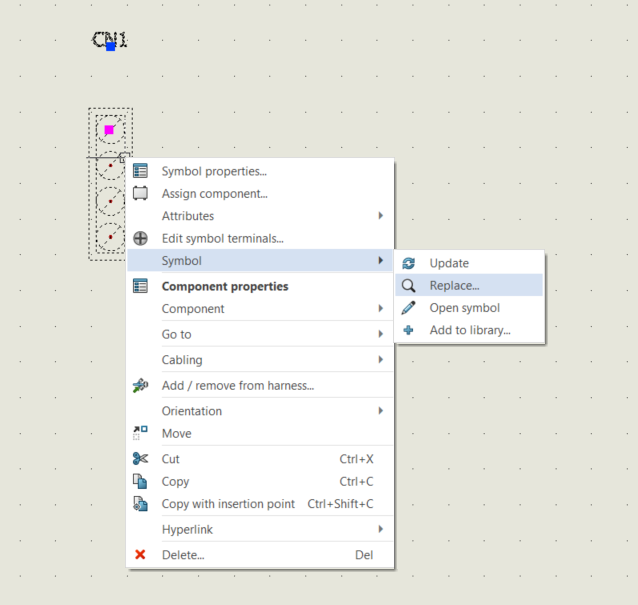
If your SOLIDWORKS Electrical Schematic symbols aren’t responding to the “Update” or “Replace” commands, the issue may stem from a communication blockage between the Electrical program and the Collaborative Server, often requiring IT configuration adjustments to resolve.
SOLIDWORKS Electrical Schematic: Adding Configurations to Application
By Jesse Deane on April 25, 2025
A question that comes up from time to time with SOLIDWORKS Electrical Schematic is how to apply changes made to configurations to other projects. For instance, let’s say you’ve changed the columns within your BOM, or perhaps you’ve changed the attributes within your PLC drawing…
SOLIDWORKS Electrical Cabinet Layout Components are Missing in the Tree?
By Jesse Deane on November 13, 2024
When working with a SOLIDWORKS Electrical cabinet layout, you may find that no components are listed. Let’s take a look at how to properly assign components to locations, so they show up in the component tree.
SOLIDWORKS 2022 Electrical 3D Add-in Error – Could Not Obtain a License
By Jesse Deane on October 25, 2024
If you are experiencing a SOLIDWORKS 2022 Electrical 3D add-in error, learn how to resolve the issue in this blog.

In this blog, learn how to solve the issue of SOLIDWORKS Electrical blank BOM reports by effectively organizing and configuring locations and settings.
SOLIDWORKS Electrical Mark Renumbering: Manual Marks Not Recalculated
By Jesse Deane on April 26, 2024
The SOLIDWORKS Electrical Mark Renumbering function can be a very powerful tool, but what happens when it doesn’t work quite as expected when dealing with manual marks? Let’s take a closer look at “Renumber Marks,” and a situation that you may encounter with it.
SOLIDWORKS Electrical – Using Connection Labels with Terminals
By Jesse Deane on May 10, 2023
While inserting multiple symbols for some component types is possible, it is not possible with SOLIDWORKS Electrical terminals. Therefore, a workaround is required if you would like to insert multiple symbols for a single-level terminal without making it a multi-level terminal. The solution to this…
Why won’t my origin destination arrows work in SOLIDWORKS Electrical?
By Jesse Deane on May 8, 2023
Origin-destination arrows can be used to create a continuity link between wires in different areas of a single sheet, or to show a continuity link between wires that are displayed on separate sheets. So, what happens when you attempt to insert the arrows, and the…
Elec3dcore – SOLIDWORKS 2022 Electrical 3D Add-in Error
By Jesse Deane on May 1, 2023
Typically, the answer for what to do when one receives a message stating “Could not obtain a license for SOLIDWORKS” may simply be to activate or reactivate your SOLIDWORKS license. However, a problem has been found when using the Electrical 3D add-in for SOLIDWORKS 2022,…