


How to fix a SOLIDWORKS Manage Can not Authenticate Error

Article by Nadeem Akhtar updated February 11, 2019
Article
During the process of restoring a SOLIDWORKS Manage database, you could receive the error “Could not Authenticate!” if you try to test the Sites Properties.

Reason for this error
The reason for this error is an incomplete procedure for restoring the SOLIDWORKS Manage database and this can cause a miss authentication on the File Server.
How to fix the Can not Authenticate error
To fix the issue, you can rename the .swmc file contained in the FileServer folder.
- Browse to the folder Fileserver folder

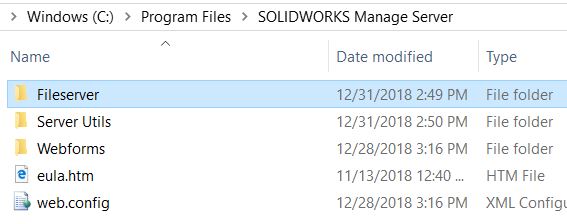 Fileserver folder
 - Select the file *.swmc present in the folder
 Select the swmc file
 - Rename it to SWManage.swmc
 Rename it to SWManage.swmc
 - Open SOLIDWORKS Manage and select the SWManage.swmc file renamed, because the previous one will not be present
 Open SOLIDWORKS Manage
File selected
- Go to System administration > Sites and run the test for FileServer
Site Properties
Related Links
Certified SOLIDWORKS Services available from Javelin
Javelin can help you to:
Posts related to 'How to fix a SOLIDWORKS Manage Can not Authenticate Error'
