


SOLIDWORKS Plastics: Vent out AirTraps with Venting Analysis

Article by Suman Sudhakaran updated September 27, 2024
Article
Have you ever wondered how the intricate details of a plastic part are flawlessly molded without visible defects? The secret lies in the specific venting of trapped air during the injection molding process. In the world of injection molding, the difference between a high-quality product and a flawed one often hinges on the presence of sink marks, weld lines, air traps, short shots, and the process parameters itself.

AirTraps Identified in Fill Analysis
During injection molding, air trapped in the part being molded can lead to further defects, such as burn marks (dieseling effect), incomplete filling, and poor surface finish. Air vents allow air to escape from a cavity as the melted polymer fills the mold. SOLIDWORKS Plastics offers a Venting Analysis capability that allows engineers to predict and prevent potential defects caused by air traps.
Without enabling Venting Analysis, the software assumes that the displaced air has the means to vent (mold is adequately vented). With Venting Analysis enabled you can predict the effect of the displaced air on the plastic filling.
To run a Venting Analysis, users select the option within the Fill Settings Property Manager as shown in the images below.
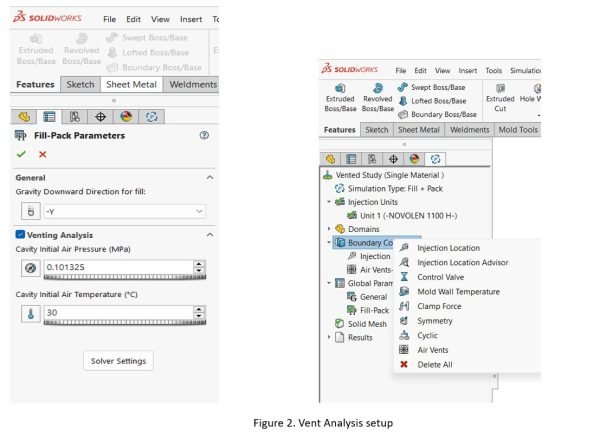
Vent Analysis Setup
Once the Venting Analysis option is enabled, the user can define the Vent locations by selecting Air Vents in the Boundary Condition section. When you run a Fill Analysis after air vents are defined in the critical locations of a cavity, the software tracks displacement of air and predicts regions of high venting pressure.
The regions of high venting pressure would be an indicator for potential hot spots. A second iteration of the Plastics Analysis study can be run adjusting the vent locations based on the initiation analysis, and the process can be iterated until an optimal venting strategy is achieved.
Consider a complex part with internal features like mounting bosses and stiffening ribs. These features, which will be on the core of the mold, require careful consideration of gate location and venting. Based on the Fill Analysis performed on the part illustrated in the image above, vent locations were defined to displace air trapped inside the visible corners of the part.

Air Vents Setup
Fill Analysis with vent locations defined shown venting pressure distribution as shown in image below. Air traps were not fully eliminated; however, they were relocated to less critical regions of the part where it would not affect the part’s structural strength or appearance.
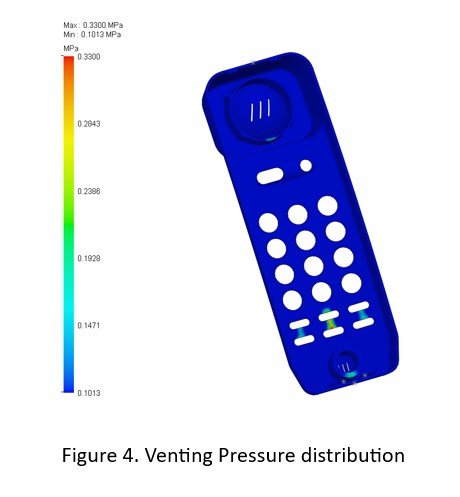
Venting Pressure Distribution
SOLIDWORKS Plastics’ Venting Analysis capability is an invaluable tool for injection molding engineers that allows for optimizing the placement of vents and evaluating its effectiveness in removing trapped air. Simulating the injection molding process provides a predictive approach to design, saving time and costs while achieving high-quality surface finish and structural integrity.
Related Links
Certified SOLIDWORKS Services available from Javelin
Javelin can help you to:
Posts related to 'SOLIDWORKS Plastics: Vent out AirTraps with Venting Analysis'
