


SOLIDWORKS Electrical Schematic: How to Import Manufacturer Parts and Cable References in 2024 SP2 Stealth Update

Article by Alaa Hosn updated November 4, 2024
Article
Import manufacturer parts and cable references into SOLIDWORKS Electrical Schematic used to be a time-consuming process, often resulting in missing or incomplete manufacturer information if not done correctly. While SOLIDWORKS Electrical consistently introduces valuable enhancements with each new release, the 2024 SP2 version has quietly added a fantastic, time-saving feature that simplifies importing data.
Import Manufacturer Parts Demo
Watch the video below on importing manufacturer parts into SOLIDWORKS Electrical Schematic:
Import Manufacturer Parts Steps
The new ability to import information from an Excel document generated in SOLIDWORKS Electrical Schematic makes sure all manufacturer part and cable reference properties are imported with ease.

Import Wizard options
The Newest Import Method Available
The capability to import manufacturer part and cable reference information is not new, there are multiple ways to do this in Electrical Schematic already, but not all data fields can be populated depending on which method is selected. What is new, is an additional method for importing manufacturer parts and cable reference data that has virtually no limitation to what properties can be imported. With the new and improved import option, users can import data all in one shot and even enter classification information, as well as circuit and terminal data. Previously, neither classification information, circuit data, or terminal data could be referenced or imported if it was in an Excel document.
The workflow for the new import option is very intuitive. This process consists of generating a pre-populated Excel document that is linked to Electrical with a click of a button, filling in the necessary columns, and importing the document back into SOLIDWORKS Electrical Schematic. The steps are nearly the exact same for importing manufacturer parts as it is for cable references, but the Excel template generated in SOLIDWORKS Electrical Schematic varies slightly to account for the properties specific to each.
Importing Data
- Navigate to the Library tab from the ribbon menu. Select either cable reference management or manufacturer part management. In this example, manufacturer part management is selected.

 Cable reference management
- Go to Import and choose to create a new file for import.
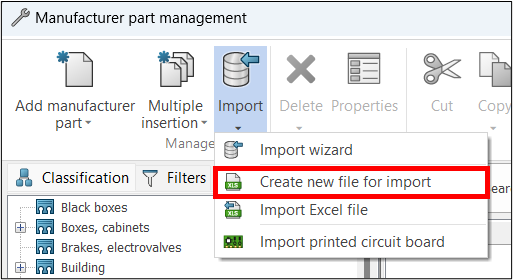 Create a new file for import
- From the following window, pick the classification type by selecting the class icon. Choosing a base class from the list will pre-populate the associated subclasses into the following Excel document to select from. If nothing is selected, the full list of classification types will appear in the Excel document.
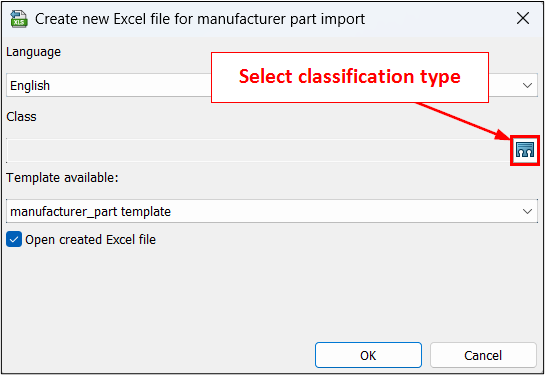 Select classification type
- Give the Excel file a name and save the document.
- Start adding data to the necessary columns.
- Mandatory columns are necessary for the successful import of data.
- Required fields left blank in the software will give a warning but allow the data to import with errors.
- The optional field can be left empty, and no errors occur.
 Different field types
- Save the Excel file.
- In SOLIDWORKS Electrical Schematic, go to Library > Manufacturer part management > Import > Import Excel file.
- Select the Excel icon in the top right corner to select a file for import.
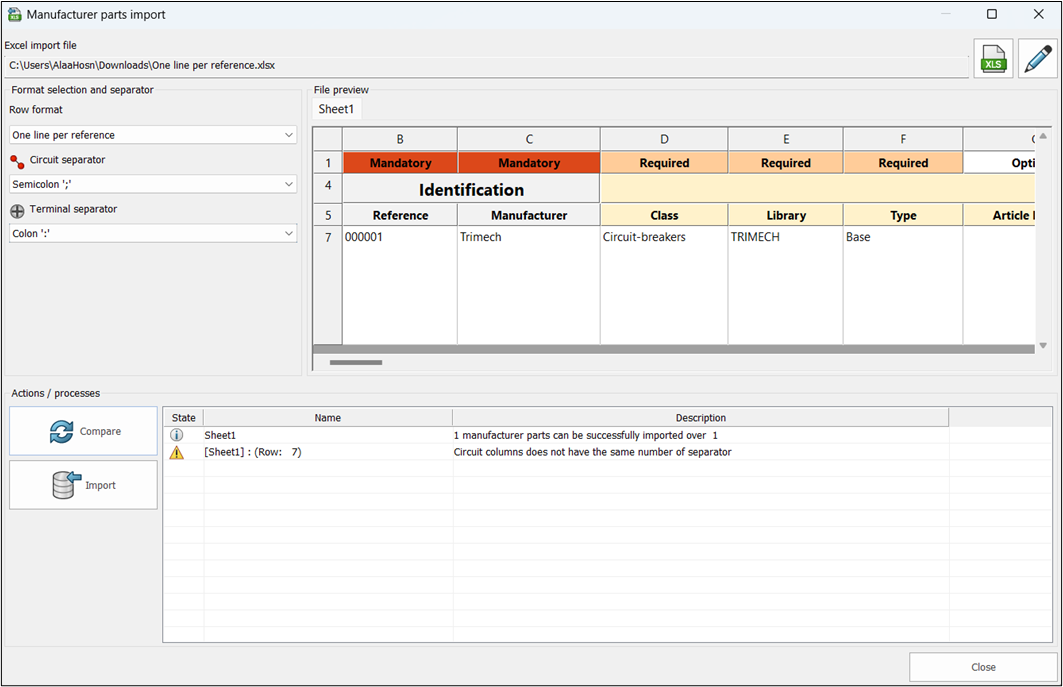 Select a file for import
 - Click compare to simulate import, when there are no critical errors select Import to complete the process.
- Check the library to confirm that the import was completed successfully.
Conclusion
The 2024 SP2 update for SOLIDWORKS Electrical Schematic introduces a powerful, streamlined method for importing manufacturer parts and cable references, addressing previous limitations in the data import process. While earlier methods allowed some import functionality, the new feature eliminates restrictions, allowing users to import classification, circuit, and terminal data directly from Excel.
This improved workflow is easy to use, allowing users to quickly generate and fill out Excel templates that are linked to SOLIDWORKS Electrical, ensuring that all relevant data is imported accurately. By simplifying the process and broadening the range of data that can be included, this update significantly enhances efficiency and accuracy for any user importing manufacturer parts and cable references into SOLIDWORKS Electrical. Upgrade to 2024 SP2 today to explore this new enhancement!
Related Links
Get Certified SOLIDWORKS Electrical Services
Our Certified Electrical Experts can help you to:
Posts related to 'SOLIDWORKS Electrical Schematic: How to Import Manufacturer Parts and Cable References in 2024 SP2 Stealth Update'
