


Blog Tag
Showing 1-9 of 9.
Technical Support
Tech tips, tutorials, and best practices for Technical Support from the Javelin technical team
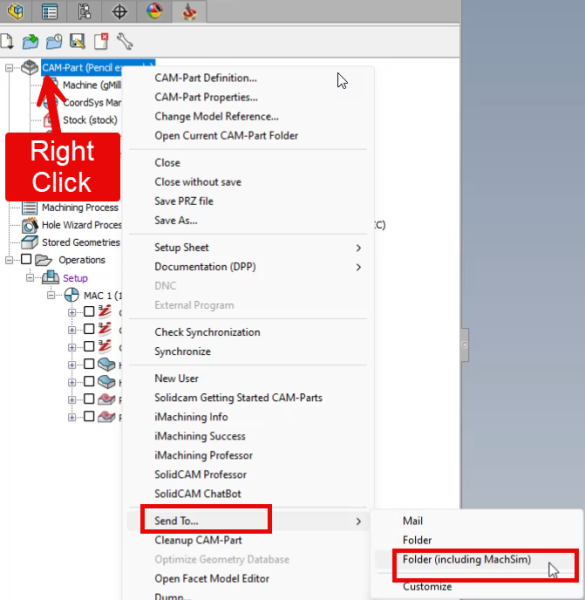
How to Create a “Send To” File Set for SolidCAM Troubleshooting
In this blog article will learn how to send complete SolidCAM file-set to TriMech’s Client Success Team for them to help trouble shoot your issue. if you have any CAM related questions you can email [email protected]
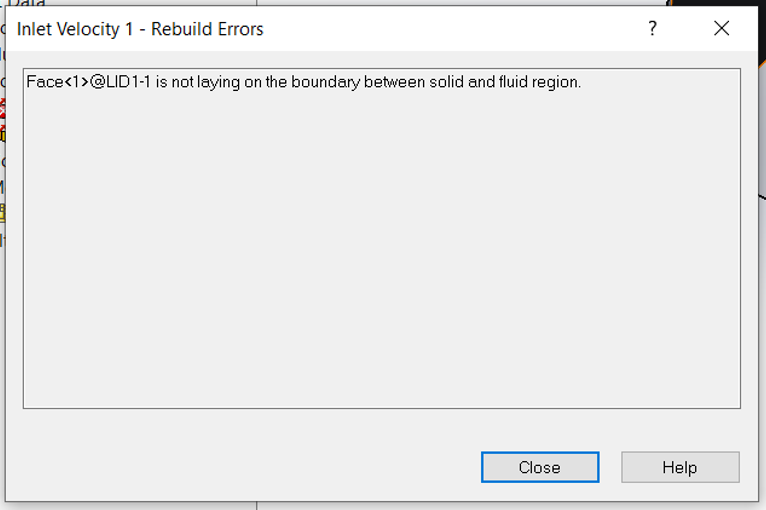
Solving the “Face is not laying on the boundary between the solid and fluid region” Error
When trying to validate a boundary condition in SOLIDWORKS Flow Simulation, we may get an error stating “Face is not…

Fundamentals of SOLIDWORKS Electrical Troubleshooting
It is critical that your electrical schematic design tool is working properly so you and your team can continue to…

Is It Time to Make the Switch to SOLIDWORKS?
The only constant in business today is change. Changes are everywhere in the business climate now. To adapt to change…

How to Access SolidCAM Support
No matter the tool, you’ll always run into something that requires you to reach out for help. Whether it’s a…

Troubleshooting the “Specified Module Could Not Be Found” Error in SOLIDWORKS Electrical
If you’re encountering the “specified module could not be found” error when launching SOLIDWORKS Electrical, you’re not alone. This is a relatively common error that can occur for a few different reasons but fortunately, there are simple fixes!

Stratasys F123 Series: Printer Operation Issues & Fixes
Stratasys has identified a few minor issues with the new F123 Series 3D Printers. Many of the issues have been…

Our Tech Support EMAIL Not Arriving?
On Friday SEPT 22, our support ticketing system, NetSuite, changed their email domain. Many of you have probably experienced problems…

Javelin provides “elite” expertise in SOLIDWORKS training and technical support
Elite AE SOLIDWORKS designation awarded to best of the best. Javelin is known across Canada as a leading provider of SOLIDWORKS…