


Blog Tag
Showing 1-4 of 4.
PDM Client
Tech tips, tutorials, and best practices for PDM Client from the Javelin technical team
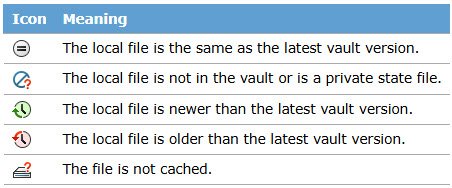
What are File Version Icons in SOLIDWORKS PDM?
File version icons in SOLIDWORKS PDM provide quick status information for vaulted files. The status icons are available in both…
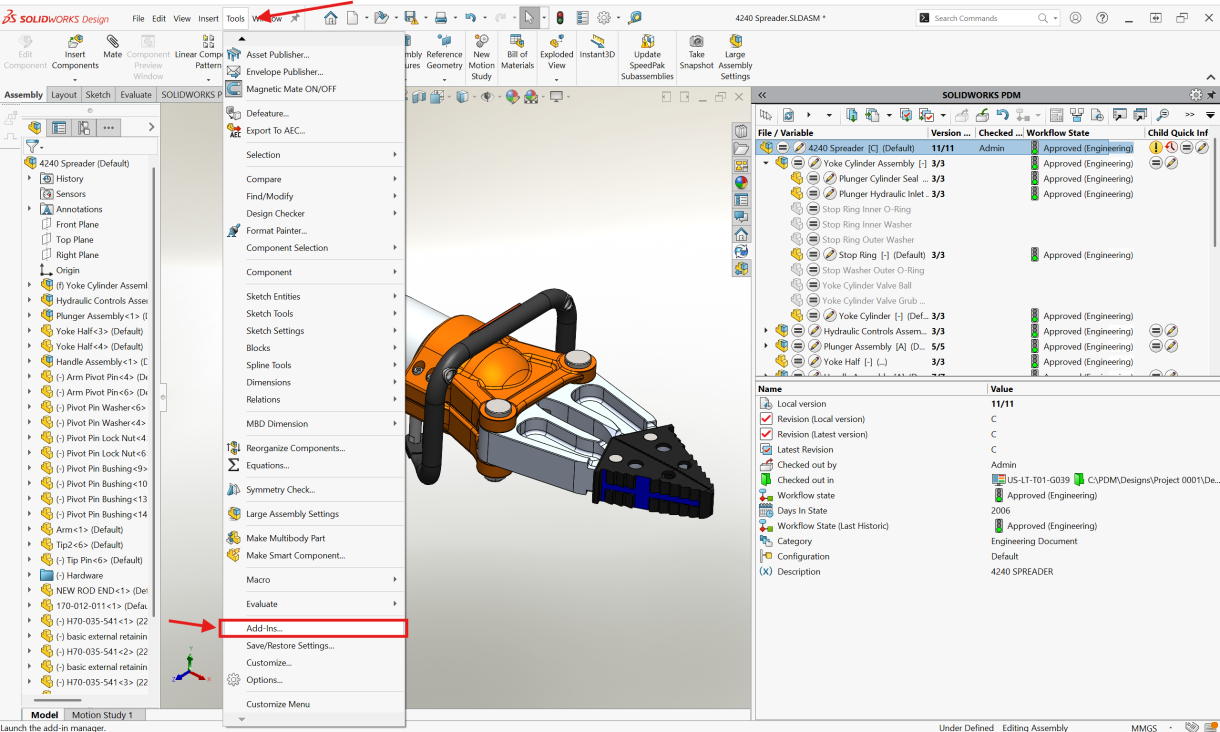
Fundamentals of using the SOLIDWORKS PDM Add-in
SOLIDWORKS PDM is the proper tool for handling all the complex file references with your CAD data, so you can…

Updating Client Registry Keys After A SOLIDWORKS PDM Server Move
After the SOLIDWORKS PDM Server components have been moved to another system, it is very important to point the PDM Client to the new server. To do this process, the SOLIDWORKS PDM Client registry information must be updated with the new server name.

How to create the Local Vault View in SOLIDWORKS PDM
Once the SOLIDWORKS PDM Standard Server and Client components have been installed, a Local Vault View needs to be created….