


I bet you did not know this sketch relation existed – “Equal Curvature” between a spline and a surface

Article by Alin Vargatu, CSWE updated March 29, 2011
Article
As we learnt in the first minutes of our first Surface Modeling lesson, the Holy Grail for the “shape designers” is the creation of class “A” surfaces: those smooth, curvature continuous entities pleasing to the eye and pleasant to the touch, found everywhere nowadays – from the flowing curves of your car’s panels to the ergonomic shape of your remote control or your mouse.

During the Advance Surface Modeling course, we also discovered various techniques for applying the curvature continuous condition, but (to my knowledge), we did not explore the Equal Curvature as a sketch relation in the particular situation where a spline is connected to an existing surface.
A) Create a 2D or 3D Sketch and draw a spline connected to an edge of your surface.

B) CTRL+Select the Spline, the edge and the face bordered by that edge. Thus, the Equal Curvature relation will become available.
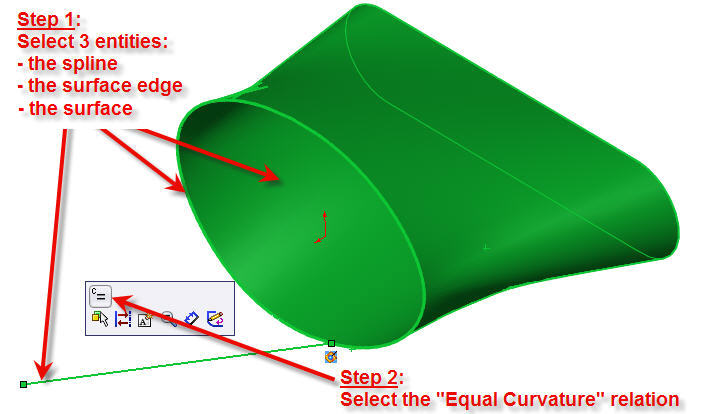
C) The result is a spline which have the same curvature as the surface in the neighbourhood of the edge.

You can now put this spline to work as a guide curve in various features like boundary, fill, sweep or loft surfaces.
Enjoy!
Related Links
Certified SOLIDWORKS Services available from Javelin
Javelin can help you to:
Posts related to 'I bet you did not know this sketch relation existed – “Equal Curvature” between a spline and a surface'
