


How to Activate DriveWorksXpress for SOLIDWORKS Automation

Article by Lily Bar updated June 26, 2026
Article
In every seat of SOLIDWORKS, there is a free, entry-level design automation included. DriveWorksXpress is an introductory level of DriveWorks, giving your team access to powerful SOLIDWORKS automation through a capable rules builder.
Every SOLIDWORKS user can activate DriveWorksXpress to take advantage of automation capabilities and streamline the production of configurable parts and assemblies.
Why Activate DriveWorksXpress?
Activating DriveWorksXpress allows for the quick generation of new versions of your SOLIDWORKS parts, assemblies, and drawings. Understanding the tools at your disposal will enable you to take full advantage of DriveWorksXpress.
Advantages of activating DriveWorksXpress include:
- One-Time Setup: Set up is required only once; no need for complex macros, design tables, or configurations.
- Save Time: Automate repetitive SOLIDWORKS tasks to focus on product innovation and development.
- Eliminate Errors: Use rules to eliminate errors and expensive design changes.
- Upscale: Upgrade to DriveWorks Solo or DriveWorks Professional anytime.
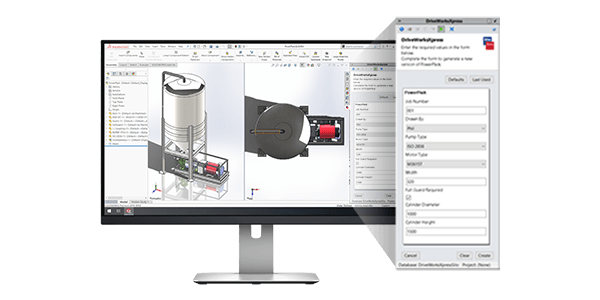
Using DriveWorks for better sales and engineering
With DriveWorksXpress, you can control dimensions, features, custom properties, and switch configurations automatically through rules. Use the powerful automation engine to drive models and update drawings.
You can add and update captured parameters directly from SOLIDWORKS and use DriveWorksXpress to make automation run smoothly, including input forms and the rules builder.
Input Forms
You can create input forms to enter product requirements and add validation to controls to ensure inputs are suitable, and the DriveWorksXpress forms will let you control the information entered.
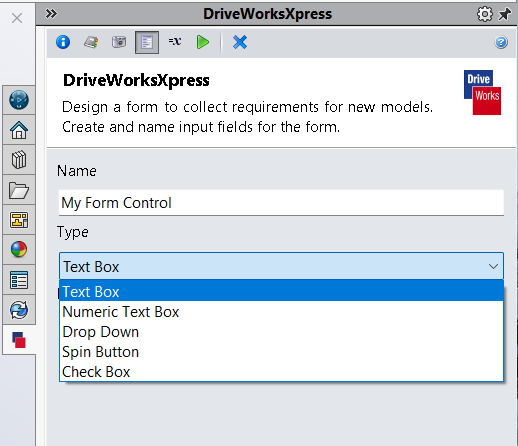
DriveWorksXpress input form creation
You can use the built-in form tool to show requirements and add validation to inputs. Any information that does not meet the input requirements is blocked, meaning you cannot have wrong information specified.
Not only do the forms provide feedback for numerical data, but you can also add the following for different methods of capturing and driving data:
- Text boxes
- Numeric text boxes
- Drop-down lists
- Spin buttons
- Check boxes
Rules Builder
The rules builder allows you to link input controls with captured parameters through formulas and logical statements. The builder uses standard Microsoft Excel functions to create engineering logic and lets you use intelligent file naming methods to build a library of components.
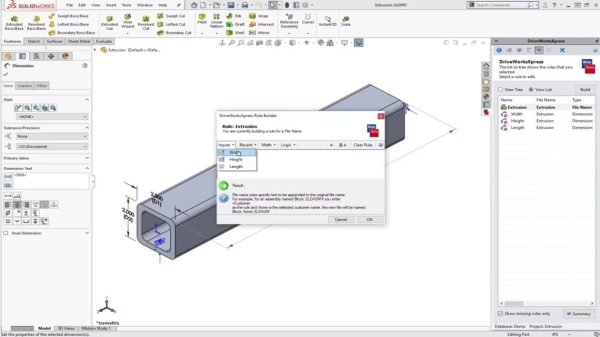
Rule creation in DriveWorksXpress
The DriveWorksXpress rules builder saves time, reduces repetitive tasks, and minimizes mistakes.
How to Activate DriveWorksXpress in SOLIDWORKS
If you have SOLIDWORKS, you already have DriveWorksXpress through your subscription. You just need to activate it to start using powerful SOLIDWORKS automation.
Follow these steps below to activate DriveWorksXpress inside SOLIDWORKS:
- Open SOLIDWORKS.
- Navigate to Tools, Xpress Products, and select DriveWorksXpress.

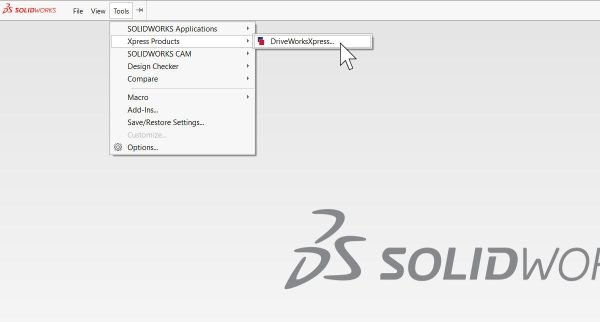 Accessing DriveWorksXpress
 - Click on the link to get your free activation code for DriveWorksXpress.
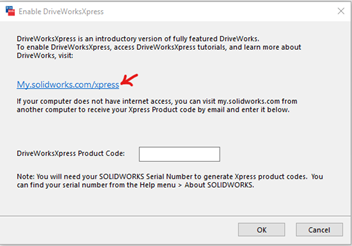 Navigate to the link to find your activation code
 - Log in with your 3DEXPERIENCE ID.
- Copy the DriveWorksXpress activation code.
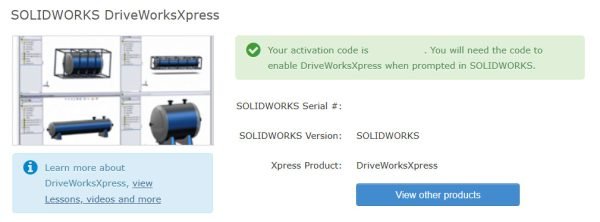 Accessing the DriveWorksXpress activation code
 - Go back to SOLIDWORKS, paste the activation code into the product code box, and click OK.
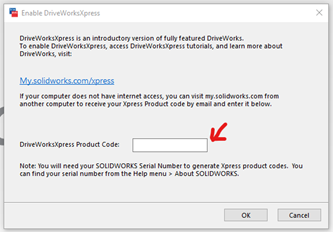 Paste the code here and click ok
DriveWorksXpress will now be activated, and you can start on your SOLIDWORKS automation journey. There are helpful tutorials and a getting started walkthrough to help get your feet under you.
Adapting to DriveWorks for SOLIDWORKS Automation
DriveWorks is a leading tool in design automation and sales configuration. With it, you can digitize your product specification sheets and automate pricing, design, and quoting.
DriveWorksXpress is just the beginning of automating SOLIDWORKS. With DriveWorks Professional, you can extend the rules builder further with additional options and dive deeper into SOLIDWORKS automation.
Related Links
Certified SOLIDWORKS Services available from Javelin
Javelin can help you to:
Posts related to 'How to Activate DriveWorksXpress for SOLIDWORKS Automation'
