


Creating a Reference between a SolidWorks File and Another File Type within SOLIDWORKS PDM

Article by Cody Foley updated September 17, 2012
Article
When working in SOLIDWORKS PDM sometime you might have a need to include a file in another files reference list. This could be a non-SOLIDWORKS file (PDF, Microsoft Document, JPG, etc) in the BOM’s or reference list of a SOLIDWORKS file (sldprt, sldasm, slddrw) or even a PDF with an Excel document. There are many use cases for this feature but below I will focus on a Word document being added as a reference to a SOLIDWORKS file.
Creating the reference
- Right-click the SOLIDWORKS File and select Check Out.
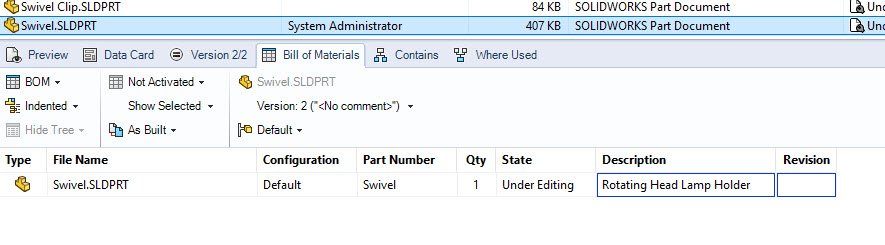
SOLIDWORKS file checked out with BOM showing.
- Select the Word document to reference.
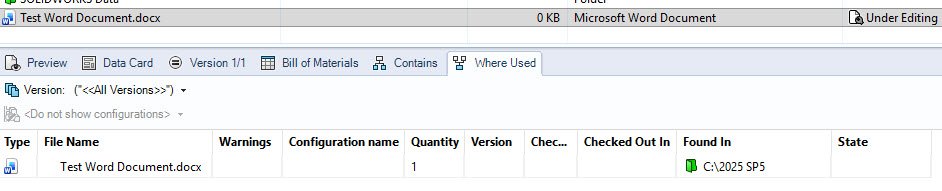
Word document selected with Where-used showing.
- Right-click that Word document and select Copy.
- If the Word document is checked out and changed, when you do the check in step later on it will also check the Word document in as well.

Context Menu Copy.
- Right-click the checked out SOLIDWORKS File and select Paste as Reference.

Context menu “Paste as reference” selected.
- A Create File References dialog box should pop up, enable these options as needed:
- Add Reference, creates a reference to the file.
- Show in Bill of Materials, includes the file in the parent file BOM.
- Click OK.
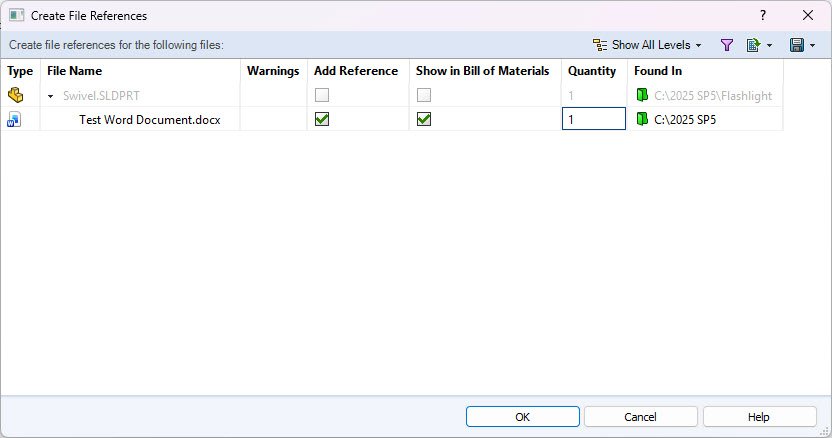
Create File Reference Dialog menu.
- Check-in the SOLIDWORKS file.
Now the Word document will appear under the “BOM”, “Contains” tab and with any Check Out/Check In dialogs with the SOLIDWORKS file, as well as the “Where used” tab of the Word document.

SOLIDWORKS File’s BOM tab showing the new Word document reference.
The example above just shows how to add a Word Document into a SOLIDWORKS files reference list but as previously mentioned you can also do this with pretty much any other file to any other file. If you have a need to add a PDF reference to an Excel document or to a TXT file you can do that as well with the same general steps.
Related Links
Want to do more with SOLIDWORKS PDM?
Our Certified SOLIDWORKS PDM Experts can help you to:
Posts related to 'Creating a Reference between a SolidWorks File and Another File Type within SOLIDWORKS PDM'
