


Exporting Nodes in SolidWorks Enterprise PDM

Article by Joe Medeiros, CSWE updated January 21, 2013
Article
There are frequent situations where you need to export some sections (nodes) of your vault. You may want to export a card to re-use it in another vault. Export a template for testing in a test vault or at the request of your VAR (Value Added Reseller).
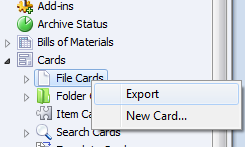
To export a node, right click on the node and select “Export”. .
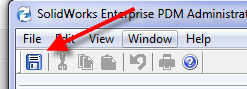
Next Click on Save Icon. The export will contain all of the relevant information including users groups etc
To import, right click on the vault and select “Import”

Related Links
Certified SOLIDWORKS Services available from Javelin
Javelin can help you to:
Posts related to 'Exporting Nodes in SolidWorks Enterprise PDM'
