


SolidWorks Electrical: Working With Dual Column Title Blocks

Article by Delvin Masilamani updated August 2, 2013
Article
Shao Liu regularly contributes to the documentation for our Electrical Team here at Javelin Technologies. The article below is a useful section from his work.
Creating customized title block is convenient for a user who wishes to automate drawing information on schematic diagrams.
When starting a new title block, title block properties window holds every import aspect of information to help the user set up correctly. Especially with row and column information which needs to be accurate. The breakdown of title block properties is the following:

a) With rows/With columns: if the user wishes to have row and column defined, in most cases rows are checked, also if 2 or more columns are needed, columns should be checked as well otherwise it stays single column.
b) Mark of first row/Mark of first column: this is the coordinates of top left corner of the drawing space (note not overall space, in this example is the inside square) relative to the origin

c) Height of the row/Width of the column: the size of each row and column, note that by default row height has a “-“prefix meaning the row start from top to bottom.
d) Number of Rows/Columns: total number of rows regardless the number of column; and vise-versa for total number of column.
e) Row numbering: give user the option of either restart the row index at new column or continue with the row index from last row of the previous column.
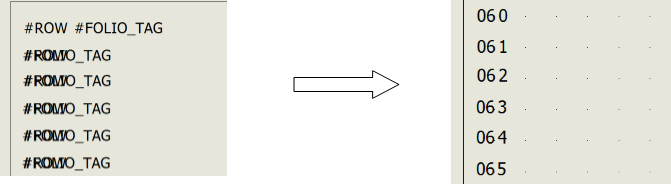
Once the initial information is set up, user can start inserting attributes into the sheet at selected locations where it will display the information once the sheet is used. For example page number (#FOLIO_TAG) and row number are inserted at the left edge of the sheet (Note even the two attribute are overlapped inside title block editing, however in the actual sheet it lines up perfectly).

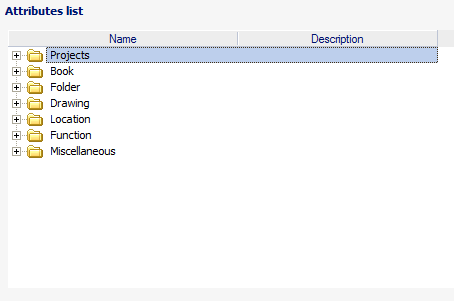
Other attributes such project labels can all be found inside attribute list to place in the correct location on the sheet or Title block.
Related Links
Get Certified SOLIDWORKS Electrical Services
Our Certified Electrical Experts can help you to:
Posts related to 'SolidWorks Electrical: Working With Dual Column Title Blocks'
