


SOLIDWORKS PDM Tasks 101

Article by Joe Medeiros, CSWE updated June 8, 2017
Article
In this article, we will do a brief overview of SOLIDWORKS PDM Tasks. A PDM Task, is a means of automating undertakings, such as converting files. SOLIDWORKS PDM ships with a number of Tasks

SOLIDWORKS PDM Tasks
These Tasks can be added when a vault is created

Including Tasks
Or they can be added by right-clicking on the Task node.

Add a New Task
Tasks rely on scripted Add-ins and SOLIDWORKS PDM ships with the Add-ins required for the tasks shown above. For those that are so inclined, you can create your own custom add-ins that will drive your own custom tasks

Custom Add-in for Tasks
Existing Tasks can be modified, in order to add to or modify their behaviour.

Edit existing tasks
Tasks are administered through SOLIDWORKS PDM Administration and they are composed of a number of elements, that define how the task will be executed:

Task Admin
How the Output file will be formatted.

Task Output
Who can run the Task

Task Users and Groups
Notifications can be sent to selected users including the person who initiated the Task, on successful completion of the Task.

Task Success Notification Settings
And notifications can be sent to selected users including the person who initiated the Task if the Task fails.
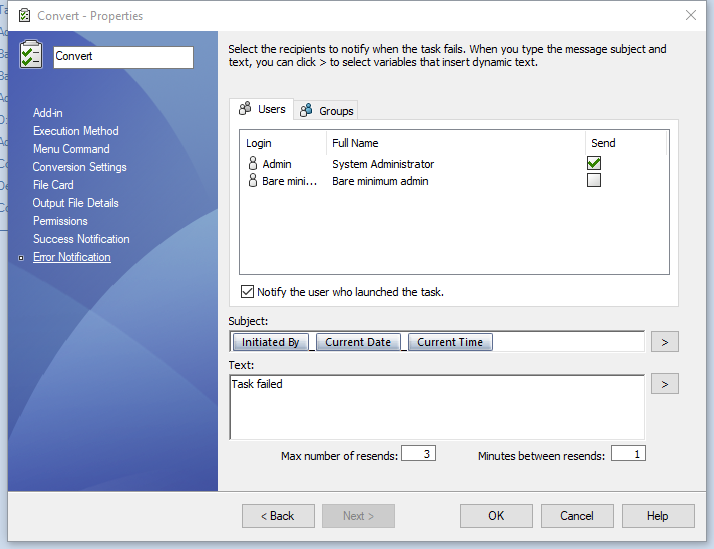
Task Failure Notification Settings
Please note that the number of retries and the amount of time between retries can be specified for a Task Failure.
Once the Task is created, it can be launched by right-clicking on a file, in the Local Vault View.

Task Commands
Tasks can also be launched from a Workflow Transition Action. Thereby further automating the generation of supporting files, such as PDF’s or DXF’s.

Task transition action
Related Links
Want to do more with SOLIDWORKS PDM?
Our Certified SOLIDWORKS PDM Experts can help you to:
Posts related to 'SOLIDWORKS PDM Tasks 101'
