


What does the SOLIDWORKS PDM File Compare function do?

Article by Nadeem Akhtar updated May 28, 2020
Article
In this tech tip I’ll describe what the SOLIDWORKS PDM File Comparison function is and how it works:
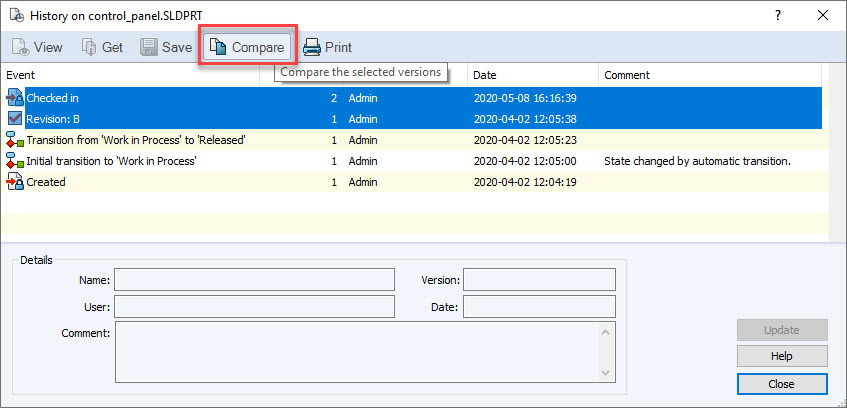
This function can compare two different versions of a file. It can be performed by going to the ‘History’ of the file and multi-select versions of a file and select ‘Compare’. Users then need some form of application that can perform the comparison (on a .sldprt file for example).

This function can be found in the SOLIDWORKS PDM Administration tool > Users > Settings > File Compare.

SOLIDWORKS PDM Administration tool
All the compare function does is launch an executable with arguments for the two selected files or versions, i.e.
programtocompare.exe [Firstfile] [SecondFile].
SOLIDWORKS does have a compare function, but users need to be able to launch SOLIDWORKS and provide two arguments to trigger the comparison. The ‘File Compare’ tab is an option provided in SOLIDWORKS PDM but it needs to be customized by the users.
Related Links
Want to do more with SOLIDWORKS PDM?
Our Certified SOLIDWORKS PDM Experts can help you to:
Posts related to 'What does the SOLIDWORKS PDM File Compare function do?'
