


What is SOLIDWORKS PDM Universal Licensing?

Article by Lynette Proch updated May 18, 2026
Article
Licensing requirements can become complex when you start to roll out infrastructure to the different teams in your organization. SOLIDWORKS PDM Universal Licensing can simplify tough licensing decisions when vault access grows beyond engineering.
Universal Licensing provides flexibility to change between various SOLIDWORKS PDM licensing types when your organization requires.
What Are the SOLIDWORKS PDM License Types?
SOLIDWORKS PDM is available in three different licenses, depending on what you need to use the vault for. The SolidNetWork License Manager will pull the appropriate license based on your installation.
- CAD Editor Licenses are for anyone who is using SOLIDWORKS CAD. This unlocks SOLIDWORKS PDM’s full potential for editing, checking in and out, and workflow capabilities for all file types.
- Contributor Licenses allow full editing and checking in and out of files as well, full access to workflow capabilities (depending on your permissions), but do not give you access to the SOLIDWORKS PDM add-in. Everything must be done through the Windows Explorer install.
- View Licenses are for users who need access to see what’s in the vault, without editing it. These normally come in five packs and can be shared by many people.
For a deeper discussion on SOLIDWORKS PDM license types, you can watch our on-demand webinar.
How Does the SolidNetWork License Manager Pull the Appropriate License?
A lot of users believe that SOLIDWORKS PDM will pull a license from the SNL, depending on what settings the individual user’s login has set up in the administration tool. However, this is not the case.
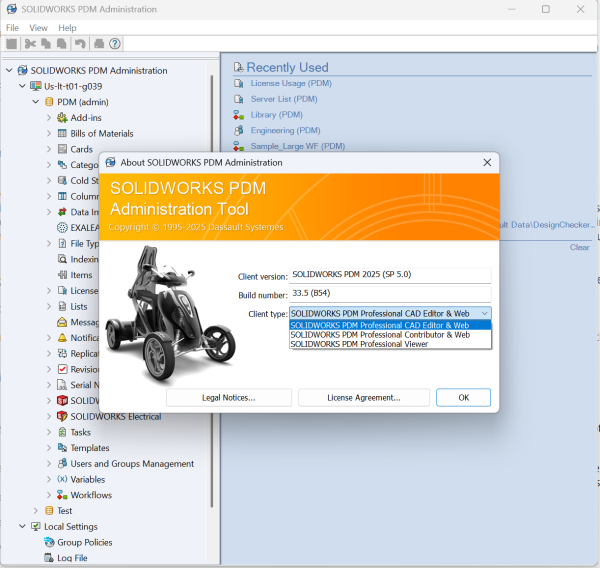
License types in the SOLIDWORKS PDM Administration tool
When installing, you will be asked what license type that machine has, and then anyone who logs into that client machine will pull that license type. This won’t affect the user’s permissions, so you don’t have to worry about whether someone who is set to a viewer license logs in to someone who normally is a CAD Editor; their user’s permission won’t change.
Options like seeing specific folders, having access to work-in-progress states, and other such options are all set up on the user level. If you make this choice and later realize you need to change it, don’t panic; there are multiple ways to do that very easily.
What is SOLIDWORKS PDM Universal Licensing?
When you are administering for larger groups, handling how many CAD editors, contributors, versus viewers can become a task in itself. For example, if you have 25 full-time CAD users, 5 interns, 12 shop floor, and 8 managers, figuring out how many licenses and what types you need can become confusing and constantly change.

Show Image Preview options in SOLIDWORKS PDM
SOLIDWORKS PDM Universal Licensing can become an asset and morph into whichever license type you require. Universal Licenses are flexible to match the needs of the user, depending on what was installed on that machine.
How Are Universal Licenses Sold?
If you have a diverse organization using SOLIDWORKS PDM Professional, Universal Licensing provides cost savings versus buying the equivalent number of SOLIDWORKS PDM licenses on their own. You can purchase Universal Licenses in packs of 25, 50, 100, or 200, depending on your needs.
Understanding Your SOLIDWORKS PDM Licensing
SOLIDWORKS PDM Universal Licensing is a great way to streamline your operations by reducing the need to track complex license requirements. By implementing it, you can experience cost savings that can be put back towards development projects.
For over 30 years, Javelin has helped clients optimize their licensing and prepare for future growth. If your organization needs help understanding your licensing requirements, we are here to help.
To schedule a free SOLIDWORKS PDM licensing consultation, contact us here.
Related Links
Want to do more with SOLIDWORKS PDM?
Our Certified SOLIDWORKS PDM Experts can help you to:
Posts related to 'What is SOLIDWORKS PDM Universal Licensing?'
