


Registering your MySOLIDWORKS Professional License

Article by Scott Durksen, CSWE updated July 21, 2023
Article
MySOLIDWORKS.com is a place to search, learn and connect with everything SOLIDWORKS. In this post learn more about the different licenses available for MySolidWorks and how to register MySolidWorks Professional to gain access to all the features the Professional package has to offer.

MySolidWorks Licenses
Anyone with a SOLIDWORKS ID or 3DEXPERIENCE ID can log in. There are different levels of licensing which unlocks more features.
| Features | Professional | Standard | Student | Guest |
|---|---|---|---|---|
| SOLIDWORKS Online Product Trial – try SOLIDWORKS anytime, anywhere, on any device…no install required | ● | ● | ● | ● |
| 3D Model Library from 3DContentCentral | ● | ● | ● | ● |
| Search – Get answers to questions from across all SOLIDWORKS community resources. | ● | ● | ● | ● |
| Access Learning – SOLIDWORKS training videos. | ● 1000+ | ● 600+ | ● 600+ | ● 300+ |
| Access to the SolidWorks Customer Portal, explore and search Advanced Forums, and the Knowledge Base. | ● | ● | ||
| Access to My VAR provides you with Javelin content feeds for SOLIDWORKS blogs, videos, news, and a schedule of upcoming events. | ● | ● | ||
| Access and search Software Performance Reports (SPRs), online help, and more | ● | ● | ||
| Get certified with SOLIDWORKS with access to CSWA Certification Prep Courses | ● | ● | ● | |
| Get certified with extensive access to ALL certification prep courses including CSWP, CSWE, & CSWPA | ● | |||
| SOLIDWORKS eCourses are complete courses converted from the SOLIDWORKS instructor-led training manuals into self-paced eLearning | ● | |||
| Value | For users with active SOLIDWORKS subscription. $360 per year, per user | Included with SOLIDWORKS subscription & SOLIDWORKS Term License | Included with an active Student Engineering Kit (SEK) and Student Edition (SWSE) Licenses | Free when you join or log in to MySolidWorks |
MySolidWorks Guest
Anyone can create a 3DEXPERIENCE ID, even without a license of SOLIDWORKS. This will provide access to Guest functionality.
MySolidWorks Standard
User IDs associated to accounts with licenses on active subscription service have access to Standard features. For more information on how to associate a user ID to an account, see our article on Transitioning to DSx Client Care & Order System.
MySolidWorks Student
Students should reach out to their school administrator for access.
MySolidWorks Professional
MySOLIDWORKS Professional licenses are purchased separately and unlocks all functionality including all lessons and full eCourses.
IMPORTANT: If you’re a CAD Administrator or Engineering Manager looking at a long list of MySOLIDWORKS Professional serials, they have to be assigned to a specific user and distributed to that user with the instructions below. This is an operation you cannot complete yourself on their behalf as the license is associated to their individual SOLIDWORKS user account.
How to register a MySOLIDWORKS Professional License
STEP 1: Log in at MySOLIDWORKS. If you have not created a 3DEXPERIENCE ID, review this 3DEXPERIENCE ID creation guide.
STEP 2: Once logged in, click your name in the top right-corner and choose My Profile
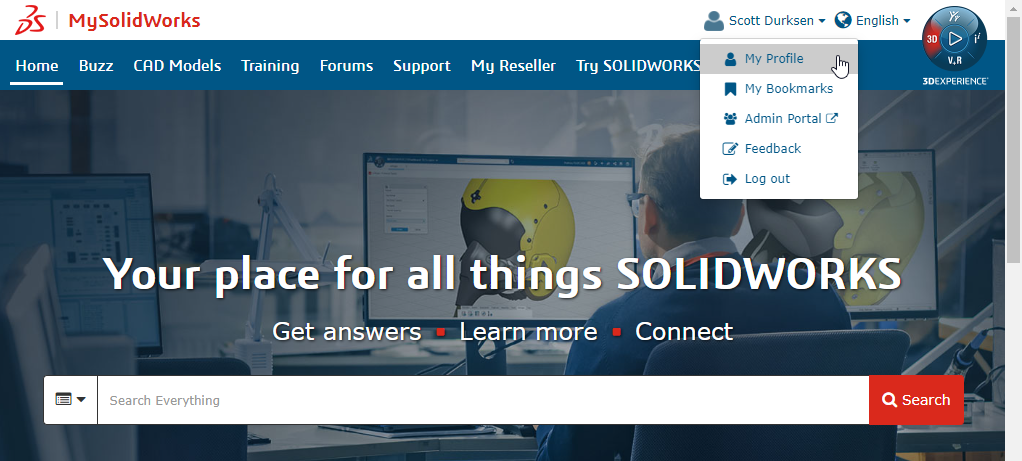
STEP 3: Click on My Subscription and select Upgrade under Professional

STEP 4: Enter your new MySOLIDWORKS Professional serial number (NOTE: This is different from your SOLIDWORKS serial number)
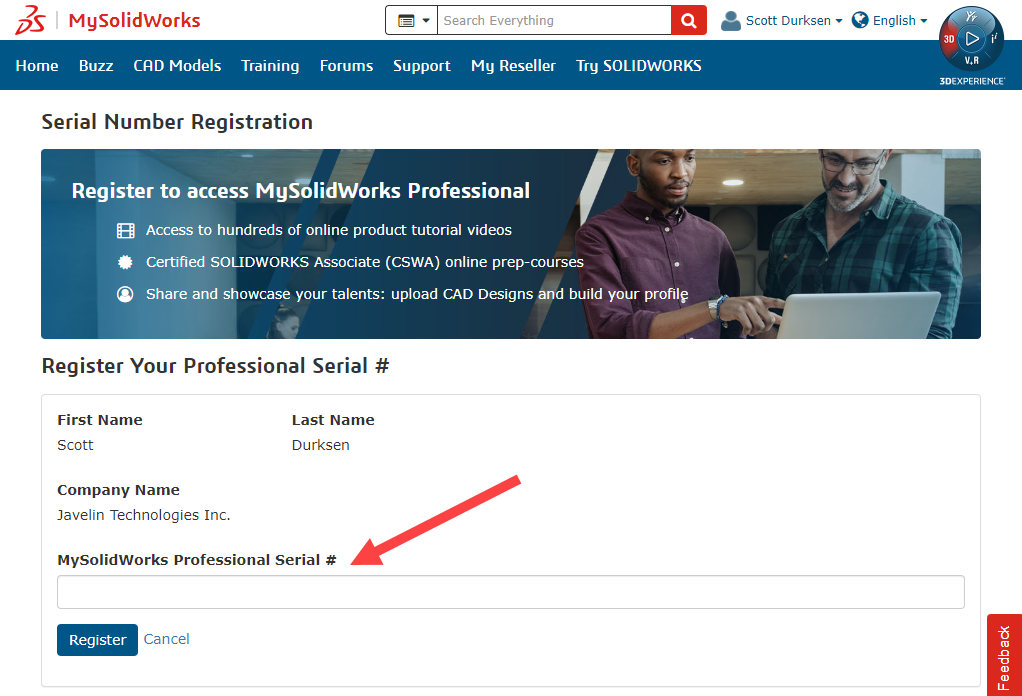
STEP 5: Follow the steps as prompted to complete the registration of your NEW MySolidWorks Professional license. Upon successful completion, you should now have access to all the Professional features. If you do not immediately gain access, you may have to wait 24 hours.
Interested in obtaining a MySolidWorks Professional License?
Learn more about MySolidWorks and contact us to get a quote for a Professional license.
Related Links
Certified SOLIDWORKS Services available from Javelin
Javelin can help you to:
Posts related to 'Registering your MySOLIDWORKS Professional License'
