


Javelin / TriMech Author

Suman Sudhakaran
Expanding SOLIDWORKS Simulation Premium Boundaries with SIMULIA Apps on 3DEXPERIENCE
 By Suman Sudhakaran on August 12, 2024
When SOLIDWORKS Simulation Premium encounters limitations with complex geometries and intricate physics, SIMULIA apps on the 3DEXPERIENCE platform offer a powerful next step, enabling engineers to efficiently handle nonlinear structural problems with robust solver capabilities and advanced material models.
Sailing Toward New Horizons using Fluid Model Creation App on 3DEXPERIENCE
By Suman Sudhakaran on July 22, 2024
Computational fluid dynamics simulation is extensively used in the modeling of fluid flows including thermal management studies. Fluid Dynamics engineer role on 3DEXPERIENCE platform includes a native application ‘ Fluid model creation’, that enables users to dive into the depths of virtually representing the fluid…
How to use Link Connector for Structural Analysis on the 3DEXPERIENCE Platform
By Suman Sudhakaran on July 19, 2024
In the ever-evolving world of engineering simulation, Structural Analysis roles on the 3DEXPERIENCE platform enable engineers to predict and validate the performance of their product designs in a unified cloud-based environment. At its core lies the powerful ABAQUS solver technology that allows users to simulate…
3DEXPERIENCE: Unlock Advanced Parametric Design Options
By Suman Sudhakaran on July 8, 2024
Parametric design study is a powerful tool that enables engineers to optimize their product designs by analyzing the impact of various design parameters on their product’s performance.
How to modify Simulation Type using the 3DEXPERIENCE Scenario Manager
By Suman Sudhakaran on July 3, 2024
The 3DEXPERIENCE Scenario Manager in the Structural Performance Engineer role and Structural Mechanics Engineer role is a hidden gem when modifying the simulation type of structural analysis case
How to Visualize Under-Constrained modes in Linear Structural Validation App on 3DEXPERIENCE Platform
By Suman Sudhakaran on June 10, 2024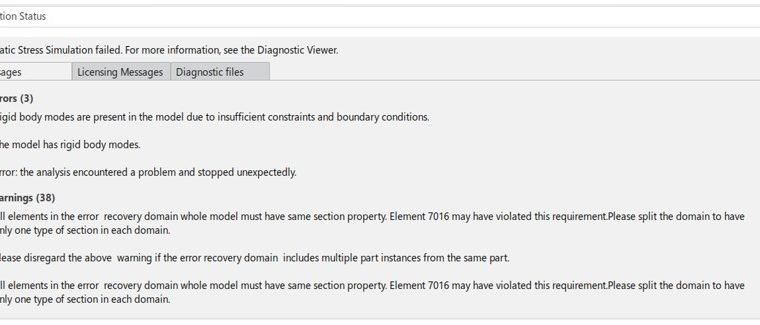
The Structural Designer role is one of the many simulation solutions available on the 3DEXPERIENCE platform. Learn more about the power of 3DEXPERIENCE to quickly pinpoint and fix under-constrained models with the Linear Structural Validation App for your designs and simulations.
Finite Element Model Representations in Structural Simulation Apps on 3DEXPERIENCE platform
By Suman Sudhakaran on March 4, 2024
SIMULIA applications on the 3DEXPERIENCE Platform offer realistic simulation solutions for a wide range of problems. For structural analyses, the finite element analysis program requires users to create a finite element mesh that closely represents the physical product, i.e., an assembly or part being simulated….
How to Delete Simulation Results on the 3DEXPRIENCE Platform
By Suman Sudhakaran on February 5, 2024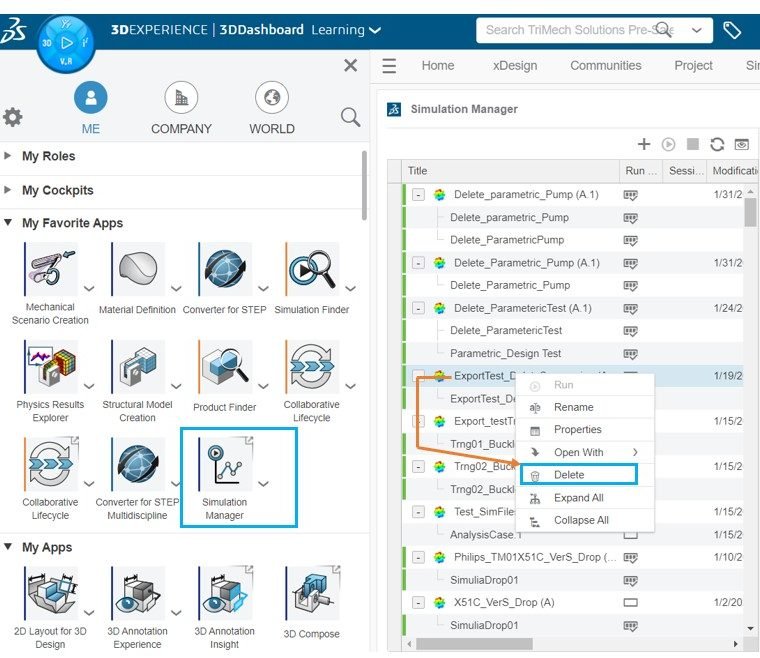
When it comes to running simulations on the 3DEXPERIENCE platform, there are few options available to the users to delete simulation results
The Power of Parameters in SOLIDWORKS Flow Simulation
By Suman Sudhakaran on December 4, 2023
When performing simulations for product designs, precision and efficiency are paramount. Engineers and designers need tools that allow them to explore a wide range of scenarios very quickly without having to manually adjust each boundary condition to simulate specific scenarios. Enter the ‘Parameters dialog’ in…
Defining FFT Plot in SOLIDWORKS Flow Simulation
By Suman Sudhakaran on June 20, 2023
After running a transient Flow Simulation study, frequency content or spectral information may be of interest. In SOLIDWORKS Flow Simulation, the fast Fourier transform (FFT) is used to convert the time signal to the frequency domain and the resulting FFT plot can be used to…
Material Calibration App in Structural Mechanics Engineer role on 3DEXPERIENCE Platform
By Suman Sudhakaran on June 16, 2023
Realistic simulation requires an accurate representation of material behavior. The material microstructure makes each material behave differently when loaded or unloaded. The mathematical model in finite element analysis uses equations to capture the behavior of materials. Material response is defined by one or more parameters…
SOLIDWORKS Connected: How to Access and Save Simulation Data
By Suman Sudhakaran on May 15, 2023
SOLIDWORKS Connected on the platform provides access to perform linear static simulation if you have activated 3DEXPERIENCE SOLIDWORKS Premium and Simulation designer role. It supports all functionalities available for only linear static simulation of parts and assemblies. There are a few things to remember when…
Defining Virtual Bolts for Simulation on 3DEXPERIENCE Platform
By Suman Sudhakaran on May 5, 2023
Connectors allow you to virtually represent bolts, pins, and similar joints. These types of virtual connections save computational resources and can be used when stresses on the joints are not of primary objective in the simulation study. Virtual bolts are enhanced coupling between two or…