


Where Did My RAM Go?

Article by Andrew Lidstone, CSWE updated December 3, 2010
Article
Most of us are likely familiar with a now commonly encountered limitation of 32 bit computer systems, they can only support a maximum 4 gigabytes of physical RAM. But you may wonder, why is this limit there and especially, what does it mean for us SolidWorks users?
To understand the why, we’ll need to travel back to early days of Windows, when a computer with 8 megabytes of RAM was a rocketship and gigabyte was a term only applied to the biggest hardrives available, remember, once that you said “no one would ever fill that”. At that time a 4GB limit seemed implausibly high and would never be an issue for everyday computer users. The limit was originally imposed by the architecture of the system, specifically in the memory addresses accessible to the processor. 32-bit processors typically use memory addresses that are 32 bits wide, allowing them to address 2^32 bytes of memory, that’s 4,294,967,296 bytes, or exactly four gigabytes.
Flash forward to today and 4GB of RAM is considered average for a home computer. However if you have 4GB of RAM installed on a 32 bit system you may have noticed that Windows does not show the full 4GB under System Information. So you ask, where did my RAM go? Well while the system may have 4 GB of memory address space, the RAM isn’t the only thing using those address. Various peripheral components are also using some of that space, and one of the biggest users is your video card.
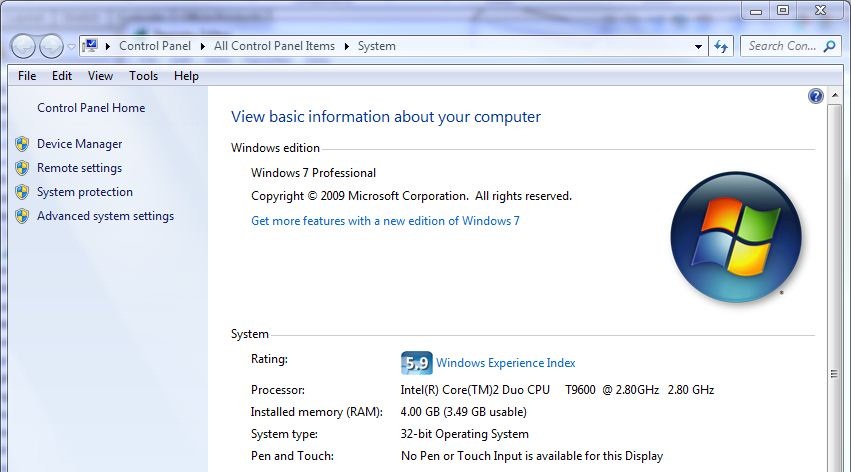
Yes that high power video card with 1 gigabyte of awesome rendering power, is actually squating on the first 1/4 of your memory address space, reducing you available memory. If your’re working with large assemblies this can potentially cause some major headaches.
The answer?
Unfortunately there is no working around the 4 GB limit of 32-Bit systems, you have to go over it, to a 64-Bit system. Thankfully though 64-Bit systems have become much more popular today. Driver and compatibility issues from times past are mostly gone now.
Javelin Technologies currently recommends Windows 7 Pro, Enterprise or Ultimate 64-Bit with a minimum 8 gigabytes of RAM for SolidWorks 2011. These operating systems limit available memory at 192 GB … that’s more than anyone will ever use right? … history says don’t count on it.
For more information on how 32-Bit windows uses memory addresses please go to: http://support.microsoft.com/kb/929605
For more information on SolidWorks 2011 hardware recommendations please got to: http://www.javelin-tech.com/main/support/solidworks_2011_hardware_faq.htm
Related Links
Certified SOLIDWORKS Services available from Javelin
Javelin can help you to:
Posts related to 'Where Did My RAM Go?'
