


SolidWorks EPDM – Ignore Permissions from Previous States

Article by Joe Medeiros, CSWE updated August 20, 2014
Article
As a file passes through a workflow, permissions are inherited from previous states. This can result in users or groups, who would normally have certain permissions in particular state, not having those permissions for some files in that state.

Workflow
For instance a user or group has the permission “Read File Contents” for a file in the “Released” state, but does not have that permission in the “Work in Progress state. This can result in the user or group not being able to view files, that passed through the “Work in Progress” State.

Read Only Permissions
In order to remedy this, the State option “Ignore permissions in previous states” can be selected to reset the permissions.
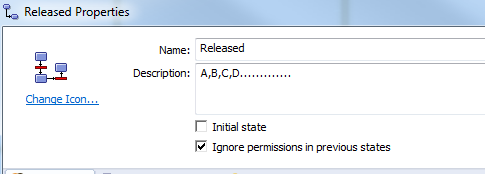
Ignore permissions
Related Links
Want to do more with SOLIDWORKS PDM?
Our Certified SOLIDWORKS PDM Experts can help you to:
Posts related to 'SolidWorks EPDM – Ignore Permissions from Previous States'
