


Rename SOLIDWORKS Files directly from the FeatureManager Design Tree

Article by Chris Briand, CSWE updated April 27, 2016
Article
A favorite feature of ours that has come along in the 2016 release is an option that will allow us to rename SOLIDWORKS files directly from the FeatureManager design tree while SOLIDWORKS has the file open and loaded.
Enable the ability to rename
Before we are able to make use of this slick bit of workflow, we need to enable the functionality within the Options Dialog.
Pick Tools > Options > System Options > FeatureManager > “Allow component files to be renamed from FeatureManager tree“. Checking or unchecking this option will enable or disable the ability to change component file names directly in the FeatureManager.

Now that we are ready to rename a file from the FeatureManager, you can hit F2 on the keyboard to rename your selected component from the parent level of your assembly or from a sub-assembly, deeper within the assembly structure.
When we attempt to rename the file, a new warning message pops up, advising users of the course of action that has been taken.
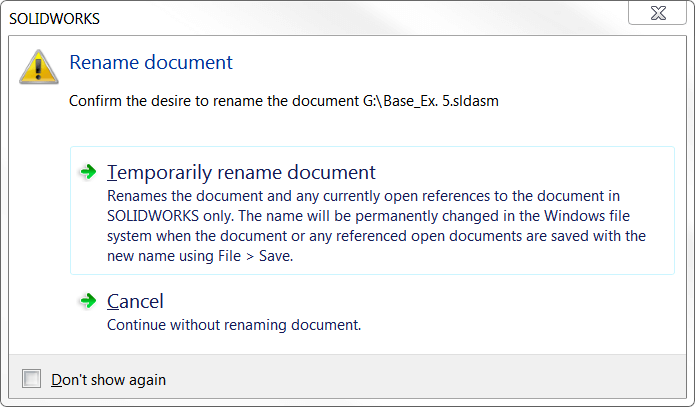
When the option “Temporarily rename document” is chosen the filename is then modified within the feature tree. It is not until the next save operation that the changes are actually stored.

When saving we are prompted with an additional dialog that advises the user about the possible issues with the references that are not available for update due to those other files not being open.There is a checkbox in this dialog that will allow up to update the “Where Used” references for the part file. This option ensures that there are no broken references left elsewhere where this renamed part may be used. There is also a checkbox for using the referenced documents location for searching (File Location Options).
We would encourage everyone to test out this new functionality on a sample file set; as it has the potential to greatly reduce the confusion some users feel while attempting to keep track of the naming of their components and the references that SOLIDWORKS depends upon for successful assembly modeling.
Related Links
Certified SOLIDWORKS Services available from Javelin
Javelin can help you to:
Posts related to 'Rename SOLIDWORKS Files directly from the FeatureManager Design Tree'
