


3 Reasons why the Stratasys F120 is the best 3D Printer for SOLIDWORKS

Article by Rod Mackay updated April 5, 2019
Article
3D printing is becoming very popular with designers, engineers, educators, and especially SOLIDWORKS users who want to create prototypes of their CAD models. We are often asked the question “What is the best 3D printer for SOLIDWORKS?”
That is a great question as there are many good 3D printers on the market right now and they vary in size, technology, and of course price. It also depends on your 3D printing requirements and the budget you have available.
Best 3D Printer is a Professional Machine
But the one thing you want to ensure when shopping around for a 3D printer is to choose a ‘commercial/professional’ machine and not a ‘consumer’ machine. In a previous article we outlined the advantages of a commercial machine over a consumer printer; but the main reason is if you use SOLIDWORKS for professional design work then you need a proven professional-grade commercial 3D printer that is going to last and consistently print good results for you every time. So for an affordable professional-grade machine we recommend the Stratasys F120.
In this article we will outline the three main reasons why we recommend the Stratasys F120 as the best 3D printer for SOLIDWORKS:
Professional 3D printing applications
Review the table below to compare the applications of a Stratasys F120 to leading consumer 3D printers. Note that the F120 is able to be used for ALL phases of your design process. Whereas a consumer 3D printer is not able to be used in applications beyond the concept phase:
| PRODUCTION PHASE | APPLICATION | COMMERCIAL Stratasys F120 | CONSUMER 3D PRINTERS |
|---|---|---|---|
| Concept Phase | Earliest Concept | Good | Good |
| Initial Product Iteration | Good | Good | |
| Communication Model | Good | Fair | |
| Focus Group Model | Good | Fair | |
| Basic Fit Testing | Good | Fair | |
| Ergonomic Testing | Good | Fair | |
| Architectural Model | Good | – | |
| Complex Design | Good | – | |
| Functional Prototyping Phase | Fit and Assembly Prototype | Good | – |
| Solid Colour Models | Good | – | |
| Functional Test Parts | Good | – | |
| Manufacturing Phase | Jigs, Fixtures, and Gauges | Good | – |
| Surrogate Parts | Good | – | |
| Production/End-use Parts | Good | – |
1. 3D print with genuine ABS-M30 and ASA Plastic
The majority of today’s consumer products — and many commercial ones — are composed of thermoplastics. When designing a new product, you can best predict its end performance by prototyping with a material as similar to it as possible. The F120 creates parts with the same types of raw material found in injection molding facilities around the globe, this allows you to 3D print plastic parts for many different applications from concept modeling through product development and manufacturing.
Here are just a few benefits of the materials used by the F120 machine:
- Mechanically strong and stable over time.
- Layer bonding is significantly stronger for a more durable part than materials from competitors.
- Greater tensile, impact, and flexural strength than materials from competitors.
- Versatile Material: Good for form, fit and functional applications.
- ABS-M30 and ASA work with soluble support material to create complex models, and support removal is hands-free.
- Available in a variety of colours
2. Higher quality models and better performance
The F120 is powered by Stratasys’ patented FDM® (Fused Deposition Modeling™) technology. It’s the technology on which thousands of design engineers test their designs and creates stronger more robust models than leading consumer 3D printers. Here are just a few reasons why the F120 is the best 3D printer to prototype:
2 (a) Easy collaboration
What’s more powerful: showing a 3D model, or a physical part that everyone can hold? Through every design iteration, the F120 turns your ideas into strong, functional models ready for collaboration and testing. The Best 3D Printer builds accurate, stable 3D parts in ABS plastic. They’re ideal for determining form, fit and function in everything from ergonomics to manufacturing processes.
-
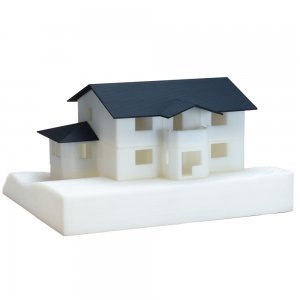
- Model House

-
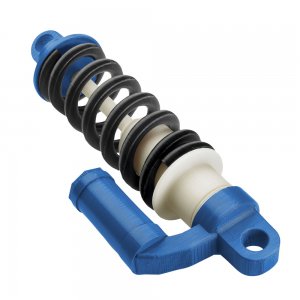
- Shock Absorber Model

-
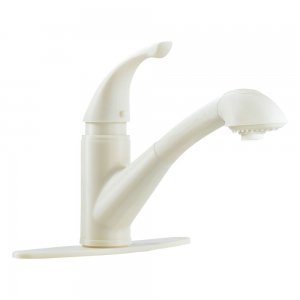
- Faucet Model

-

- Valve Model

-

- Air duct model

-
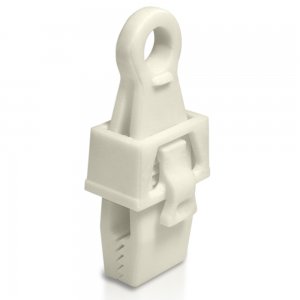
- Clip Model

2 (b) Product Functional Testing
When it’s time to test your concepts, F120 models stand up to functional testing whereas consumer 3D printer models can easily break. You’ll get more quality feedback, resulting in a better product. With a footprint of just 889 x 870 x 721 mm (35 x 35 x 29 in.), the F120’s ability to produce quick, inexpensive models will help you efficiently review multiple concepts right from your desk.
2 (c) Better quality model and machine performance
Typically consumer 3D printers have issues when producing models on a regular basis. You will find models that have stringing and oozing or are warped. Also printer performance is not consistent with material nozzles that get clogged, difficulties with printing small details and misaligned prints. The F120 has none of these issues and creates reliable consistent models every time.

3. Stratasys F120 can be used for manufacturing
Let’s have a look at the manufacturing phase applications in more detail as this is where the F120 is best 3D printer to aid your manufacturing:
3 (a) 3D print Jigs, Fixtures, and Gauges
Manufacturing relies on tools, including jigs, fixtures, templates and gauges, to maintain quality and production efficiency – now you can quickly manufacture them with an F120. Instead of spending time and money to machine, fabricate, mold, or cast your tools you can easily design them in SOLIDWORKS then print them with the F120 3D printer using production-grade material. The F120 will:
- Reduce lead times by 40 to 80 percent.
- Reduce costs by 70 to 95 percent.
- Improve assembly accuracy.

Jig & Fixtures Example
3 (b) Create Surrogate Parts
Mock-ups, or surrogate parts, may be substituted for production components during the assembly and interface evaluation phase of a project. Surrogate parts preserve all of the critical details for an installation while minimizing expense and lead time when they are manufactured with an F120. Produced as needed, with up-to-date configuration changes, the F120 surrogates will:
- Confirm clearances and interfaces for installation assessment;
- Highlight serviceability issues and;
- Validate routing interfaces for wiring harnesses and fluid conduits.

Surrogate Part Example
3 (c) Create Production/End-use Parts
Using a Stratasys F120 3D printer is a unique alternative for the production of end-use items. Having little in common with traditional manufacturing methods, the uniqueness of 3D printing can change the decision-making process, overturns old principles and creates new criteria. The primary advantage of 3D printing parts is that it removes constraints imposed by traditional manufacturing processes, such as injection molding or die casting and allows you to:
- Replace expensive molding, machining or tooling.
- 3D print a short or limited run production.
- Create complex or small intricate parts which would be hard to manufacture with traditional processes.

3D Printed End-use Parts
Conclusion: Stratasys F120 is the best 3D Printer for SOLIDWORKS
So there you have it, three good reasons why the F120 is the best ‘starter’ SOLIDWORKS 3D printer:
- Able to print with true ABS and ASA Materials
- Creates better prototypes than consumer 3D printers
- Can create end-use parts and manufacturing tools.
Related Links
Want to get started with 3D Printing?
Our 3D Printing resources can help you to:
Posts related to '3 Reasons why the Stratasys F120 is the best 3D Printer for SOLIDWORKS'
