


SOLIDWORKS Hole Wizard Database Error | File is Not the Expected Version

Article by Carleigh Amyot, CSWE updated June 5, 2026
Article
When a SOLIDWORKS Hole Wizard database error pops up, it can be difficult to figure out what went wrong. While some of the errors are more straightforward to fix, some of them could cause extended downtime if not fixed properly.
The “Database file… is not the expected version” error is a common issue that arises when working with multiple versions of SOLIDWORKS or when not completely uninstalling the software between versions.
What is the SOLIDWORKS Hole Wizard?
The SOLIDWORKS Hole Wizard is a useful tool for creating models in SOLIDWORKS with standard holes for screws, pegs, and bolts. It contains a ready-to-use database of hole sizes, including counterbore, countersink, straight tap, and legacy holes.
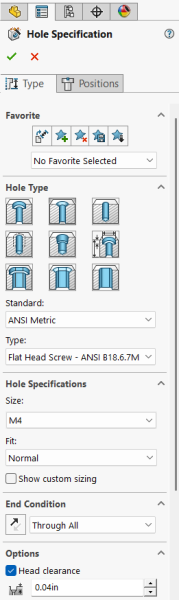
The SOLIDWORKS Hole Wizard properties
The Hole Wizard allows you to choose the necessary hole type and position it using a surface and sketching points to define the hole.
The File is Not the Expected Version Error
The “Database file… is not the expected version” error could appear in different formats depending on the version of SOLIDWORKS you are running. Historically, there were a few alternatives to the message that all had the same core issue.
- In newer versions, SOLIDWORKS lets you know that the Hole Wizard has an unsupported database version, along with the current and expected versions.

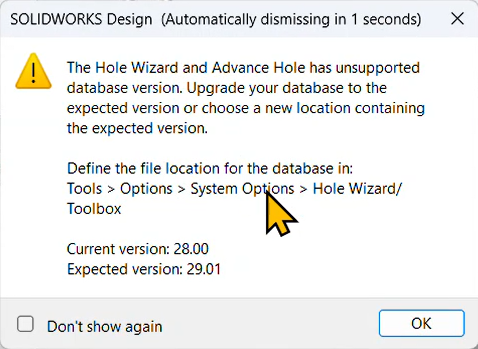 The new SOLIDWORKS Hole Wizard database error
 - In older versions, SOLIDWORKS would just say it was an unexpected version and the current version without much information.
 Hole Wizard error on older versions of SOLIDWORKS
The current and expected version in the warning will vary depending on the version of SOLIDWORKS you are running and the version of the Hole Wizard SOLIDWORKS has found, but the message and the process remain the same.
How to Fix This Hole Wizard Database Error
The problem is that you have multiple versions of SOLIDWORKS installed on your computer, so SOLIDWORKS has trouble linking to the correct database. It is also possible that you had an earlier version of SOLIDWORKS installed on your computer, and it did not completely uninstall.
If you do not have time to completely uninstall all versions of SOLIDWORK and just want the Hole Wizard to work, start by following these steps:
- Navigate to Tools > Options.
- Under the System Options tab, select Hole Wizard/Toolbox from the menu on the left.
- At this point, you may get an additional error message, but it can be ignored.
- Click the ellipses next to the path to define the folder location of the correct Hole Wizard database.
- By default, the location will be under C:\SOLIDWORKS Data 20XX
- Click OK to confirm the changes.
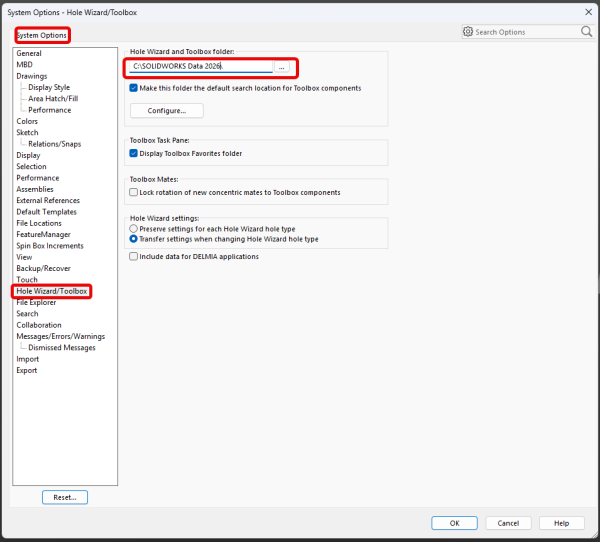 Accessing the Hole Wizard settings
Keep in mind, this is changing one of the search paths for SOLIDWORKS, and it may require local admin credentials. This is a system-level setting, so once changed, it will stay in effect for all files and sessions of SOLIDWORKS moving forward.
Preventing the Error in Future Releases
To prevent this from occurring in the future, when installing a new version of SOLIDWORKS in addition to an older version you are keeping, there are two file locations you must rename during installation to keep all of the version files independent and neatly sorted.
Support for SOLIDWORKS Upgrades
The SOLIDWORKS Hole Wizard database error is just one of the things that might catch you out during a SOLIDWORKS upgrade. Typically, the upgrade process is straightforward, but when dealing with network licensing or SOLIDWORKS PDM, you want to make sure you minimize downtime.
Javelin offers specialized services that enable your team to offload the work to us. Our certified experts have decades of experience upgrading SOLIDWORKS and dealing with any mishaps along the way.
To learn more about our SOLIDWORKS upgrade services, contact us here.
Related Links
Certified SOLIDWORKS Services available from Javelin
Javelin can help you to:
Posts related to 'SOLIDWORKS Hole Wizard Database Error | File is Not the Expected Version'
