


Working With Composite Materials in SOLIDWORKS Simulation Premium

Article by Suman Sudhakaran updated September 30, 2025
Article
Composite materials, known for their superior strength-to-weight ratio, continue to revolutionize industries from aerospace to automotive. They are made of two or more constituent materials with different properties whose combination results in enhanced material characteristics that individual materials cannot provide by themselves. SOLIDWORKS Simulation Premium provides a built-in toolset to make running structural analysis on composite shells streamlined and efficient.
What are Composite Materials?
A composite material is a special type of laminated, orthotropic material that is modeled as a single surface with several layers of orthotropic materials. The number of material phases in composites is usually two, and they are not soluble in one another. One of the material phases is the reinforcing phase, such as carbon or glass fiber, and the other is a matrix phase, for example, an epoxy or vinyl ester, in which the reinforcing phase is dispersed. They can be classified into continuous fiber composites, short fiber composites, and particulate composites.
The high stiffness and strength-to-weight ratio of composite materials make them appealing for aircraft to achieve overall mass reduction. Due to their low thermal coefficient of expansion, composites are also preferred for use in satellites where huge temperature changes occur. They also exhibit high fatigue strength, corrosion resistance, and resistance to impact, fracture, and creep.
Using Shell Meshes for Composite Materials
Shell mesh definition using the Composite subtype is used to represent a body made of composite materials. The options in the Property Manager allow you to define the total number of plies, either symmetric or unsymmetric.

Defining a composite material using the Shell Definition Property Manager
For symmetric plies, only half the number of total plies is available for editing in the Composite shell table. For unsymmetric plies, the middle layer is also available for editing.
Considerations for Laminate Materials
Laminates are generally stacked with plies of different orientations to optimize load-carrying capacity in different directions. Users can control ply angle definition across different shells and faces using Composite Orientation options. Specifying fiber orientation in each ply is important to capture the composite properties accurately. For redefining ply angles consistently, it is recommended to choose a non-zero, non-ninety-degree ply angle. We typically see clients use a 45 or 60 degree rotation for this.
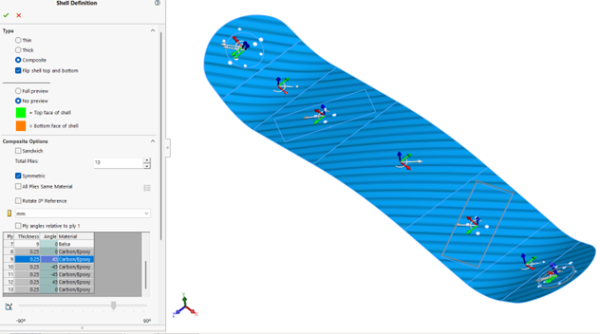
SOLIDWORKS Shell Definition with rotated plies for a laminate material
Ply thickness, angle, and materials can also be used as variables if a design study is to be set up using a composite material. Offsets can be defined to control the position of the composite laminate or stack relative to its surface geometry. Once the properties for the plies are set up, the composite stack information can be saved in CSV or TXT format for future use.
How are Composite Materials Solved in SOLIDWORKS Simulation?
SOLIDWORKS Simulation locates the first ply on the bottom face of the shell and the last ply at the top face of the shell. Flipping the mesh reverses the stacking sequence and affects the results for unsymmetric laminates. After running a linear static stress analysis, parameters such as maximum stress across all plies or individual ply or interlaminar shear stresses can be evaluated.

Orientation of plies based on surface mapping
To determine whether a laminate will fail due to applied loading, the program first calculates stresses across the different plies and then applies a failure criterion based on these stress levels using a failure theory such as Tsai-Hill Failure Criterion, Tsai-Wu Failure, or Maximum Stress Criterion. A laminate is considered to fail when the first ply or the first group of plies fails.

Factor of Safety plot for a composite skateboard study
In general, it is difficult to determine which theory to use due to the lack of comprehensive experimental results. Whenever possible, it is recommended to use all three failure theories and select the worst case for a relatively conservative design.
Pushing the Boundaries of SOLIDWORKS Simulation
Composite shells in SOLIDWORKS Simulation Premium enable you to optimize the performance of composite structures, pushing the boundaries of what is possible. SOLIDWORKS Simulation Premium gives you the top-tier FEA tools available in the desktop simulation portfolio. However, there may be complex studies or specification applications where offloading a simulation to the 3DEXPERIENCE proves fruitful.
To learn more about the advanced simulation tools available in our portfolio, click here.
Related Links
Certified SOLIDWORKS Services available from Javelin
Javelin can help you to:
Posts related to 'Working With Composite Materials in SOLIDWORKS Simulation Premium'
