


Javelin / TriMech Author

Justin Williams
SOLIDWORKS PDM 2020 Child Reference State Conditions
 By Justin Williams on October 10, 2019
In SOLIDWORKS PDM 2020 we have the ability to define child reference state conditions, to prevent parent files from being transitioned before all the requirements are met. In the example we’re going to use in this article, we’ve got the parent assembly; Light.SLDASM and we…
Installing the SQL Server Management Studio (SSMS)
By Justin Williams on September 30, 2019
The SQL Server Management Studio (SSMS) is an integral component for administrating SOLIDWORKS PDM, as it allows us to maintain and capture backups of the database. When installing a new instance of SQL Express via the installation manager for SOLIDWORKS PDM 2019 and later versions,…
New Log Out Option in SOLIDWORKS PDM 2020 is more convenient
By Justin Williams on September 26, 2019
New in SOLIDWORKS PDM 2020, we have an additional more convenient method to log out of and verify who we’re logged in as: We can access the icon from anywhere within the vault view, and log out via clicking and selecting ‘log out’; We can…
How to manually launch a task in SOLIDWORKS PDM
By Justin Williams on September 5, 2019
Using SOLIDWORKS PDM Professional, we can configure tasks to launch on right-click actions, but we can also manually launch a task from within the administration tool. How to manually launch a task via the task list Administration Tool > Tasks Task List Add Task Select…
How to link SOLIDWORKS Drawing Sheet details to a PDM Data Card
By Justin Williams on June 5, 2019
In SOLIDWORKS PDM we can map SOLIDWORKS Drawing Sheet details directly to a Data Card, making the information easily accessible to users. In this article we’re going to look at how to create that relationship within the vault. How to map the SOLIDWORKS Drawing Sheet…
How to make SOLIDWORKS PDM custom columns retain their order in Windows Explorer
By Justin Williams on June 3, 2019
If you’re using custom columns for Windows Explorer within SOLIDWORKS PDM you may have run into an issue with them not retaining their order while navigating the vault or after a reboot. This issue can be caused by a mismatch in the registry of the client machine,…
What does the Preserve Relative Paths option do in the SOLIDWORKS PDM Move Tree tool?
By Justin Williams on May 29, 2019
If you’ve had a chance to take one of our Using SOLIDWORKS PDM classes, it’s likely you’ve heard me rave about the Copy or Move Tree Tool. In a recent class, I was asked to clarify what the SOLIDWORKS PDM Move Tree Preserve relative paths…
How to re-enable automatic local vault refresh in SOLIDWORKS PDM
By Justin Williams on May 13, 2019
If you’re using SOLIDWORKS PDM 2019, then you’ve likely noticed some changes to the local vault view. As part of the performance improvements in 2019, the frequency that Windows Explorer completes a refresh has been reduced. This behavior is most apparent with operations like a…
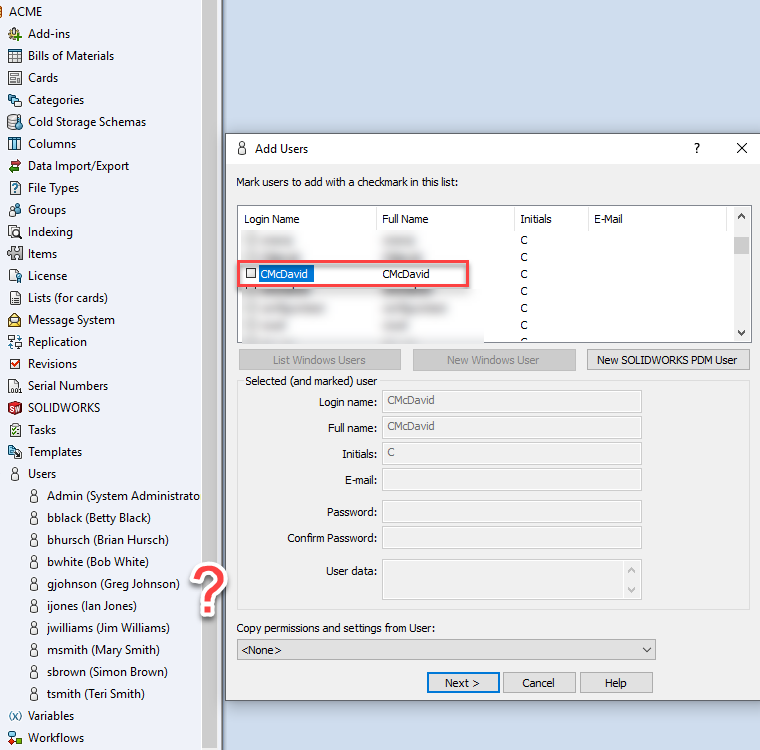
When a new SOLIDWORKS PDM User is created in the vault, the user is stored in both the database and the registry on the archive server. When a user is deleted via the administration tool, the user is removed from the database, but still listed…
How to include SOLIDWORKS files in the SOLIDWORKS PDM Professional Content Search (Updated)
By Justin Williams on April 19, 2019
After enabling the content search in SOLIDWORKS PDM Professional, by default the Windows Search Service supports indexing the following files types: Microsoft Office files HTML files MIME messages Plain-text files We can include other file types by installing its corresponding third-party iFilter. After a new…
How to include PDF files in SOLIDWORKS PDM Content Search
By Justin Williams on April 18, 2019
After enabling the content search in SOLIDWORKS PDM Professional, by default the Windows Search Service supports indexing the following files types; Microsoft Office files HTML files MIME messages Plain-text files How to include PDF files in the PDM Content Search We can include other file types…
How to enable Content Search in SOLIDWORKS PDM Professional (Part 2)
By Justin Williams on April 1, 2019
In this article, we are going to look at how to enable the content search in SOLIDWORKS PDM Professional using the Windows Search Service. The following is required: SOLIDWORKS PDM Professional version 2016 SP0 or newer The archive server service must be able to access…
How to enable Content Search in SOLIDWORKS PDM Professional (Part 1)
By Justin Williams on April 1, 2019In this article, we are going to look at how to enable the content search in SOLIDWORKS PDM Professional using the Windows Search Service. This features requires: SOLIDWORKS PDM Professional version 2016 SP0 or newer The archive server service must be able to access the…
How to Search All Variables within SOLIDWORKS PDM
By Justin Williams on March 18, 2019
Ever have a scenario where you’re looking for a specific value but can’t remember which variable it’s stored in? If you know where the value should be stored (for example part number), searching within SOLIDWORKS PDM is easy as we can search that specific variable…
How to extract configuration specific information to a SOLIDWORKS PDM Data Card
By Justin Williams on March 4, 2019
In SOLIDWORKS PDM we can extract configuration specific information from the SOLIDWORKS part or assembly, and map it directly to the data card variable. How to map the configuration name to the PDM data card First, create the Variable to store the information in. Then map…