


How to include SOLIDWORKS files in the SOLIDWORKS PDM Professional Content Search (Updated)

Article by Justin Williams updated April 19, 2019
Article
After enabling the content search in SOLIDWORKS PDM Professional, by default the Windows Search Service supports indexing the following files types:
- Microsoft Office files
- HTML files
- MIME messages
- Plain-text files
We can include other file types by installing its corresponding third-party iFilter. After a new iFilter is installed the archive must be reindexed to include the new file type in the content search.
Can we include SOLIDWORKS files in the content search?
Yes….kind of. With the SOLIDWORKS iFilter installed on the indexing server, we are able to index content in SOLIDWORKS files, such as annotations in drawings and custom properties. The exception is; that it doesn’t include dimension values in drawings (unless they are linked to a custom property).

How to include SOLIDWORKS files in the PDM Content Search
Step 1 – Add the SOLIDWORKS iFilter to the server running Windows Search
There is no standalone iFilter for SOLIDWORKS files available to install separately, but we can add one by installing SOLIDWORKS or just SOLIDWORKS Explorer on the server.
With SOLIDWORKS Explorer being retired in 2019, it is now required to install SOLIDWORKS on the archive server and then rebuild the index with the release of 2020 and later versions.

Step 2 – Add and check in some files for testing

Step 3 – Verify the iFilter is installed and rebuild the index
- Control Panel > Indexing Options

- Advanced > File Types Tab
- Ensure the SOLIDWORKS entries exist
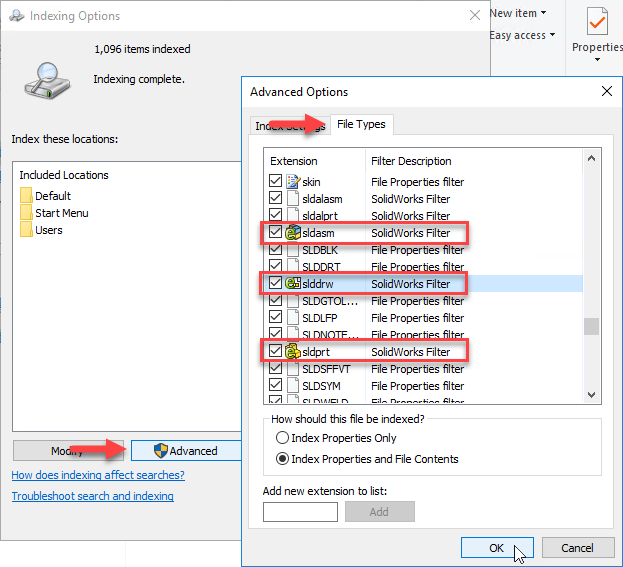
As the iFilter was added after the content search was set up, we’ll need to rebuild the indexes to include the SOLIDWORKS files;
- Indexing Options
- Advanced > Index Settings Tab
- Hit Rebuild
- Advanced > Index Settings Tab

NOTE: Before testing, we need to wait for the rebuild to complete, in larger vaults this may take some time;

Step 4 – Test

To learn how to include PDFs please see our blog article.
Related Links
Want to do more with SOLIDWORKS PDM?
Our Certified SOLIDWORKS PDM Experts can help you to:
Posts related to 'How to include SOLIDWORKS files in the SOLIDWORKS PDM Professional Content Search (Updated)'
