


Javelin / TriMech Author

Justin Williams
SOLIDWORKS PDM 2017 Copy Group Permissions and Members
 By Justin Williams on November 10, 2016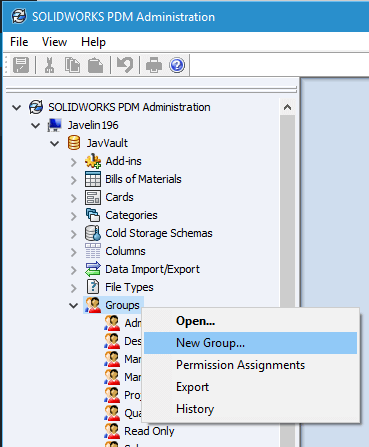
One of my favorite new enhancements within SOLIDWORKS PDM 2017 is that Vault Administrators can copy group permissions and members from an existing group when creating a new group. Previously the only way to copy permissions to a new group was manually; which was a monotonous task to say…
SOLIDWORKS PDM 2017 Rollback Enhanced to include References
By Justin Williams on November 2, 2016
The Rollback feature in SOLIDWORKS PDM 2017 has been enhanced to allow a parent file to be rolled back with its child references and files indicated as sub-parents (such as drawing files) to a previous version, state and revision. Previously this command could only be performed on individual files and didn’t include referenced files….
How to use the SOLIDWORKS PDM Professional Move Tree Feature
By Justin Williams on July 26, 2016
The benefits of copy tree and how to use it have been well documented. Similar to Copy Tree, SOLIDWORKS 2015 and 2016 include the Move Tree feature, which instead of copying; will move partial or entire file and folder structures, including related drawings, to another folder or folders maintaining…
Adding a Search Favorite in SOLIDWORKS PDM Professional
By Justin Williams on July 22, 2016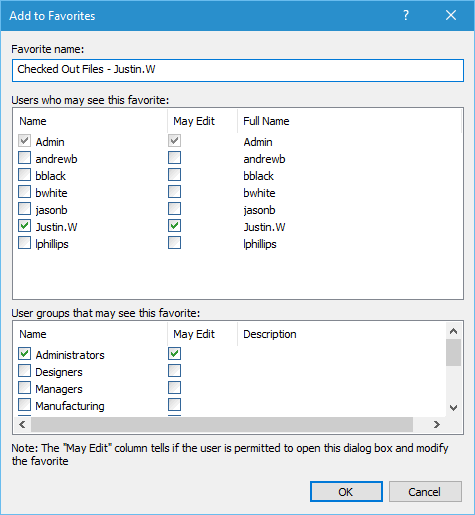
In SOLIDWORKS PDM Professional you can add a Search Favorite, making it quicker and easier to access frequently used searches via Windows Explorer. Listed below are the steps to create a SOLIDWORKS PDM Professional Search Favorite: To save a search simply expand the favorites drop-down and select Add To Favorites option…
How to link PDF Document Properties to SOLIDWORKS PDM Professional Data Card Variables
By Justin Williams on June 22, 2016
In SOLIDWORKS PDM Professional 2016 it’s possible to link PDF document properties with SOLIDWORKS PDM variables and create a two way relationship. How To Map Custom Properties to PDF Data Cards First step is to create some variables for this information via Administration Tool > Variables > Right-Click > New Variable…
Rename a file in the SOLIDWORKS FeatureManager Design Tree and PDM will update all the references
By Justin Williams on June 7, 2016
When you rename an assembly file in SOLIDWORKS via the FeatureManager Design Tree SOLIDWORKS PDM will update all the references for you automatically. Here I have a SOLIDWORKS flashlight assembly: I’d like to change the name of my sub assembly Head_sub to JavHeadSubAssy. SOLIDWORKS PDM rename file requirements…
How to create a shortcut to your favorite SOLIDWORKS PDM Search
By Justin Williams on May 16, 2016
Did you know that you can create a SOLIDWORKS PDM Search shortcut directly on your desktop? Being the responsible PDM user that you are, it’s safe to assume that you’re checking in your documents at least once a day? A search shortcut can be a speedy…

Do you have a special workflow for migrated data? Does it look something like this: Or this: New Set Revision function These workflows aren’t necessary anymore with the new Set Revision function in SOLIDWORKS PDM 2016. Let’s take a look… In this example, all the data…
Get more out of your SOLIDWORKS PDM Search Tool
By Justin Williams on May 9, 2016
Are you a searcher or an explorer? If you’re a searcher then you’re in luck as SOLIDWORKS PDM Professional comes equipped with a powerful search tool, that can minimize the time it takes to locate a file or folder. Let’s start with a look at some of…