


How to enable Content Search in SOLIDWORKS PDM Professional (Part 2)

Article by Justin Williams updated April 1, 2019
Article
In this article, we are going to look at how to enable the content search in SOLIDWORKS PDM Professional using the Windows Search Service.
The following is required:
- SOLIDWORKS PDM Professional version 2016 SP0 or newer
- The archive server service must be able to access the archive folders via locally attached or SAN storage. Network shares are not supported.
NOTE: In this example, the archive server and SQL server are on the different systems. If they are on the same system, please see part 1 of this article
Step 1 – Enable Windows Search
- Server Manager > Manage > Add Roles and Features

- Features > Select Windows Search Service > Next
- Then click Install
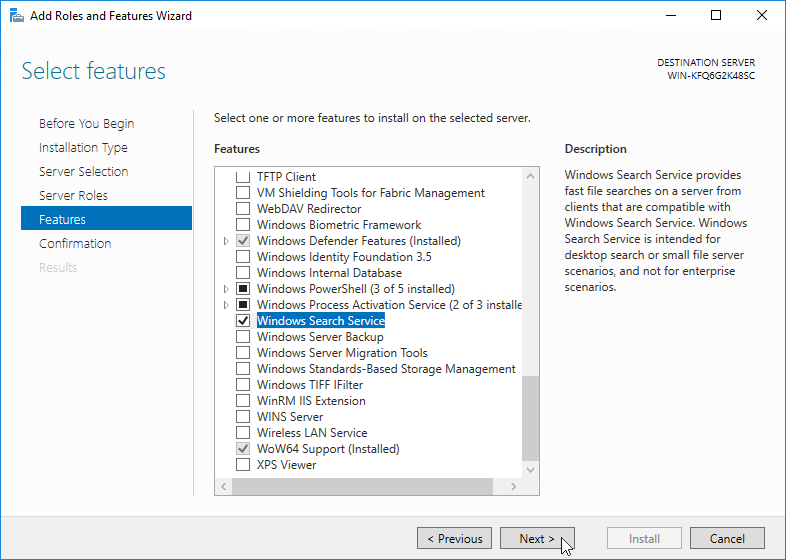
- Confirm via services that the Windows Search Service is running, if not start it;

NOTE: This will need to be completed on BOTH the archive and the SQL server
Step 2 – Configure Windows Search to index the vault archives folder
On the archive server;
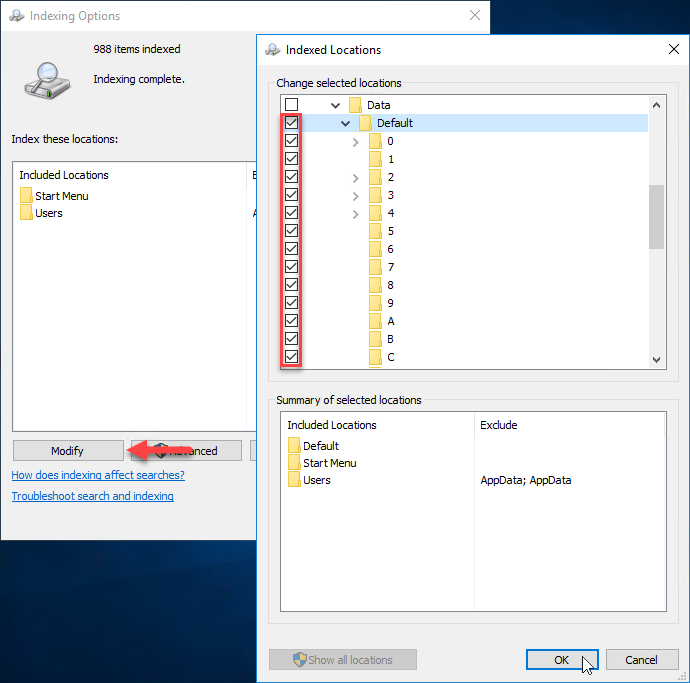
- Control Panel > Indexing Options

- Modify > Add the archive folder location including all of its subfolders > Ok
Step 3 – On the archive server, share the vault archive folder
NOTE: The vault archive folder MUST be accessible from SQL server via a UNC path
- Navigate to the vault archive folder > Right-Click Properties
- Sharing Tab > Share
- Note the UNC path
- Sharing Tab > Share

Step 4 – Configure the vault to use Windows Search for indexing
- Administration Tool > Indexing
- Check Index File Vault Archives
- Ensure Windows Search is selected for the Indexing Method
- Select the Archive Path > Edit

- Add the UNC Path to the vault archive from the SQL server

Step 5 – Complete
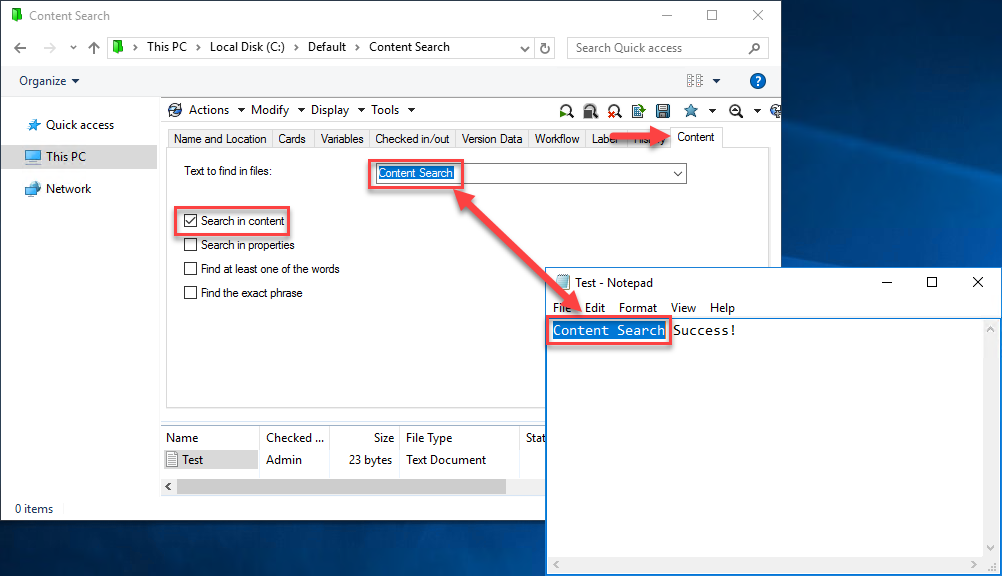
- We should now be able to search the content of files within the vault via;
- Complete Search Card > Content Tab
- Search in Content
- Complete Search Card > Content Tab
Wrap up…
By default the Windows Search Service supports indexing the following files types;
- Microsoft Office files
- HTML files
- MIME messages
- plain-text files
To learn how to include PDFs and for SOLIDWORKS files please subscribe to our blog for future articles.
Related Links
Want to do more with SOLIDWORKS PDM?
Our Certified SOLIDWORKS PDM Experts can help you to:
Posts related to 'How to enable Content Search in SOLIDWORKS PDM Professional (Part 2)'
