


Adding Custom SOLIDWORKS Toolbox Component Sizes

Article by Scott Durksen, CSWE updated July 29, 2010
Article
If there is a specific fastener you need but can’t find the size in the default SOLIDWORKS Toolbox, you can modify and add custom sizes.
Open SOLIDWORKS and go to Tools > Options > System Options tab > Hole Wizard/Toolbox.

Then you can click on the ‘Configure‘ button to bring up the Toolbox Settings.

Then choose ‘2. Customize Your Hardware’

OPTIONAL: You can simply customize the existing Toolbox standards, or if you prefer you have the option of making a copy of an entire standard and rename it so you have a separate customized standard.


Select Hardware to Customize
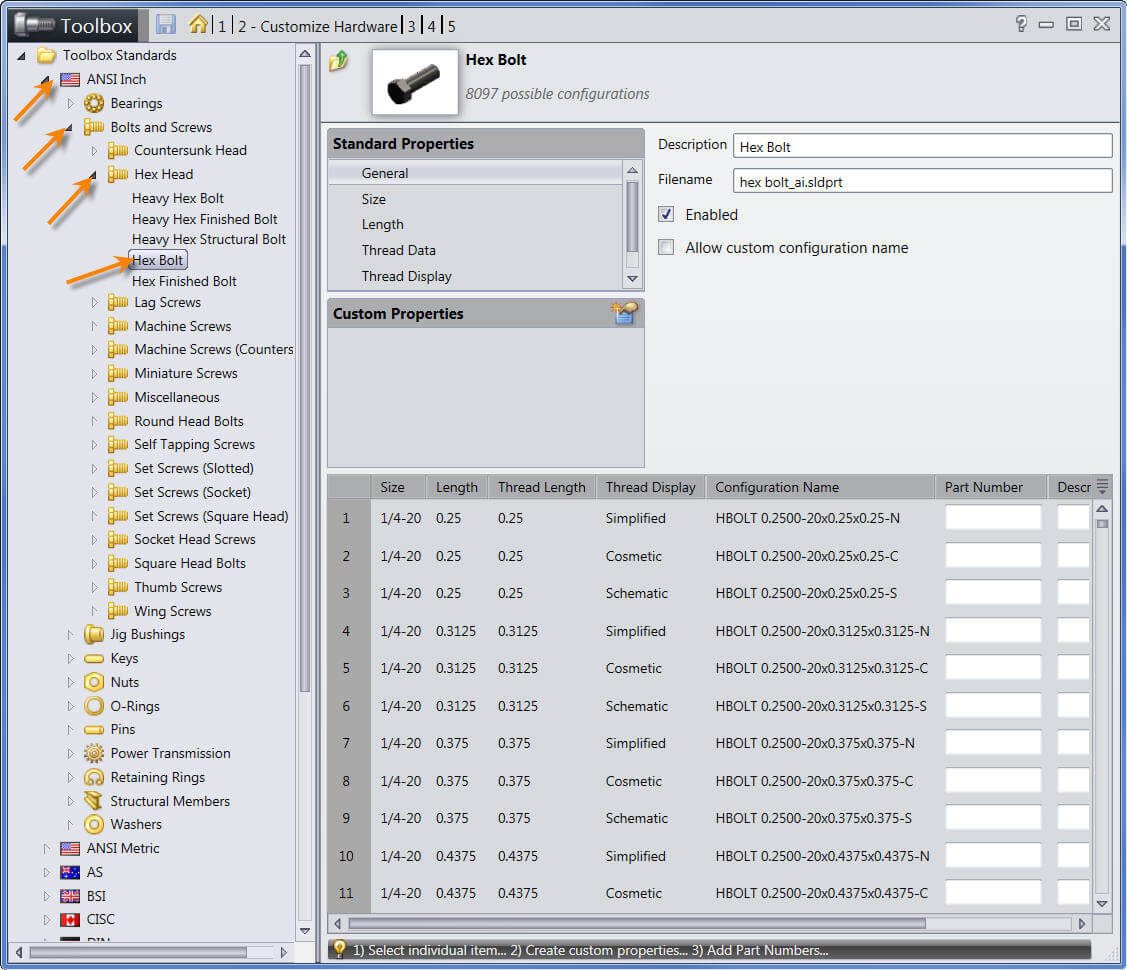
Select the Standard, Type and Fastener you wish to customize. You will need to add data to three areas: Size, Length and Thread Data.
Toolbox Component Size
To add a new size, select ‘Size’ and click the ‘+’ button. Add the size required (**Note the size information listed below may not be accurate, please verify required sizes before adding**)


Toolbox Component Length
You can add as many lengths as needed. You can have multiple instances of the same length, but different thread lengths. The thread length must be equal or less then the overall length. Select ‘Length’ and click the ‘+’ button to add each length.


Toolbox Component Thread Data
In this case, there was thread data available for the 9/16 size. Search to see if the thread data is available for your size. If not, again you’ll need to click the ‘+’ button to add the data for your custom size.


Update Database
Then you can scroll down in the list on the bottom half and find the sizes you’ve added. You can see that I’ve added lengths of 0.5″ and 1″. There are 3 of each size as there are options for Cosmetic, Schematic or Simplified. These options are available in the “Thread Display” in the Standard Properties above and will apply to all sizes of this particular fastener.
Click Save to update the Toolbox database.

Now you can select in your custom size when adding the Toolbox component to an assembly.

Related Links
Certified SOLIDWORKS Services available from Javelin
Javelin can help you to:
Posts related to 'Adding Custom SOLIDWORKS Toolbox Component Sizes'
