


Verification on Rebuild – Revisited

Article by Joe Medeiros, CSWE updated November 6, 2012
Article
“Verification on Rebuild” controls the level of error checking during rebuilds, it has been recommended in the past that this be cleared except when troubleshooting a problematic part. In fact, on the topic of “Verification on Rebuild”, SolidWorks Help states that “the default setting (cleared) is adequate and results in a faster rebuild of the model”. Recently I sat in on a SolidWorks webinar by Andrea Ciccone, that convinced me otherwise.
During this webinar it was explained that in earlier releases, clearing “Verification on Rebuild” was recommend because models were more prismatic and computers were less capable then they are now. As SolidWorks users created increasing complex models, this setting can have an adverse impact, especially in downstream processes or applications, as model errors may not be captured by SolidWorks during rebuilds.
If we take a look at the below geometry we can see that the path and profile intersect.

This should result in the feature failing due to self intersecting or zero thickness geometry, but SolidWorks will generate a feature from this sketch if “Verification on Rebuild” is cleared.

At some point usually after the creating additional features, a rebuild may eventually display multiple rebuild errors. Trying to fix all the rebuild errors can be quite difficult. If “Verification on Rebuild” is turned on, from Tools > Options > System Options > Performance,
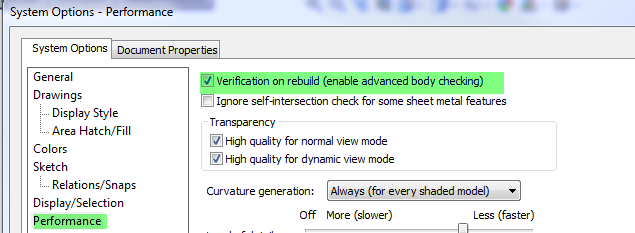
the error will be captured before the feature is created.

Checking “Verification on Rebuild” will increase rebuild times, but the amount of time required to fix a complex part with multiple rebuild errors may be far greater.
* I would like to thank Andrea Ciccone for his informative and eye opening presentation.
Related Links
Certified SOLIDWORKS Services available from Javelin
Javelin can help you to:
Posts related to 'Verification on Rebuild – Revisited'
