


EPDM – The Template Node

Article by Joe Medeiros, CSWE updated June 24, 2013
Article
Templates can be used to create files from a master file (i.e. ECO’s), project folder structures and assign variables through a Template Card. This article will provide an overview of the main sections which can be used to create a template. Some sections will be covered in greater detail in subsequent articles.
In SolidWorks Enterprise PDM Administration, right-click the Templates node and select New Template…
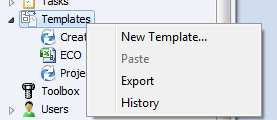
In the first Window we provide a name for our template.

In the Execute as Window you specify what permissions are granted when files and/or folders are created. Use the permissions from the logged in user uses the folder and/or state permissions of the user running the template. Read permissions from the following user is useful when the logged in user lacks sufficient permissions to folder, and/or state. When a user runs the template, the assigned user’s permissions are temporarily used.

Template Cards are used to input information when running the template. The Template Card is similar in function to the File Data Card, with the exception that the Template Card is only accessed once, when running the template. Template Variables can be created and linked to Variables in the Template Card. If the Template Card Variables are also used in the File Data Card, information entered in the Template Card will populate the File Data Card. The use of Template Cards will be covered in more detail in another article.

In the Files and Folders section you can define a Folder structure for a new project. The folder structure consists of a root folder and optional sub-folders. The root folder can be created in a specific location inside the vault, or it can be set to the Current Folder. If the Current Folder option is selected, the template creates the file in the folder where the template is run.
Both the root folders and sub-folders can be linked to a template variable, so that the folder inherits the value of the template variable.

Also in the Files and Folders Section you can assign a template file which can be used to create additional documents for a specific project such as ECO’s. Please refer the related blog posts:
EPDM – Office Templates & EPDM – Mapping Variables to Microsoft Office

An Icon can be assigned to the template which appears next to the template name in the list of templates from the Vault View New menu.

And access can be granted to users and groups.

Related Links
Want to do more with SOLIDWORKS PDM?
Our Certified SOLIDWORKS PDM Experts can help you to:
Posts related to 'EPDM – The Template Node'
