


SOLIDWORKS EPDM – Displaying State as Note in a Drawing

Article by Joe Medeiros, CSWE updated September 23, 2014
Article
The state of a file can be displayed in a drawing by using Transition actions, to assign a value to variable. A custom property mapped to this variable, can then be linked to a note in a drawing.
In the drawing data card, a control is associated with the variable that will display the state. To ensure the initial state will have a value, we enter the initial state name in the control’s properties.

Data Card
The variable needs to have an attribute that is mapped to the appropriate custom property
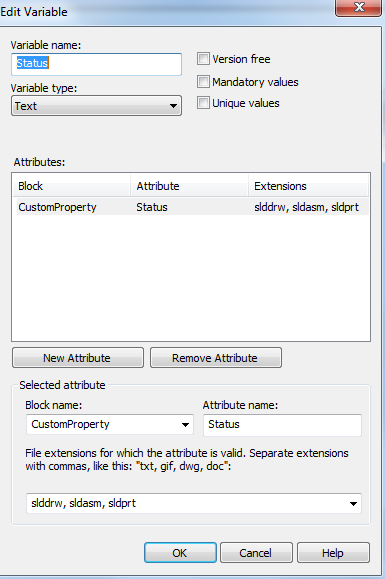
Edit Variable
To have the value for the variable update to display the next state name, we add an action in the transition proceeding the state.
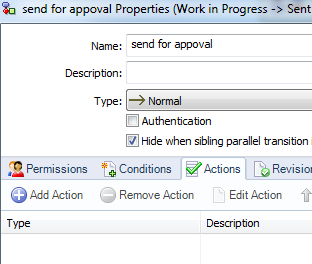
Add Action
For the transition action we choose Set Variable as the Type, select the variable used in our data card and and choose Dest. State as the value for the variable. We also need to provide a description for the transition action.
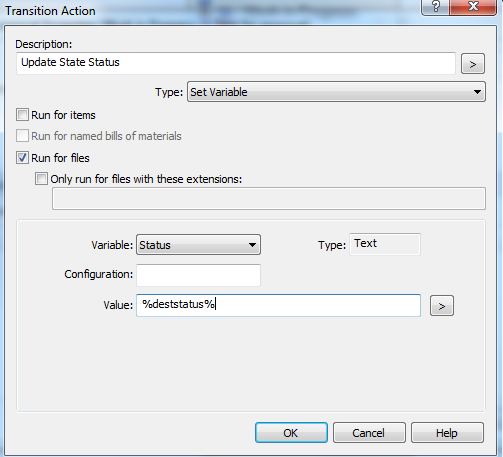
Transition Action Properties
We repeat this process for each transition that proceeds a state we wish to display.
In the SolidWorks drawing, we can create a link to a note in a drawing. The drawing must first be checked to ensure the variable will be mapped to a custom property.
Related Links
Want to do more with SOLIDWORKS PDM?
Our Certified SOLIDWORKS PDM Experts can help you to:
Posts related to 'SOLIDWORKS EPDM – Displaying State as Note in a Drawing'
