


How to define a SOLIDWORKS Detail View in a specific shape rather than a circle

Article by Moe Younis updated September 27, 2017
Article
When teaching the SOLIDWORKS Essentials course I often get asked “Can you make a SOLIDWORKS Detail View that is not a circle?” The answer is yes, you can!
- First create a closed contour sketch where you want the detail view using either an ellipse, spline, or any other sketch geometry.
- Select the sketch and then select Detail View from the View Layout Tab.

- You can then choose a style for the Detail Circle: Per Standard, Broken Circle, With leader, No leader, or Connected.

Detail Circle Style
- Under the Style you will then select Profile to use the sketch you created.
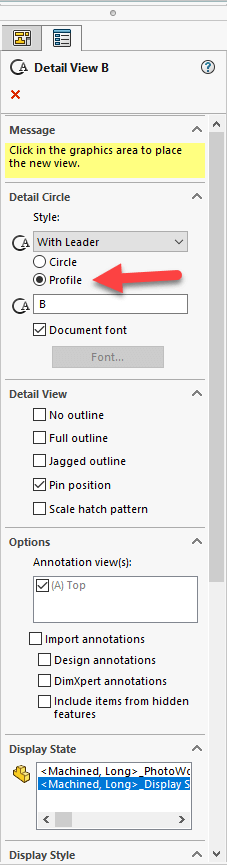
Use Profile
You will now have a SOLIDWORKS Detail View contained within the profile sketch you selected.

Related Links
Certified SOLIDWORKS Services available from Javelin
Javelin can help you to:
Posts related to 'How to define a SOLIDWORKS Detail View in a specific shape rather than a circle'
