


Creating and using SOLIDWORKS PDM Labels

Article by Joe Medeiros, CSWE updated April 30, 2018
Article
SOLIDWORKS PDM Labels are used to add a note to a version of a file. Once added, Labels can be used in searches, as well as adding information to a file’s History. Labels in many ways perform the same functions as Version Comments, but unlike a version comment, a Label can be added without creating a new version.
To add a Label, in the SOLIDWORKS PDM Local Vault View, select one or more files, or select folder(s).
Next from the Modify pull-down select Label.

Modify Label
In the dialog box, enter a Name for the Label. Optionally, a Comment can be added.

Create label dialog
When applying Labels from the folder, Labels can be added to sub-folders and files contained within the sub-folder, by selecting Recursive.

Create recursive label
Once created, the Label can be viewed and modified from the File’s History. To delete the Label, clear the Name

File history includes labels
Once created Labels can be used to Search for files and folders.
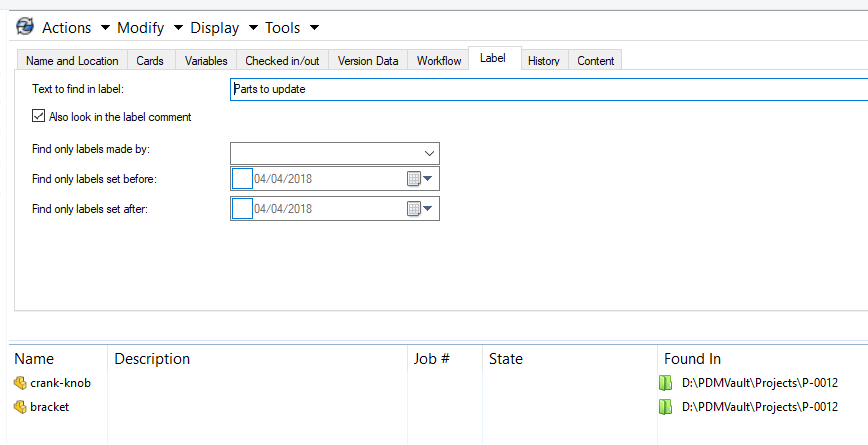
Search using a label
NOTE that Labels are only available with SOLIDWORKS PDM Professional.
Related Links
Want to do more with SOLIDWORKS PDM?
Our Certified SOLIDWORKS PDM Experts can help you to:
Posts related to 'Creating and using SOLIDWORKS PDM Labels'
