


Are you using Full Row Select in your SOLIDWORKS PDM Vault View?

Article by Andrew Lidstone, CSWE updated August 21, 2018
Article
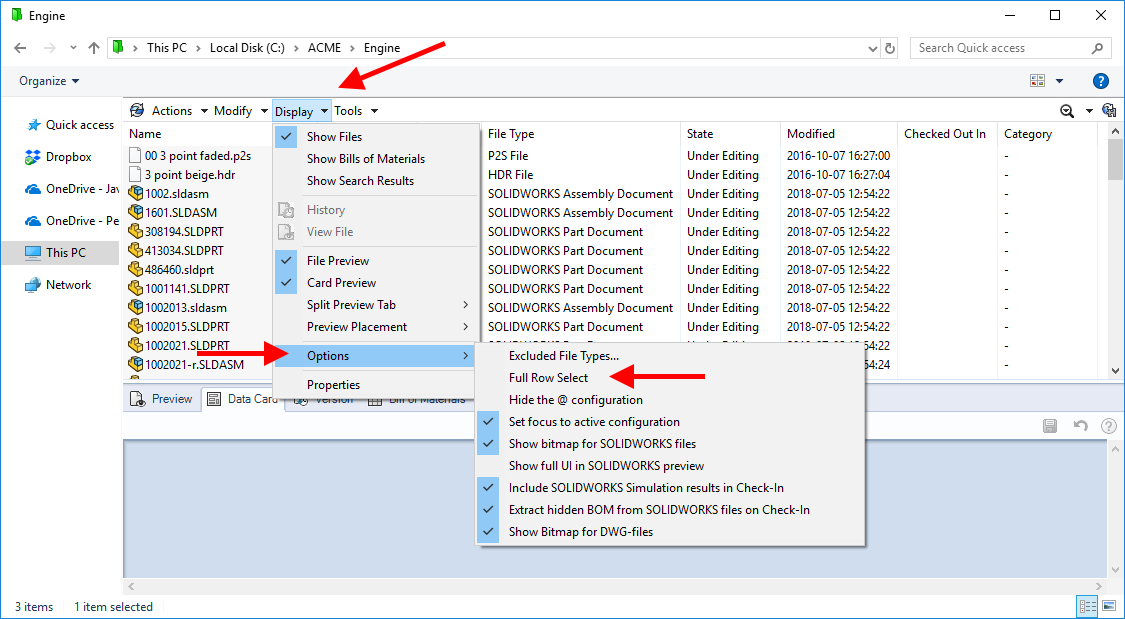
SOLIDWORKS PDM Full Row Select is one of the most useful interface options in the PDM Vault View and is often one of the most commonly overlooked.
This feature allows you to select a file by clicking in any column, not just the file name. This can be a real time saver if you have many columns in your vault view.

NOTE: To use Full Row Select effectively you should have your Vault View set to use Detail View.
In your SOLIDWORKS PDM Vault View pick on Display > Options > Full Row Select to enable this interface option.
Related Links
Want to do more with SOLIDWORKS PDM?
Our Certified SOLIDWORKS PDM Experts can help you to:
Posts related to 'Are you using Full Row Select in your SOLIDWORKS PDM Vault View?'
