


SOLIDWORKS PDM 2019 Drawing Selection Option During State Change

Article by Justin Williams updated September 30, 2018
Article
New in SOLIDWORKS PDM 2019, we have the option: Do not select references that are defined as drawing nodes during state change. Previously we only had the option: Do not mark referenced files when changing state and couldn’t specify to only exclude drawings.
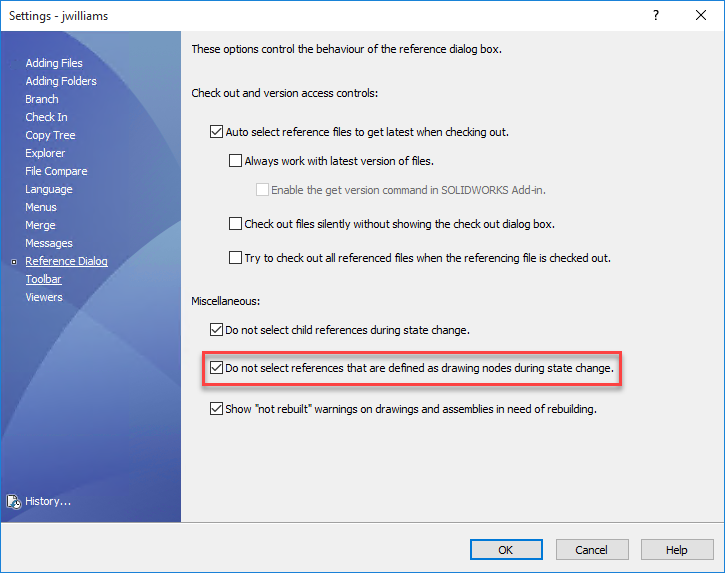
By default this setting is disabled, to enable it;
- Administration Tool > Users/Groups > Username/Group Name
- Right Click > Settings
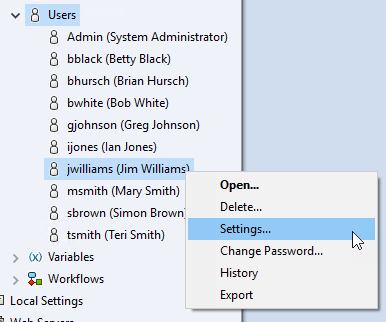
- Settings > Reference Dialog
- Check > Do not select references that are defined as drawing nodes during state change

- Click OK and save the setting.
How can this SOLIDWORKS PDM Drawing Nodes setting help improve our vault?
We’ve all done it….accidentally transitioned something we didn’t mean to. Having this setting available helps users to customize the vault further to their preferred setup, resulting in less erroneous transitions thus increasing efficiency.
Related Links
Want to do more with SOLIDWORKS PDM?
Our Certified SOLIDWORKS PDM Experts can help you to:
Posts related to 'SOLIDWORKS PDM 2019 Drawing Selection Option During State Change'
