


Letting SOLIDWORKS Simulation Tools Do The Heavy Lifting – Part 2

Article by Sawyer Gara updated August 5, 2024
Article
If you just finished reading the first part of our SOLIDWORKS Modeling and Simulation Exploration, then you’re ready for the finale to see us push the model to its absolute limits. The best part about virtually validating parts and assemblies is that we don’t break a sweat even when performing superhuman acts.
Thanks to the associativity between SOLIDWORKS CAD and SOLIDWORKS Simulation, we can easily, and immediately take the model that was just completed into the SOLIDWORKS simulation tools:
Modeling Recap
Just in case you missed the first part of the series or just want a refresher on what we covered, we’ll discuss a brief recap of the modeling process. To start the barbell was created based on measurements taken from a real barbell in my garage gym alongside manufacturing research done to select our material: a 41XX Steel Alloy. The model was simplified for the purpose of our simulation by disregarding bearings or any other moving pieces and using an appearance for the knurling.
The weight plates were also simplified and approximated. There is a lot of variety between weight plate styles and manufacturers, so I settled on using real measurements from rubber bumper plates I own and then adding in artistic elements such as the TriMech logo to the plate. To ensure the plates weighed what we would expect, for each configuration I utilized the “Override Mass Properties” tool to set them to precisely 45, 35, 25, and 10 pounds. This ensures that regardless of any errors or assumptions made in the modeling process, our simulation will be accurate. Finally, this was all brought into a SOLIDWORKS Assembly and loaded up to 420 lbs to break the record for my weight class in the Clean and Jerk.

Simulation Assumptions
All simulation studies require some form of assumptions to be made to simplify the study for the sake of solver efficiency and speed. Luckily, the system we are simulating is relatively simple so speed is not a real issue for SOLIDWORKS Simulation, but assumptions were made nonetheless. First, the Global Contact was set to bonded to assume that the components in contact, such as the weight plates to each other and the bar, are not going to move or slide in relation to each other. This alone is going to greatly reduce the solve time as there is less component to calculate by the solver.
Next, I only looked at the scenario in the context of static loading to see if the barbell could even hold up to the weight we loaded on. Realistically, I knew the original load was possible having lifted more than that at one point but we could have done another study in combination with SOLIDWORKS Motion to see what the bar is under during the full movement. The final assumption was to have uniform loading and precise fixturing for the study. In the real world, the plates should be uniformly distributed on the bar ends but there is always slight fluctuations. Additionally, grips typically vary from lifter to lifter and are slightly different distances from the bar center. I took my normal grip location and used that for the study.
The Original Studies
The first two scenarios I tested were basic with simple fixtures to constrain the assembly. The original was just a single fixture on the center knurled section of the barbell with the type “Fixed Geometry”. The second was a similar fixture but instead on the split face, I designated in the modeling phase of the experiment that represented where I would hold on to the bar.
In both cases, I specified Gravity as the external load and let the weights of the barbell and weight plates do the loading for me. Had I wanted to simplify the study further, the weight plates could have been removed and a distributed mass or force could have been used instead. Doing so would have greatly reduced simulation time since contact between weight plates would not need to be calculated as well as the extra bodies wouldn’t need to be meshed.
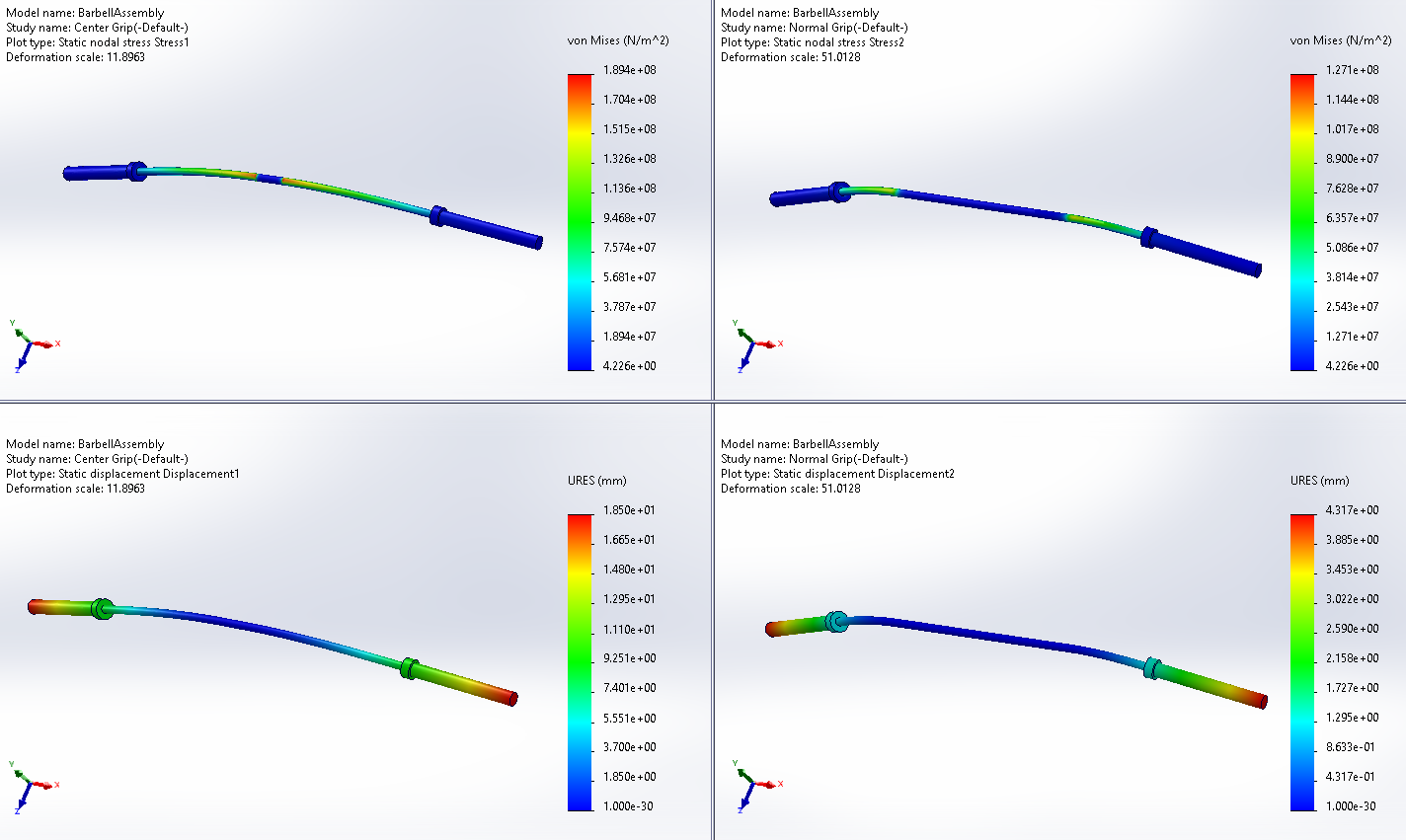
Solving the first two studies provides the above results. Regardless of the setup, the stresses obtained from SOLIDWORKS Simulation are well below the Yield Strength of the material so there is not a real threat of failure by any means. As mentioned earlier, 420 pounds is not an inhuman amount of weight so there was no doubt it would hold up. On the displacement side, with a “normal” grip the bar ends are experiencing roughly 4.3mm of vertical displacement downwards.
This is less than half a centimeter so no cause for concern of the weights slipping off, especially with the clips on the end. The “center” gripped scenario produces a larger amount of displacement however there is a bigger problem at hand. If you look closely near the middle of the bar, you’ll notice a sharp increase in the stress as we approach the boundary. Running a Hot Spot Analysis indicates there are Hot Spots present and can be indicative of a stress singularity at that region. Fortunately for us, this is not the pinnacle of our simulations so we can safely ignore this for now.

For me, the bigger problem is how “inorganically” the barbell bends under load. The Fixed Geometry restricts too much movement in the locations where the lifter would typically grab the bar since it assumes there is no movement in any direction on the faces selected. Thanks to the ease of how SOLIDWORKS Simulation makes creating new studies, I have just the solution.
Introducing Additional Components
Using Fixed Geometry in the Original Studies is good enough for the first-pass analysis but to hone and refine the results, the studies require more true-to-life setups. In real life, the barbell is merely supported by the lifters’ palms at the top of the lift and held in place by their grip. Using a hook grip typically locks the bar in place and doesn’t allow it to roll off the hands but the wrists often flex to conform to the bar while it rotates outward as the weights pull it to the floor.

My solution to this problem is potentially a two-parter. First and foremost, I replaced the fixed geometry condition with a pretty basic “cup”. This semi-circle represents the lifter’s grip on the bar in its simplest form while allowing the bar itself to bend above it. The grip component itself is fixed in place and has a “Contact” condition between itself and the barbell. This Contact will ensure they don’t ignore each other during the simulation but won’t be bonded together like the weight plates.
To test the second part of the solution, a copy was made of the study using the same configuration and setup. An additional axis was created where the virtual wrist would sit against our virtual grip components; one for each. Using the new axis, the Fixed Geometry was replaced with two “Reference Geometry” Fixtures that restricted movement other than rotation about the virtual wrist.
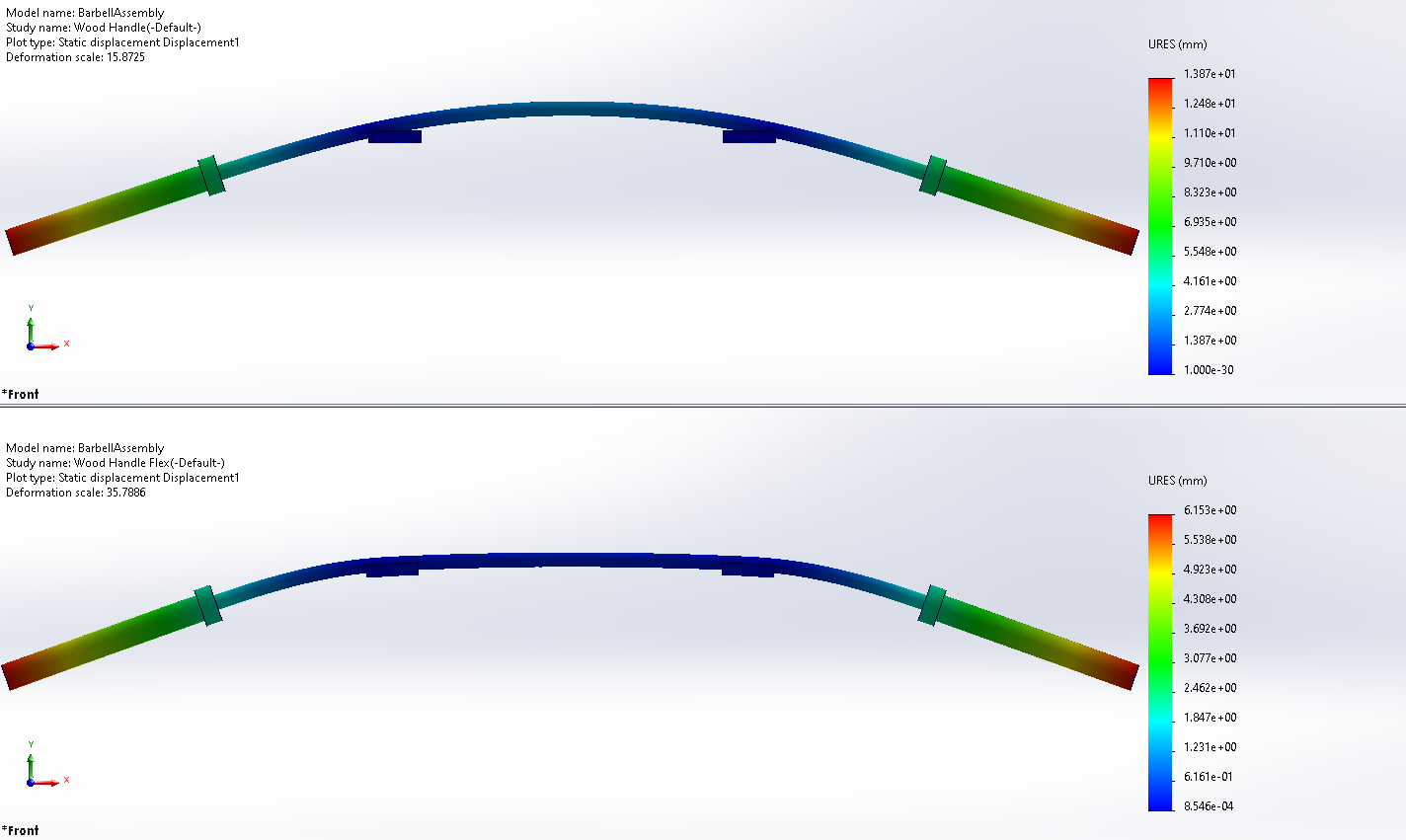
Both setups had stress values within a reasonable error percentage of each other so we will focus on the results for displacement. Looking at the image above, you can clearly see the difference between the Fixed Geometry and the “Virtual Wrist” methods. The Fixed method produces a displacement of 1.3 cm which is more than the original “Normal Grip” test.
This is the expected result since now the middle of the bar has more movement and the weight plates are producing more of a moment thanks to a longer arm. However, looking at the displacement plot it’s clear the bar isn’t staying in contact with the Grip Region. The Virtual Wrist produces a displacement of roughly 6 mm and maintains contact with the Grip Region due to the freedom of rotation that the wrist axis provides.
Looking To the Future with SOLIDWORKS Simulation Tools
This experiment using SOLIDWORKS Simulation tools and SOLIDWORKS CAD already has me thinking about additional virtual tests now that I have a cohesive and configurable model. Luckily, making changes to either the model or the simulation setup is a breeze thanks to the associativity between the study and my normal modeling environment. If you want to follow along with any additional experiments and learn about any of the other industry-leading engineering tools in our portfolio, sign up for our newsletter to keep up to date!
Related Links
Certified SOLIDWORKS Services available from Javelin
Javelin can help you to:
Posts related to 'Letting SOLIDWORKS Simulation Tools Do The Heavy Lifting – Part 2'
