


Raising the Bar: Modeling with SOLIDWORKS CAD – Part 1

Article by Sawyer Gara updated August 5, 2024
Article
As a former college athlete, I love the spirit of competition and getting to see other athletes perform at their peak on the biggest stage. A big focus of my training during that time was doing Olympic-style Weightlifting having spent ample trying to beat my personal bests in the Clean and Jerk as well as the Snatch.
I, unfortunately, was never competing on the world stage or chasing any records, and now being washed up, I can only appreciate what the world’s best athletes can do up on that platform in the coming days. The one thought I always had was to the effect of, “What kind of stress is going through the bar with records loaded on?” I might not be in my athletic prime to physically load up a bar and empirically test but thanks to SOLIDWORKS CAD and SOLIDWORKS Simulation, I can get my answer without breaking a sweat.
This is the first part of a two-part series that will explore modeling with SOLIDWORKS CAD and Simulation using SOLIDWORKS Simulation.
Modeling The Barbell
Before we can run a simulation, we need a model. Bringing the real world into a virtual testing environment thanks to the modeling capabilities within SOLIDWORKS CAD. I started off by taking measurements of the barbell I have in my garage gym and replicating that within a new SOLIDWORKS part. This was easily achievable using a revolve extrude on one half of the barbell and then mirroring it across the midplane of my part. Don’t forget to utilize Double Dimensions when working with mirrored or revolved geometry to define the final dimension instead of having to halve it.

Since the end goal of this experiment is to simulate, I didn’t worry about the assembly’s pieces that go into the barbell like the bearings or endcaps to simplify the model. Along that same thought, I used an appearance to represent the knurling to reduce the complexity for meshing. However, I could have utilized the 3D Textures functionality introduced in SOLIDWORKS 2019 to convert the knurled appearance into real 3D Geometry. Doing so would have given me the most accurate properties for the model. From my research, most barbells are constructed using a 41XX Steel Alloy and then coated with a material for a better surface finish.
The stock SOLIDWORKS Material library included a 4340 Steel that matched the tensile strength from my barbell manufacturer’s specifications so I was able to use that for my model. With everything set, my mass evaluated to 45 pounds just like I expected. You’ll notice below that I have some additional faces along the knurling that will be used later to place fixtures in my simulation.

SOLIDWORKS Model of Barbell
Modeling with SOLIDWORKS – the Weight Plates
To model the weight plates, I took a lot more creative liberties since these vary significantly more from manufacturer to manufacturer. Looking at economy steel plates, rubber bumper plates, or calibrated competition plates the only similarities are typically the inner diameter to fit on the bar and the outer diameter, so the lifter starts at a consistent point. The thicknesses, materials, and designs are all up to the manufacturer’s specifications to meet the desired weight within a tolerance.
I once again took my measuring implements to the garage and worked up a sketch based on the 45-pound bumper plate I had. The majority of the modeling is a main cylindrical boss extrude and a cylinder cut to inset the face. For the inset, draft was used to add a chamfered lip to the cut. Using a Sketch Block I have saved in my library, the TriMech logo was inserted and extruded from the model to add some personalization and pizazz to what’s to come.
A basic rubber was applied to the model and the astute reader would be able to guess that the mass was significantly incorrect. This is due to a bumper plate typically being rubber molded around a solid steel core or steel chunks mixed into the rubber. Similar to the barbell, the end goal is an accurate simulation and not necessarily completely accurate models so using the Mass Properties command, each configuration was overridden to have the correct poundage assigned that we want.
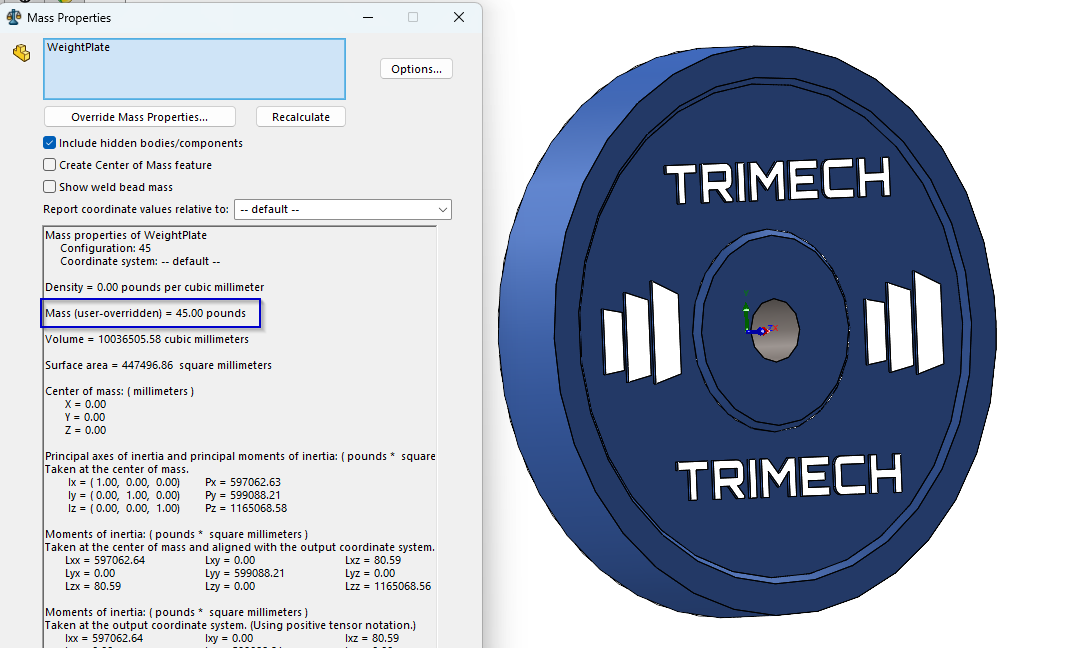
Override Mass in Mass Properties
Bringing It All Together
The assembly process was by far the easiest part of this exploration since most of the troubleshooting and design decisions were made in the individual parts. The only decision left to make is “How much weight are we initially going to test?” The answer to that is simple: the Olympic Record for the Clean and Jerk in the weight class I would line up in if I competed today. A quick Google search shows that the current record holder is Chen Lijun with a very impressive 187 kg which equates to roughly 412 lbs. To make the math and assembly simple, I rounded up to 420 lbs for the coming study.

SOLIDWORKS Linear Component Pattern
The barbell was inserted as the first, fixed component. The way it was modeled, the midplane of the assembly lines up with the midplane of the barbell allowing me to use certain assembly features (which we discuss below) that save a ton of time. Then, the first 45-pound plate was inserted into the assembly on one end of the bar. Using the Linear Component Pattern, adding the additional 3 plates was simple using the plate thickness as the spacing and the endcap of the barbell for the direction.

Barbell Designed with SOLIDWORKS CAD
From this point, the rest of the assembly included inserting another weight plate but using the 10-pound configuration I created and mating in the clips on each end. In almost no time at all we have a loaded-up barbell that we can virtually validate to ensure it can withstand a new Olympic Record attempt. Be sure to check our Part 2 of this exploration where we utilize SOLIDWORKS Simulation to push our assembly to its limits.
Related Links
Certified SOLIDWORKS Services available from Javelin
Javelin can help you to:
Posts related to 'Raising the Bar: Modeling with SOLIDWORKS CAD – Part 1'
