


Javelin / TriMech Author

Chris Briand, CSWE
New in SOLIDWORKS 2015 – Access your Configurations with a new Toolbar [VIDEO]
 By Chris Briand, CSWE on April 20, 2015
Accessing the various configurations of a model or an assembly has never been easier, as we now have an additional spot within the SOLIDWORKS interface to switch configurations – the CONFIGURATIONS TOOLBAR. The advantage with this toolbar is that it can be located anywhere and…
New in SOLIDWORKS MBD 2015 – Assembly Break Views [VIDEO]
By Chris Briand, CSWE on April 7, 2015
As a second part to our earlier post regarding the Model Break View functionality available with SOLIDWORKS MBD 2015, let’s take a look at the same functionality for an Assembly Break View.
New in SOLIDWORKS 2015 – Keep or Delete Bodies with the Delete Bodies Tool [VIDEO]
By Chris Briand, CSWE on April 2, 2015
For many SolidWorks tools we often have a wishlist….. It is often added to when we find ourselves stuck in a particular workflow. The recent enhancement to the Delete Bodies Tool within SOLIDWORKS 2015 is a great enhancement that will find us a way out…
SOLIDWORKS 2015 Advanced Mechanical Mates [VIDEO]
By Chris Briand, CSWE on March 30, 2015
Attempting to simulate a chain or conveyor system within SOLIDWORKS has traditionally been a challenge. As a precursor to working with the Chain Component Pattern in SOLIDWORKS, you may want to apply some advanced mechanical mates to the path and components of your conveyor to ensure that…
New in SOLIDWORKS 2015 – Center Lines Sketch Rectangle Tool [VIDEO]
By Chris Briand, CSWE on March 23, 2015
The Center Lines Sketch Rectangle Tool enhancement is one of those changes that is far more profound than one may first think. Given the number of times that one has to adjust a sketch involving a centered rectangular profile, the ability to swap the diagonal center lines…
New in SOLIDWORKS 2015 – The Selection Context Menu! [VIDEO]
By Chris Briand, CSWE on March 16, 2015
If you have had the opportunity to attend a class with us here at Javelin, I am certain you have heard all of our instructors speak about the abilities that the selection tools within SOLIDWORKS have to accelerate your workflow. Well get ready to have…
New in SOLIDWORKS 2015 – Set Multiple Dimensions to a Driven Status at Once [VIDEO]
By Chris Briand, CSWE on March 10, 2015
Once again drilling down into the fine details of how SOLIDWORKS 2015 can increase efficiency within your workflow – SOLIDWORKS has given us the ability to set Multiple Dimensions to the “Driven” status at the same time. The following video will show you how to…
Use Non-Parallel Planes for a SOLIDWORKS Sheet Metal Loft! [VIDEO]
By Chris Briand, CSWE on March 5, 2015
Some of my favorite enhancements to come from this latest release of SOLIDWORKS are addressing some limitations that have affected my own workflow in the past. Traditionally, one would require the use of parallel planes in order to create a SOLIDWORKS Sheet Metal Loft part…
New in SOLIDWORKS 2015 – Slice Section View now includes Surfaces! [VIDEO]
By Chris Briand, CSWE on February 18, 2015
Until the current release of SOLIDWORKS, displaying surfaces within a drawing view has been a bit tricky in SolidWorks. Past releases have had us jump through a few hoops to get exactly what we want to have displayed on a drawing. SOLIDWORKS 2015 alleviates the…
New in SOLIDWORKS 2015 – Spline Based Leaders [VIDEO]
By Chris Briand, CSWE on January 26, 2015
Sometimes the best path between two points is a curve! Among the many new features of SOLIDWORKS 2015 is the ability to apply spline based leaders. Take a look at the video below to see how you can apply a spline based leader to your annotations…
New Mates in SOLIDWORKS 2015: Mate to Profile Center [VIDEO]
By Chris Briand, CSWE on January 9, 2015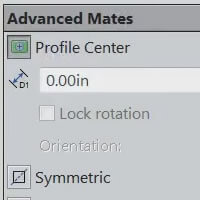
There are many cases as designers that we are simply looking to get a job done – generally seeking the most efficient way possible. The ability to use the center of a geometric profile to provide a feature against which to mate, definitely falls within…
New in SOLIDWORKS 2015 – Saved Selection Sets! [VIDEO]
By Chris Briand, CSWE on December 30, 2014
My absolute favorite enhancement for SOLIDWORKS 2015 is the ability to save repeatably selectable SELECTION SETS from the feature manager! It is often in our designs that we need to re-select the same sets of faces, edges or components more than a few times while…
New in SOLIDWORKS MBD 2015 – Model Break View [VIDEO]
By Chris Briand, CSWE on November 11, 2014
Along with the new release of the core SOLIDWORKS 2015 products, we also have a variety of new SOLIDWORKS products that are eagerly awaiting their insertion into your design and documentation process. One of those new products is SOLIDWORKS MBD 2015 (Model Based Definition). Let’s take…
New in SOLIDWORKS 2015 Professional – Select By View [VIDEO]
By Chris Briand, CSWE on October 22, 2014
When speaking with folks who are new to the SolidWorks sphere of influence, I will typically mention the ability to make fast and accurate selections as primary skill to focus upon when learning SolidWorks. This latest release of SolidWorks will help everyone accelerate their ability…
New in SOLIDWORKS 2015! – The Split Feature can now split Surface Bodies! [VIDEO]
By Chris Briand, CSWE on September 26, 2014
As we climb up the steep hill that is the list of new enhancements to SOLIDWORKS 2015, I wanted to peddle backwards for a moment to a feature that is a tad underused by most SolidWorks users – The Split Feature. This tool gives us the…