


Javelin / TriMech Author

Jim Peltier, CSWE
Save Each Sheet as its own Drawing, or Combine Multiple Drawings into a Multi-sheet SOLIDWORKS Drawing [VIDEO]
 By Jim Peltier, CSWE on March 18, 2014
Some companies like to have one drawing file with multiple sheets, where each sheet contains the detail drawings of each part. Other companies prefer to have a single drawing file for each part. Both methods are acceptable practice, so on rare occasions you may find…

When discussing the ability to insert a picture into a sketch in SOLIDWORKS and seeing how to trace it, the question always arises: Is there a way to automatically trace an image? Obviously, if you want to maintain some sort of design intent, then you will want…
How to SHIFT More CTRL to the SOLIDWORKS User (using CTRL, SHIFT and ALT keys)
By Jim Peltier, CSWE on March 5, 2014
Greetings, fellow SolidWorks users. A question we are sometimes asked is for a comprehensive list of all the things that Ctrl, Alt, and Shift keys are used for in SolidWorks, since this isn’t exactly documented in the shortcut keys. CTRL Ctrl+Drag: You can use this to…
Working with SolidWorks Files on a Network
By Jim Peltier, CSWE on March 4, 2014
The Typical Problem Often times when you work in a multi-user environment, it seems like a good idea to store your project files on a network drive so that everybody can access them. This allows everybody to see the files, prevents multiple people from editing…
Why You Need LOCAL Administrative Rights to Install SOLIDWORKS
By Jim Peltier, CSWE on February 27, 2014
Perhaps the most common reason for failed installations our customers encounter is a lack of proper permissions to install SOLIDWORKS. To ensure that the installation goes smoothly, one of the things we always state is that the user must have local administrative rights on the…
Jim’s SolidWorks 2014 Pick of the Day: Through All Both!
By Jim Peltier, CSWE on January 13, 2014
With all the new improvements to advanced functionality and all the new functionality in SolidWorks 2014, it’s no surprise that this tiny but time-saving enhancement is not widely talked about. But I noticed this little gem and decided to share it with you. While creating…

By now, you are probably well aware that one of the display modes that SolidWorks has is the “Perspective” mode, which can make more distant things appear smaller. It’s just one of many optical illusions that we humans must deal with in our day-to-day existence….
How to Find SOLIDWORKS Intersection (Virtual Sharp) [VIDEO]
By Jim Peltier, CSWE on December 16, 2013If you have ever needed to dimension to a virtual sharp (a point at which two lines would intersect if they were long enough), then you have probably done so by either creating construction lines so the lines intersect, or sketched in a point to dimension to (as my colleague describes in this blog article). While both of these methods work, they require the creation of reference sketch entities in a separate step. Of course, sometimes you get lucky and can sketch and dimension the lines to a sharp point before inserting a sketch fillet and maintain that relationship, but this doesn’t work in all situations. One of the nice new enhancements added in SOLIDWORKS 2014 is the ability to select an intersection between two entities when…
SolidWorks 2014: Performance Increases (Believe it or Not)
By Jim Peltier, CSWE on November 28, 2013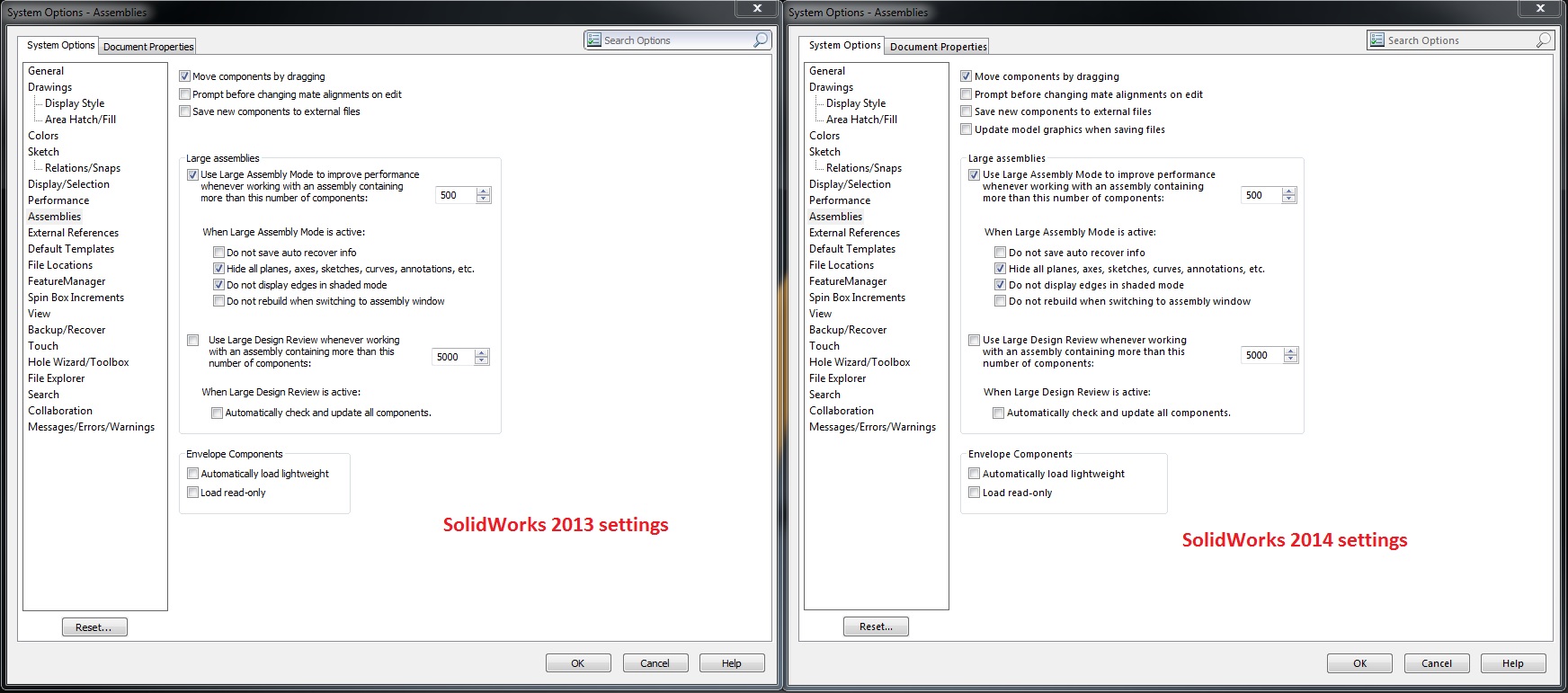
Okay, I know what you’re thinking: “Performance increases? I’ve heard that before!” or “Yeah, right: what used to take 30 seconds now takes 29!” I know because I thought the same thing when I was hearing about what’s new with SolidWorks 2014. One of the…
Adding SOLIDWORKS Custom Properties to your Parts using the BOM table
By Jim Peltier, CSWE on November 26, 2013
If you’ve ever dealt with legacy parts or imported parts, then you have probably experienced adding Custom Properties manually. In fact, when you’re adding Custom Properties to a series of parts, then you may have used Task Scheduler to automatically add or modify these properties….
When is a Fully Defined Sketch not Fully Defined? [VIDEO]
By Jim Peltier, CSWE on November 24, 2013We all like Fully-Defined sketches. There’s no room for ambiguity. The sketch and resulting features are more stable. Rebuild times are improved. SolidWorks likes fully-defined sketches as well. And, when you’re editing a sketch, SolidWorks is kind enough to tell you when your sketch is fully defined. However, sometimes it will tell you the sketch is fully defined when it’s “fully defined enough,” meaning there may be under defined bits in it. I am, of course, referring to the endpoints of construction lines. However, I’ve recently learned that there are other instances when a “fully defined” sketch is not so.
Showing or switching SOLIDWORKS BOM Units [VIDEO]
By Jim Peltier, CSWE on November 20, 2013
NOTE: This article is relevant for SOLIDWORKS 2023 and prior. SOLIDWORKS 2024 introduced new functionality to link custom properties to units that can be referenced in a BOM. See our new article Showing Units in SOLIDWORKS Custom Properties. In an ideal world, we would have…
SOLIDWORKS Sheet Metal Flat Pattern Drawing View Flip and Rotate
By Jim Peltier, CSWE on November 14, 2013
Often times we create sheet metal works of art (or just really complex designs) and we want the design to be clearly shown as a SOLIDWORKS Sheet Metal Flat Pattern Drawing View. Here I’ve create a relatively simple part (just tell that to the laser…
My 3D Mouse Buttons don’t work in the newest SOLIDWORKS version?!
By Jim Peltier, CSWE on November 12, 2013
If you don’t like a shooting wrist pain brought on by doing everything in SOLIDWORKS single-handedly, then you’ve probably already have purchased a 3D Mouse to balance the workload. Some of the 3D Connexion ones (available through Javelin’s Store) have programmable buttons in them so…

Greetings, fellow SOLIDWORKS users! I’m here to help clear up some of the ambiguity of SOLIDWORKS Lightweight Mode that causes many users to shy away from using it. I myself used to be guilty of this because the first thing I would do after opening an…